

MCX8000, the field manual
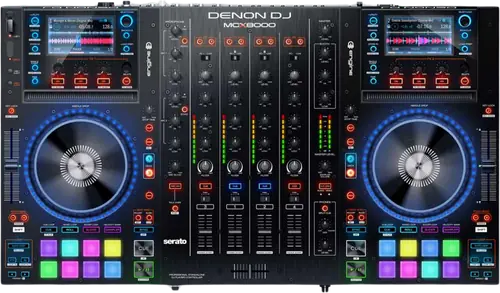
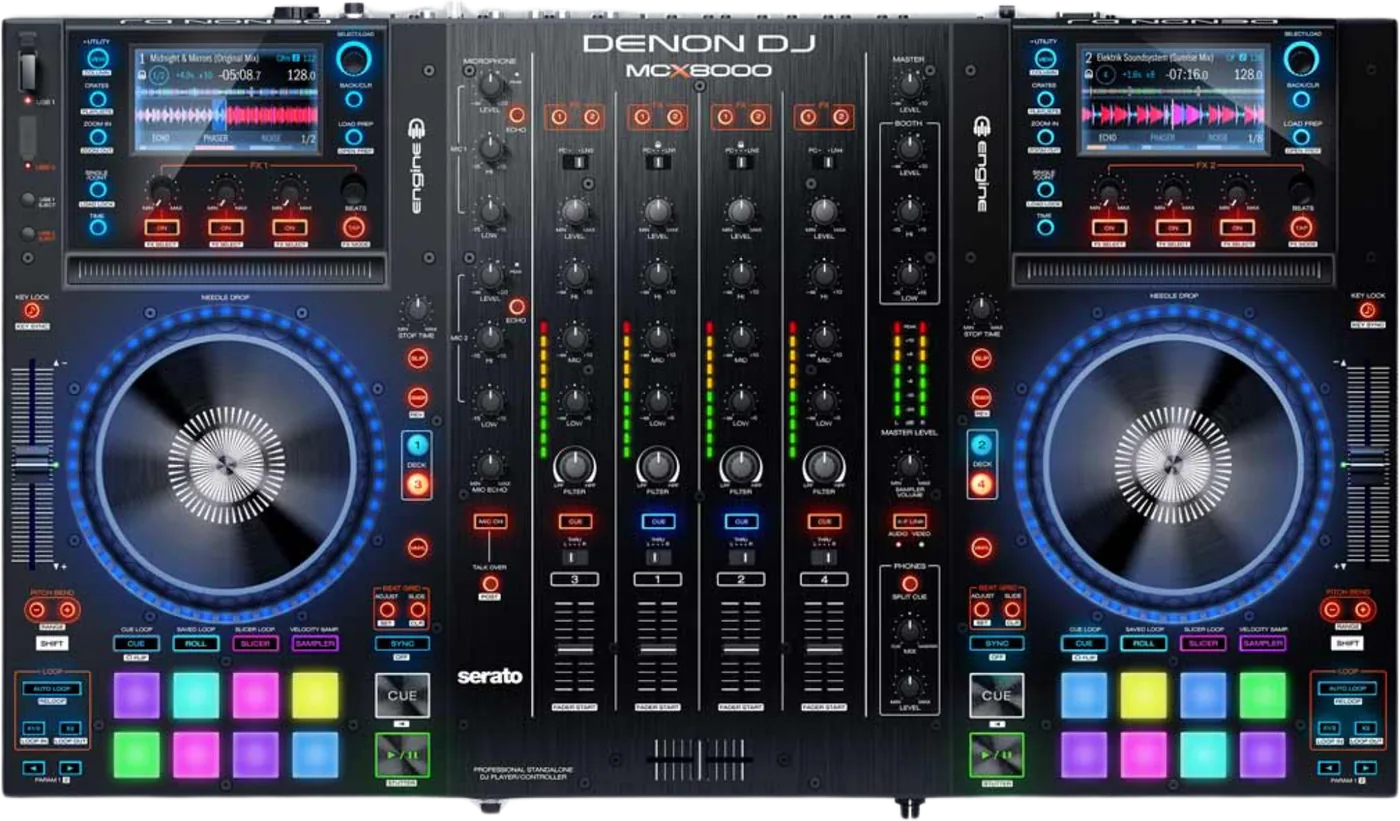
Booth briefing. The MCX8000 is Denon's four channel Serato controller with a standalone side: it can also play from two USB drives with no computer attached. Standalone playback is two decks rather than four. Drives for standalone play are prepared on a computer with Engine PRIME 1.6.1, the last Engine release that supports this unit, which Denon still provide on their download page. Engine DJ 2.0 and later rebuilt the database and do not prepare drives for it, so Engine PRIME 1.6.1 is the tool for this deck.
Fast Lane
The five things that decide your gig
The five things on the MCX8000 that change what happens next, if you are reading this in the booth. All five are explained in full further down this page.
Only Engine PRIME 1.6.1 can prepare its drives. Nothing newer.
Denon are explicit and they have not softened it since: "MCX8000 users should continue using the final build of Engine PRIME (v1.6.1) to prepare their drives." And separately: "The MCX8000 is not compatible with the new Engine DJ v2.0 database."
Engine PRIME 1.6.1 is still downloadable from Denon’s own downloads page and from the Engine DJ downloads page, in Windows and Mac builds, with its user guide dated 14 April 2021. Anyone who tells you the software is gone is wrong. It is frozen, not withdrawn.
Standalone is two decks, not four.
On a Mac, the driver is the thing to remove.
The macOS driver is a thing to remove, not install. Denon: "A driver for MCX8000 support was previously required on macOS Catalina. This driver is no longer necessary on macOS Big Sur or macOS Monterey and may even prevent communication altogether." If a Mac will not talk to the unit, uninstall the driver with the package’s own uninstaller before you look anywhere else.
Format FAT32, and reformat it now and then rather than deleting.
Three Denon documents give three answers. The user guide says FAT16 and FAT32 and recommends FAT32. The FAQ adds HFS+ Mac Journalized and a 2 TB maximum. Their own Serato crate walkthrough is stricter than both: "For Engine use, FAT32 thumb drives must be utilized." None of the three carries a date. FAT32 is the only format all three agree on, so FAT32 is what to use.
Denon document a failure mode specific to that choice. On FAT32: "The format retains its file structures on the back-end, even if you have deleted every file off of the drive...causing the information to pile up and bog down the system." They name it as a common reason for delays, slow response and freezing. Reformat the stick occasionally rather than just deleting from it.
A track that analyses fine on the computer can be one it will not play.
The unit plays AAC, AIF and AIFF, MP3 and WAV, all at 44.1 kHz, 16 or 24 bit. No FLAC, no ALAC, no Ogg, no 48 kHz and nothing hi res. That is a trap rather than a limitation, because Engine Prime itself reads FLAC, ALAC, Ogg Vorbis and files up to 192 kHz. A track that analyses perfectly on the computer can be a track this unit will not play, which is exactly what the MCX8000 compatibility preference exists to catch.
If something goes wrong
A Mac that will not talk to it
Uninstall the driver first. The macOS driver is a thing to remove, not install. Denon: "A driver for MCX8000 support was previously required on macOS Catalina. This driver is no longer necessary on macOS Big Sur or macOS Monterey and may even prevent communication altogether." If a Mac will not talk to the unit, uninstall the driver with the package’s own uninstaller before you look anywhere else.
Why this is the first thing and not the last. Every instinct says install the driver. On this unit Denon say the opposite, and they name the versions: Big Sur and Monterey. Their uninstaller is inside the same driver package, so the fix is to run that and reconnect.
The version of this that people actually hit. A working setup that stops working after a Mac is replaced or upgraded. Nothing about the controller changed; the operating system moved past the point where the driver helped. Denon say the driver may prevent communication rather than that it always will, so try removing it before you conclude anything worse.
Freezing, dropouts and distortion
Start with the drive. Denon document a failure mode specific to that choice. On FAT32: "The format retains its file structures on the back-end, even if you have deleted every file off of the drive...causing the information to pile up and bog down the system." They name it as a common reason for delays, slow response and freezing. Reformat the stick occasionally rather than just deleting from it.
Denon’s own list, and it is broader than the drive. For the MCX8000 they name a computer that has not been prepared for DJ work, bad cables, speakers and headphones causing interference and dropouts, software or drivers that are not current, and AMD processors specifically as a source of performance problems.
The one that gets missed. If the trouble is only in Engine mode, check what is in the rear hub port. The rear USB hub port does not feed Engine. Denon: "The USB hub will not send information to Engine. It bypasses the controller and sends information to and from your computer." A drive in that port will not appear in standalone mode.
A track that will not play, or a library that looks empty
Short answer. Nothing plays properly off an unprepared drive. Denon: "It's important to analyze all of your songs or Serato DJ crates in the Engine Prime software prior to DJing with them." Firmware 1.3 added a Continuous Play mode for drives that were never indexed, and that is the fallback rather than the intended path.
The other half of it is the file itself. The unit plays AAC, AIF and AIFF, MP3 and WAV, all at 44.1 kHz, 16 or 24 bit. No FLAC, no ALAC, no Ogg, no 48 kHz and nothing hi res. That is a trap rather than a limitation, because Engine Prime itself reads FLAC, ALAC, Ogg Vorbis and files up to 192 kHz. A track that analyses perfectly on the computer can be a track this unit will not play, which is exactly what the MCX8000 compatibility preference exists to catch.
And AAC has a history here. AAC is the format with a documented history of trouble here. Firmware 2.1 fixed playback of certain AAC and M4A files and missing titles for AAC and AIFF loaded from the Prepare folder, and firmware 2.5 fixed AAC recognition again.
The ceilings, in case the library is simply too big. The user guide prints hard ceilings: fewer than 100,000 playable files, fewer than 512 crates with seven subcrate layers, and fewer than 512 playlists. An Engine target database needs about 500 MB free on the drive.
What to watch for
The software that prepares its drives
Short answer. Denon are explicit and they have not softened it since: "MCX8000 users should continue using the final build of Engine PRIME (v1.6.1) to prepare their drives." And separately: "The MCX8000 is not compatible with the new Engine DJ v2.0 database."
Why it happened. Denon explain why in one sentence: "Upon the release of Engine DJ 2.0, the database was rebuilt to improve stability and performance." Everything from Engine DJ 2.0 onward writes a database this unit cannot read, and the current Engine DJ Desktop is version 5.1.0.
The mechanism, which explains why it is a one way door. The mechanism is a conversion and not native support. Engine Prime’s own user guide describes the setting: "Enable MCX8000 Compatibility: When set to On, Engine Prime will support one directional database conversions to the legacy MCX8000 format." Two words in that sentence do the work. One directional means the conversion never comes back the other way, and legacy is Denon’s own classification of this unit’s format while Engine Prime was still the current application.
And the part people get wrong in the other direction. Engine PRIME 1.6.1 is still downloadable from Denon’s own downloads page and from the Engine DJ downloads page, in Windows and Mac builds, with its user guide dated 14 April 2021. Anyone who tells you the software is gone is wrong. It is frozen, not withdrawn.
What this does not mean. Newer Engine DJ versions do not destroy drives you already prepared. The precise failure is that they cannot produce a drive this unit can read. An existing MCX8000 drive keeps working until you need to change what is on it.
Why nothing from a PRIME deck applies here
Short answer. The MCX8000 is not an Engine OS product. Engine OS runs on the PRIME and SC players. This unit runs its own firmware with an Engine playback mode fed by a converted legacy database, which is why nothing about SC6000 or PRIME 4 drive preparation transfers to it.
Why the distinction is worth a section. The word Engine appears on this unit, on the SC6000, on the PRIME 4 and on the desktop application, and it means something different in at least two of those places. A DJ who reads an Engine OS guide and applies it here will prepare a drive this unit cannot open.
The tell. If a guide talks about Engine DJ 2.0 or later, or about an Engine OS firmware version, it is not about this machine.
What Denon do and do not say about its future
Short answer. No Denon page says the MCX8000 is discontinued or that its support has ended. The product page is live, the downloads page still lists a full software set for it, and Serato still list it as supported hardware with no legacy notice. What is true is much narrower and is printed on this page in full.
What is actually documented. Denon are explicit and they have not softened it since: "MCX8000 users should continue using the final build of Engine PRIME (v1.6.1) to prepare their drives." And separately: "The MCX8000 is not compatible with the new Engine DJ v2.0 database."
And what Denon have not published. The highest macOS version Denon name for the MCX8000 is macOS 12 Monterey, where they list it as Supported on both Intel and M1 processors. Denon address Ventura, Sonoma, Sequoia and Tahoe nowhere for this model, which is an absence in their publishing rather than a statement that it fails. Serato do address it: their macOS 26 Tahoe article lists the MCX8000 under supported Denon DJ hardware.
Why this page is careful here. A frozen desktop application and a compatibility list that stops at Monterey both point one way, and neither is a statement. Note also what points the other way: the product page is live and the downloads page carries a current full software set. The honest position is to print the specific restrictions, which are severe enough on their own, and not to add a verdict Denon never gave.
Compatibility
Drivers, and the one you should not install
macOS. The macOS driver is a thing to remove, not install. Denon: "A driver for MCX8000 support was previously required on macOS Catalina. This driver is no longer necessary on macOS Big Sur or macOS Monterey and may even prevent communication altogether." If a Mac will not talk to the unit, uninstall the driver with the package’s own uninstaller before you look anywhere else.
What Denon never say. Denon never use the words class compliant about this unit. What they do say is that no driver is needed from Big Sur onward and that installing one can break communication, which is the practical answer to the same question.
Windows. Denon publish an MCX8000 Windows driver, version 1.0.5, with no operating system list beside it. Windows 11 support for this model is not stated anywhere.
How far Denon have followed macOS
Short answer. The highest macOS version Denon name for the MCX8000 is macOS 12 Monterey, where they list it as Supported on both Intel and M1 processors. Denon address Ventura, Sonoma, Sequoia and Tahoe nowhere for this model, which is an absence in their publishing rather than a statement that it fails. Serato do address it: their macOS 26 Tahoe article lists the MCX8000 under supported Denon DJ hardware.
Read that as what it is. An absence in Denon’s publishing, not a report that the unit fails. Nobody has said it stops working on Ventura or later, and nobody has said it keeps working either.
What that means for buying one. If you are on a recent Mac, test the whole chain at home before you take a booking on it: the controller, Serato, and Engine PRIME 1.6.1. On the software half Denon are more helpful than they are on the hardware: they state that Engine PRIME Desktop is fully supported on macOS Monterey, on both M1 and Intel, which is newer than the version list printed inside its own user guide.
Serato, and what is included
The licence. Denon: "Yes! Simply download Serato DJ Pro and connect the MCX8000 to your computer". Serato say the hardware unlocks Serato DJ Pro for free when plugged in, and list it for Serato Studio as well.
DVS. DVS is a paid Serato expansion pack and runs on channels 3 and 4. Denon: "DVS is supported (DVS expansion pack sold separately)".
Why the DVS channel assignment matters. DVS running on channels 3 and 4 is the same pair that Engine standalone cannot use. The two halves of this controller use opposite ends of the mixer.
Features explained
What it does with the laptop shut
The limit first. Standalone is two decks, not four. Denon state it twice: "You can use 2 channels of Engine on decks 1 & 2 on the MCX8000", and in their own walkthrough, "only channels 1 and 2 will work in Engine standalone mode." Channels 3 and 4 are Serato, DVS or line only.
The effects. Denon name the standalone effects and the list is short: "The three built-in effects are limited to Echo, Phaser, and Noise."
Recording. Denon answer the recording question directly: "No. At this time Engine cannot be used to record your sets."
What it does have. Beat grids, quantize, beat sync and pitch range lock in Engine mode all arrived with firmware 2.0, and SoundSwitch support in Engine mode arrived with 2.5. A unit below those versions does not have them.
What to take from this. It is a real standalone answer to a dead laptop and it is a two deck one. If your set needs four decks, the laptop is not optional.
What it will actually play
Short answer. The unit plays AAC, AIF and AIFF, MP3 and WAV, all at 44.1 kHz, 16 or 24 bit. No FLAC, no ALAC, no Ogg, no 48 kHz and nothing hi res. That is a trap rather than a limitation, because Engine Prime itself reads FLAC, ALAC, Ogg Vorbis and files up to 192 kHz. A track that analyses perfectly on the computer can be a track this unit will not play, which is exactly what the MCX8000 compatibility preference exists to catch.
The documented trouble spot. AAC is the format with a documented history of trouble here. Firmware 2.1 fixed playback of certain AAC and M4A files and missing titles for AAC and AIFF loaded from the Prepare folder, and firmware 2.5 fixed AAC recognition again.
The ceilings. The user guide prints hard ceilings: fewer than 100,000 playable files, fewer than 512 crates with seven subcrate layers, and fewer than 512 playlists. An Engine target database needs about 500 MB free on the drive.
Which drives it reads, and how they go bad
Short answer. Three Denon documents give three answers. The user guide says FAT16 and FAT32 and recommends FAT32. The FAQ adds HFS+ Mac Journalized and a 2 TB maximum. Their own Serato crate walkthrough is stricter than both: "For Engine use, FAT32 thumb drives must be utilized." None of the three carries a date. FAT32 is the only format all three agree on, so FAT32 is what to use.
And FAT32 has a documented failure mode. Denon document a failure mode specific to that choice. On FAT32: "The format retains its file structures on the back-end, even if you have deleted every file off of the drive...causing the information to pile up and bog down the system." They name it as a common reason for delays, slow response and freezing. Reformat the stick occasionally rather than just deleting from it.
Space. An Engine target database needs about 500 MB free on the drive, so do not fill a stick to the last megabyte.
The port that is not a drive port. The rear USB hub port does not feed Engine. Denon: "The USB hub will not send information to Engine. It bypasses the controller and sends information to and from your computer." A drive in that port will not appear in standalone mode.
Professional tips
Before you play on one
Keep Engine PRIME 1.6.1 installed and do not let anything update it. It is the only application that can feed this unit, and it is still downloadable from Denon.
Get it to firmware 2.5. A long list of Engine mode faults was fixed only at that version, including BPM showing zero and the History not registering.
Reformat the stick rather than deleting from it. Denon document FAT32 degrading over time on this unit specifically.
Do not install the Mac driver. On Big Sur and Monterey Denon say it can stop the unit communicating altogether.
Plan for two decks standalone. If the laptop dies mid set, channels 3 and 4 go with it.
Connections and setup
What goes in and what comes out
Inputs. It has two RCA line level input pairs, two RCA pairs switchable between phono and line, an XLR and 6.35 mm combination microphone 1 input and a 6.35 mm microphone 2 input.
Outputs. two balanced XLR master outputs, an unbalanced RCA master pair, two balanced XLR booth outputs, a 6.35 mm stereo headphone output and a 3.5 mm stereo headphone output.
USB and network. two USB ports for drives at 5 V and 1 A, one USB port to a computer, one USB hub port to a computer at 5 V and 500 mA, and an Ethernet port for StagelinQ. The rear USB hub port does not feed Engine. Denon: "The USB hub will not send information to Engine. It bypasses the controller and sends information to and from your computer." A drive in that port will not appear in standalone mode.
Screens and surface. It has two 4.3 inch high definition displays, one per deck. Denon publish no resolution for them, plus dual 5.5 inch responsive platters, velocity sensitive performance pads with RGB feedback, and a user replaceable crossfader that takes a Mini Innofader.
Power. It runs from a 12 V DC, 5 A centre positive adapter. Denon publish no mains voltage range or wattage for the unit itself.
Its audio path. 44.1 kHz and 24 bit, 20 Hz to 20 kHz within 1 dB, with a dynamic range above 108 dB A weighted and total harmonic distortion below 0.01 percent.
Size and weight, and Denon do not agree with themselves. Three Denon documents give three different sets of figures. The user guide says 28.7 by 17.0 by 2.8 inches and 18.4 lb. The FAQ says 28.6 wide by 16 deep by 2.9 high and 18.20 lb. The product page says 28.68 by 17.04 by 2.76 inches and 8.34 kg, which is 18.39 lb. Two of the three agree closely and the FAQ is the outlier by a full inch on the depth. All three are Denon’s own, so this page prints all three rather than picking one.
Firmware, drivers and manuals
Firmware, and the versions that do not exist
The version they publish today. Version 2.5 is the highest published version. Its new feature is SoundSwitch support in Engine mode, and it fixed a long list of Engine faults: Prepare list continuous play, tracks shown unexpectedly in blue, BPM showing zero, History not registering, an empty title list, scratching during reverse slip mode, reverse play not deactivating with the SLIP button, certain AAC files not being recognised, and the key field not carrying over from Prepare.
Two numbering points worth knowing. There is no version 2.2, 2.3 or 2.4 in Denon’s release note history. A unit displaying one of those is being misread. Version 2.0 is the one that added Engine Prime drive support along with beat grids, quantize, beat sync and pitch range lock, and version 1.4 added Mac OS Sierra support.
Why the history has no dates. Denon’s release note history carries no per version dates, only component build numbers. The one dated document is a separate release notes PDF for version 1.5, issued 29 November 2016.
Official downloads and documents
Go to Denon DJ for the files themselves. We link their pages instead of hosting a copy, because a manual copied here is a snapshot of release day and theirs is the one that stays current.
Firmware downloads. Official Denon DJ firmware page →
Manuals. Official Denon DJ manual page →
Broken link? Let us know and we'll fix it.
Frequently asked questions
Quick answers
- Which software prepares its drives?
- Denon are explicit and they have not softened it since: "MCX8000 users should continue using the final build of Engine PRIME (v1.6.1) to prepare their drives." And separately: "The MCX8000 is not compatible with the new Engine DJ v2.0 database."
- Can I still get Engine PRIME 1.6.1?
- Engine PRIME 1.6.1 is still downloadable from Denon’s own downloads page and from the Engine DJ downloads page, in Windows and Mac builds, with its user guide dated 14 April 2021. Anyone who tells you the software is gone is wrong. It is frozen, not withdrawn.
- Why can it not use Engine DJ 2.0 or later?
- Denon explain why in one sentence: "Upon the release of Engine DJ 2.0, the database was rebuilt to improve stability and performance." Everything from Engine DJ 2.0 onward writes a database this unit cannot read, and the current Engine DJ Desktop is version 5.1.0. The mechanism is a conversion and not native support. Engine Prime’s own user guide describes the setting: "Enable MCX8000 Compatibility: When set to On, Engine Prime will support one directional database conversions to the legacy MCX8000 format." Two words in that sentence do the work. One directional means the conversion never comes back the other way, and legacy is Denon’s own classification of this unit’s format while Engine Prime was still the current application.
- Is it an Engine OS unit like an SC6000?
- No. The MCX8000 is not an Engine OS product. Engine OS runs on the PRIME and SC players. This unit runs its own firmware with an Engine playback mode fed by a converted legacy database, which is why nothing about SC6000 or PRIME 4 drive preparation transfers to it.
- How many decks work without a computer?
- Two. Standalone is two decks, not four. Denon state it twice: "You can use 2 channels of Engine on decks 1 & 2 on the MCX8000", and in their own walkthrough, "only channels 1 and 2 will work in Engine standalone mode." Channels 3 and 4 are Serato, DVS or line only.
- Can it record a set on its own?
- Denon answer the recording question directly: "No. At this time Engine cannot be used to record your sets."
- What effects does it have standalone?
- Denon name the standalone effects and the list is short: "The three built-in effects are limited to Echo, Phaser, and Noise."
- How should I format the drive?
- Three Denon documents give three answers. The user guide says FAT16 and FAT32 and recommends FAT32. The FAQ adds HFS+ Mac Journalized and a 2 TB maximum. Their own Serato crate walkthrough is stricter than both: "For Engine use, FAT32 thumb drives must be utilized." None of the three carries a date. FAT32 is the only format all three agree on, so FAT32 is what to use.
- What file formats will it play?
- The unit plays AAC, AIF and AIFF, MP3 and WAV, all at 44.1 kHz, 16 or 24 bit. No FLAC, no ALAC, no Ogg, no 48 kHz and nothing hi res. That is a trap rather than a limitation, because Engine Prime itself reads FLAC, ALAC, Ogg Vorbis and files up to 192 kHz. A track that analyses perfectly on the computer can be a track this unit will not play, which is exactly what the MCX8000 compatibility preference exists to catch.
- Do I need to install a Mac driver?
- No, and you should remove it if you have one. The macOS driver is a thing to remove, not install. Denon: "A driver for MCX8000 support was previously required on macOS Catalina. This driver is no longer necessary on macOS Big Sur or macOS Monterey and may even prevent communication altogether." If a Mac will not talk to the unit, uninstall the driver with the package’s own uninstaller before you look anywhere else.
- Which macOS versions does Denon name?
- The highest macOS version Denon name for the MCX8000 is macOS 12 Monterey, where they list it as Supported on both Intel and M1 processors. Denon address Ventura, Sonoma, Sequoia and Tahoe nowhere for this model, which is an absence in their publishing rather than a statement that it fails. Serato do address it: their macOS 26 Tahoe article lists the MCX8000 under supported Denon DJ hardware.
- Do I get Serato DJ Pro with it?
- Denon: "Yes! Simply download Serato DJ Pro and connect the MCX8000 to your computer". Serato say the hardware unlocks Serato DJ Pro for free when plugged in, and list it for Serato Studio as well.
- Is Serato DVS included?
- DVS is a paid Serato expansion pack and runs on channels 3 and 4. Denon: "DVS is supported (DVS expansion pack sold separately)".
- Which firmware version should it be on?
- Version 2.5 is the highest published version. Its new feature is SoundSwitch support in Engine mode, and it fixed a long list of Engine faults: Prepare list continuous play, tracks shown unexpectedly in blue, BPM showing zero, History not registering, an empty title list, scratching during reverse slip mode, reverse play not deactivating with the SLIP button, certain AAC files not being recognised, and the key field not carrying over from Prepare.
- Is it discontinued?
- No Denon page says the MCX8000 is discontinued or that its support has ended. The product page is live, the downloads page still lists a full software set for it, and Serato still list it as supported hardware with no legacy notice. What is true is much narrower and is printed on this page in full.
Playing soon and it is not working?
Start Emergency ModeKeep the Emergency Card
We will email you the printable PDF so it is on your phone before the next dark booth. Occasional notes that save gigs. No spam, unsubscribe in one click.
Registering is free and counts everywhere on Save My Gig. We send a confirmation email first. Your address is stored with Brevo, our email provider. Unsubscribe any time. Privacy
Sources: Denon DJ's own product page, FAQ and support articles, the MCX8000 User Guide v1.1, the Engine Prime v1.6 User Guide, the official MCX8000 release note history, the Engine DJ downloads page and FAQ, and Serato's hardware pages, checked 10 September 2026. Specifications theirs, priorities ours.