

MC7000, the field manual
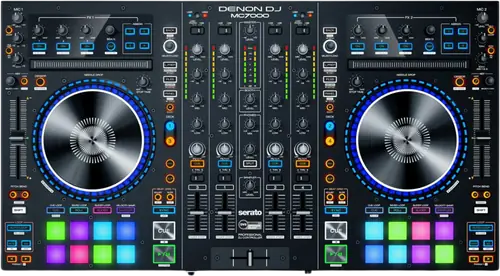
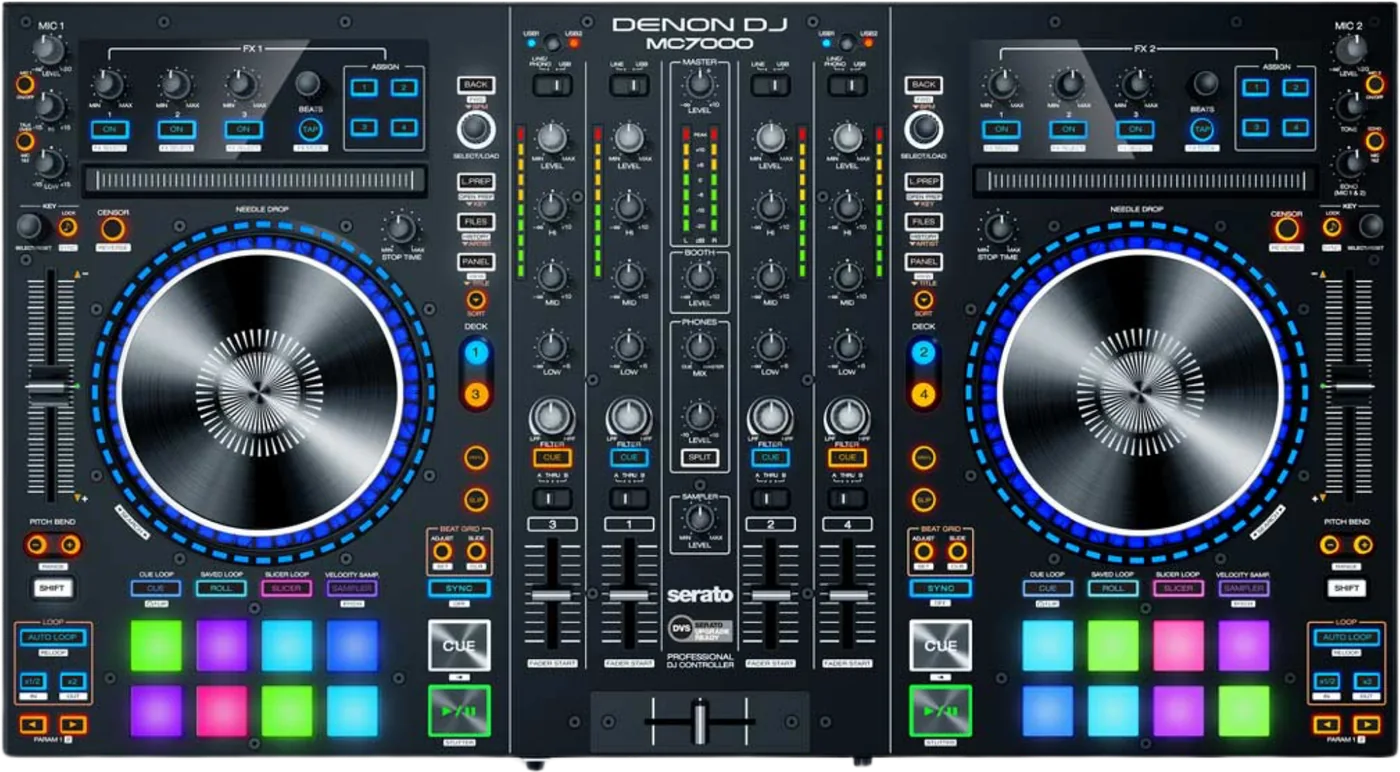
Booth briefing. The MC7000 is Denon's four channel Serato controller. Its defining feature is two independent USB audio interfaces, so two laptops can be plugged in at the same time and a changeover happens without pulling a cable. The booth outputs are balanced XLR. It is a computer controller rather than a standalone mixer: Denon do not describe it as standalone, which is what separates it from the MC6000MK2, so the laptop stays in the signal path for the whole set.
When it goes wrong: The computer cannot see the controller No sound from the controller
Fast Lane
The five things that decide your gig
The five things on the MC7000 that change what happens next, if you are reading this in the booth. All five are explained in full further down this page.
Two laptops at once, and each deck picks which one it drives.
Two USB ports and two independent audio interfaces. Denon: "MC7000 has two USB ports, allowing you to control audio from two computers at the same time, which allows for seamless transitions while switching from one DJ to another." Each deck has a button that chooses which computer it is controlling.
Denon never call this one standalone. They do call the MC6000MK2 that.
Denon never describe the MC7000 as a standalone mixer. The phrase does not appear on its product page, in its User Guide or in its audio specification document, and their own MC6000MK2 datasheet does use it. What Denon do document is that each channel takes a rear panel analogue source independently of the software, and that the two microphones are "routed directly to the master outputs". Their own site navigation carries a separate Standalone DJ Systems category and this controller is not in it. So what can be said is what the routing does, and no more than that.
A firmware update can change how it sounds and feels, by design.
Version 1.2 is worth understanding before you install it. It added a hardware settings mode with settings that have non zero defaults, and at least one user found their unit behaving differently mid event afterwards. Microphone attenuation defaults to -10 dB and platter touch sensitivity is adjustable and can be left anywhere. If a unit sounds quieter on the microphone or feels different under the hand after an update, that is where to look, not at a fault.
Denon and Serato do not agree about macOS Tahoe on this unit.
Denon and Serato do not currently line up on macOS 26 Tahoe. Denon's Tahoe compatibility table does not list the MC7000 at all: it names only the LC6000, MCX8000, PRIME 2, PRIME 4, PRIME 4+, PRIME GO, PRIME GO+, SC Live 2, SC Live 4, SC5000, SC5000M, SC6000, SC6000M, X1800 and X1850. Serato do list "Denon DJ MC7000*" as supported on Tahoe from Serato DJ Pro and Lite 4.0.1, and that asterisk carries a footnote. Absence from Denon's table is an absence and not a statement, so this page prints both positions rather than picking one.
Balanced XLR booth outputs, which most controllers do not have.
The booth outputs are balanced XLR, which is unusual at this level and Denon call it out as a feature. Most controllers give you a jack pair. If the room takes XLR for the monitor feed, this one plugs straight in.
If something goes wrong
A recording that comes out too quiet
Short answer. The master USB output level is adjustable in hardware, from 0 dB to +20 dB in 2 dB steps, default 0 dB. Hold the Deck 2 CUE button and turn the SELECT/LOAD encoder in hardware settings mode. That is the answer when a recording off this unit comes out too quiet.
Why it is worth knowing about. Most people go looking in the software, find the record gain, and raise it there with the noise floor. On the MC7000 the level going into the computer is adjustable in the hardware first, which is the right place to fix it.
Where it lives. Inside hardware settings mode, which arrived with firmware 1.2. Power on while holding BACK and PANEL on either deck, and hold for two seconds. Inside: platter touch sensitivity in nine steps from -4 to +4, default 0, by touching the platter and turning SELECT/LOAD. Microphone attenuation from -20 dB to 0 dB in 2 dB steps, default -10 dB, on Deck 1 CUE. Microphone talk over level from 0 dB to -40 dB in 4 dB steps, default -12 dB, on Deck 3 CUE. Talk over resume speed, normal or fast, on SHIFT and Talk Over. MIDI command transmission interval up to 14 ms, default 4 ms, on SPLIT. USB output level on Deck 2 CUE. Reset everything with SHIFT and BACK.
A unit that sounds or feels different after an update
Short answer. Version 1.2 is worth understanding before you install it. It added a hardware settings mode with settings that have non zero defaults, and at least one user found their unit behaving differently mid event afterwards. Microphone attenuation defaults to -10 dB and platter touch sensitivity is adjustable and can be left anywhere. If a unit sounds quieter on the microphone or feels different under the hand after an update, that is where to look, not at a fault.
The two settings that do it. On the MC7000, microphone attenuation defaults to minus 10 dB, so a microphone that was fine before an update can come back quieter. Platter touch sensitivity is adjustable across nine steps and does not announce where it is.
How to put it back. Enter hardware settings mode and reset: hold SHIFT and BACK. That restores every default, which is the fastest way to get a known state on a unit somebody else has been inside.
One platter ring LED that never lights
Short answer. Denon staff answered a report of one platter ring LED permanently off: "It's extremely unlikely to be a firmware issue, and much more likely to be a simple, single LED that's 'out'", and described it as a warranty fix needing a service centre. That is a forum reply from a Denon account rather than formal documentation, and it saves a firmware reinstall that would not have helped.
Why it saves you time. A single dark LED in an MC7000 platter ring looks like a lighting bug and the instinct is to reinstall firmware. Denon’s own answer is that it is far more likely to be one dead LED, which is a service job and not a software one.
What Denon do not say. They do not say whether it spreads and they do not say whether it touches the audio. What they do say is that it is a warranty repair rather than a firmware problem, and that is the part that saves you an evening.
What to watch for
What it does with the laptop shut, and what nobody claims
Short answer. Denon never describe the MC7000 as a standalone mixer. The phrase does not appear on its product page, in its User Guide or in its audio specification document, and their own MC6000MK2 datasheet does use it. What Denon do document is that each channel takes a rear panel analogue source independently of the software, and that the two microphones are "routed directly to the master outputs". Their own site navigation carries a separate Standalone DJ Systems category and this controller is not in it. So what can be said is what the routing does, and no more than that.
What Denon do document. Denon print the switch positions: "Set this switch to the desired audio source from this channel: USB (a track playing on that layer in the software), Line (a device connected to the line input on the rear panel), or Line/Phono (a device connected to the line/phono input on the rear panel)."
How to read that. A channel set to Line or Line/Phono is taking a physical input and mixing it, and the microphones bypass the computer entirely. What is missing is any sentence from Denon saying the mixer functions as a whole survive with no computer connected. Plenty of controllers behave that way and Denon simply do not claim it for this one.
If that is what you need. The MC6000MK2 is the Denon unit whose own datasheet carries the words stand-alone digital mixer, and the MCX8000 is the one that plays from USB with no computer at all. Those are different machines with different claims.
DVS capable is not DVS included
Short answer. Denon’s bullet says "Serato DJ DVS-compatible" and that is a statement about the hardware, not about a licence. Serato are explicit that the licence is separate: "To use this hardware with Serato Control Vinyl or Serato Control CDs, you will need the Serato DVS expansion pack", and their quickstart adds that a paid upgrade to Serato DJ Expansions or Serato DJ Suite is needed to use connected turntables, media players or CD players.
Why the two makers sound different. Denon are describing the MC7000 hardware, which genuinely is ready for it. Serato are describing the licence, which genuinely is not included. Both are correct and only one of them is the thing that stops you at the door.
What to do before a timecode gig. Open Serato DJ Pro with the unit connected and confirm the DVS panel is there, at home, with time to fix it.
Compatibility
Operating systems, and what the asterisk means
What Denon say. Denon list the MC7000 as Supported on macOS Monterey, Ventura, Sonoma and Sequoia on both Intel and Apple Silicon, and on Windows 11. Big Sur is Supported too but on Intel only: on that article Denon say all their testing was done on Intel Macs and that Apple Silicon should be considered not supported until further notice. That qualification belongs to Big Sur alone and is superseded from Monterey onward. Sequoia is the highest macOS version Denon name for this unit and Windows 11 is the highest Windows version.
What their asterisk means, and it is on every one of those rows. Every one of those Supported entries carries an asterisk, and Denon spell it out: "The product may have passed testing showing support for connection and MIDI communication, but firmware update software or other utilities may not have been tested or are found to be not supported." Serato say the same thing about Tahoe in their own words: you should be able to connect, but the firmware updaters are not yet supported there. The controller works; the tool that updates it is the part nobody has cleared.
And macOS Tahoe, where the two makers part company. Denon and Serato do not currently line up on macOS 26 Tahoe. Denon's Tahoe compatibility table does not list the MC7000 at all: it names only the LC6000, MCX8000, PRIME 2, PRIME 4, PRIME 4+, PRIME GO, PRIME GO+, SC Live 2, SC Live 4, SC5000, SC5000M, SC6000, SC6000M, X1800 and X1850. Serato do list "Denon DJ MC7000*" as supported on Tahoe from Serato DJ Pro and Lite 4.0.1, and that asterisk carries a footnote. Absence from Denon's table is an absence and not a statement, so this page prints both positions rather than picking one.
Drivers. Serato state it plainly: on macOS the MC7000 is class compliant USB plug and play with no drivers needed. Denon publish no macOS driver for it at all, and their User Guide addresses the driver step to Windows users only, telling them to download and install it from their account. Windows driver version 1.0.4, and Denon attach no operating system label to it on the downloads page. Windows 11 support for this unit comes from a separate Denon compatibility article, not from the driver listing.
What nobody has said. Neither Denon nor Serato publish an end of support statement for this unit.
Serato, and what comes with it
The licence. Denon list the MC7000 as "Serato DJ Enabled, meaning that Serato DJ will be unlocked while your product is plugged into your computer with a USB cable." There is no separate licence or voucher: unplug the controller and the unlock goes with it.
The expansion packs. Serato list three expansion packs as included with this unit: Serato Flip, Serato Pitch ’n Time DJ and Serato Video.
Stems. The MC7000 is on Denon’s Serato Stems compatible hardware list and requires Serato DJ Pro 3.0.12 or higher.
DVS is the exception and it has a section of its own.
Other software. Denon publish a VirtualDJ 8.2+ user manual and TRAKTOR mapping files for TRAKTOR PRO 2.11 and TRAKTOR PRO 3 in this unit’s downloads section. A published mapping is not a statement of support, and Denon make no TRAKTOR support claim anywhere.
Features explained
The two interfaces, and what they are for
Short answer. Two USB ports and two independent audio interfaces. Denon: "MC7000 has two USB ports, allowing you to control audio from two computers at the same time, which allows for seamless transitions while switching from one DJ to another." Each deck has a button that chooses which computer it is controlling.
Why it is better than swapping a cable. Both computers stay connected and both stay running. The handover is a button press per deck rather than an unplug, so there is no gap and no moment where neither machine owns the output.
What Denon do not publish. Denon publish the format, 24 bit and 44.1 kHz, and no channel count for the USB soundcard. No four in, four out figure appears on the product page, in the User Guide specification table, in the audio specification document or in the hardware settings document. This page does not print one.
And the level going out. The master USB output level is adjustable in hardware, from 0 dB to +20 dB in 2 dB steps, default 0 dB. Hold the Deck 2 CUE button and turn the SELECT/LOAD encoder in hardware settings mode. That is the answer when a recording off this unit comes out too quiet.
Firmware, and the settings it brought with it
Where it stands. Version 1.2, 4 May 2018, and nothing since. Denon publish no consolidated changelog for this unit; the release notes come from Denon staff posts on their own community forum.
The history. Three versions exist. 1.0 was the shipping firmware and no release notes for it were found. 1.1 of 12 January 2018 fixed a specific fault, that "static distortion occurs during use on Mac OS 10.13.2 systems", and Denon said "This update is only required for Mac users running 10.13.2." 1.2 of 4 May 2018 added the whole hardware settings mode.
The part to read before you install 1.2. Version 1.2 is worth understanding before you install it. It added a hardware settings mode with settings that have non zero defaults, and at least one user found their unit behaving differently mid event afterwards. Microphone attenuation defaults to -10 dB and platter touch sensitivity is adjustable and can be left anywhere. If a unit sounds quieter on the microphone or feels different under the hand after an update, that is where to look, not at a fault.
What is in hardware settings mode. Power on while holding BACK and PANEL on either deck, and hold for two seconds. Inside: platter touch sensitivity in nine steps from -4 to +4, default 0, by touching the platter and turning SELECT/LOAD. Microphone attenuation from -20 dB to 0 dB in 2 dB steps, default -10 dB, on Deck 1 CUE. Microphone talk over level from 0 dB to -40 dB in 4 dB steps, default -12 dB, on Deck 3 CUE. Talk over resume speed, normal or fast, on SHIFT and Talk Over. MIDI command transmission interval up to 14 ms, default 4 ms, on SPLIT. USB output level on Deck 2 CUE. Reset everything with SHIFT and BACK.
Professional tips
Before you play on one
Reset hardware settings on a unit you did not set up. SHIFT and BACK inside hardware settings mode. Microphone attenuation and platter feel are both in there and neither announces itself.
Use both USB ports for the handover. Two laptops connected, a button per deck, no gap.
Take the XLR booth outputs if the room offers XLR. Balanced booth on a controller is rare and it is a better feed than an adapter off a jack.
Do not plan on it working without the computer. Denon do not claim that for this model.
Sort DVS at home. The hardware is ready and the licence is a separate purchase.
Connections and setup
What goes in and what comes out
Inputs. It has two RCA line level input pairs, two RCA pairs switchable between line and phono, an XLR and 6.35 mm combination microphone 1 input and a 6.35 mm microphone 2 input.
Outputs. two balanced XLR master outputs, an unbalanced RCA master pair, two BALANCED XLR BOOTH outputs, a 6.35 mm stereo headphone output and a 3.5 mm stereo headphone output.
The booth output is the unusual one. The booth outputs are balanced XLR, which is unusual at this level and Denon call it out as a feature. Most controllers give you a jack pair. If the room takes XLR for the monitor feed, this one plugs straight in.
USB. two USB ports to computers, and a power adapter input. Denon publish the format, 24 bit and 44.1 kHz, and no channel count for the USB soundcard. No four in, four out figure appears on the product page, in the User Guide specification table, in the audio specification document or in the hardware settings document. This page does not print one.
Power. It runs from a 5 V DC, 4 A centre positive adapter, from 100 to 240 V AC at 50 or 60 Hz, drawing 15 W at maximum. The adapter is included and no Denon source says this unit runs on USB bus power, so treat the adapter as required.
The physical facts. It measures 664 x 378 x 68 mm as width, then depth, then height, and weighs 7.0 kg. Its audio path is 44.1 kHz and 24 bit on the USB path, 20 Hz to 20 kHz within 1 dB, dynamic range above 108 dB A weighted, signal to noise above 88 dB A weighted, and total harmonic distortion below 0.01 percent on line and phono. Those figures are from Denon’s Audio Specifications document version 1.0, and their downloads page now offers a version 1.4 of the same document that could not be retrieved.
Firmware, drivers and manuals
What Denon publish
The documentation is complete and unusually detailed. Denon publish the User Guide, a separate audio performance specification document and a hardware settings mode specification, which is the one that lists every adjustable default in the unit.
The firmware notes are on their forum rather than their site. Denon publish no consolidated changelog for this model; the release notes for versions 1.1 and 1.2 come from posts by their own staff on their community forum, which is why this page quotes them as such.
Official downloads and documents
Go to Denon DJ for the files themselves. We link their pages instead of hosting a copy, because a manual copied here is a snapshot of release day and theirs is the one that stays current.
Firmware downloads. Official Denon DJ firmware page →
Manuals. Official Denon DJ manual page →
Broken link? Let us know and we'll fix it.
Frequently asked questions
Quick answers
- Does it work without a computer?
- Denon never describe the MC7000 as a standalone mixer. The phrase does not appear on its product page, in its User Guide or in its audio specification document, and their own MC6000MK2 datasheet does use it. What Denon do document is that each channel takes a rear panel analogue source independently of the software, and that the two microphones are "routed directly to the master outputs". Their own site navigation carries a separate Standalone DJ Systems category and this controller is not in it. So what can be said is what the routing does, and no more than that.
- Can I connect two laptops?
- Yes, and that is the point of the unit. Two USB ports and two independent audio interfaces. Denon: "MC7000 has two USB ports, allowing you to control audio from two computers at the same time, which allows for seamless transitions while switching from one DJ to another." Each deck has a button that chooses which computer it is controlling.
- Do I get Serato DJ Pro with it?
- Denon list the MC7000 as "Serato DJ Enabled, meaning that Serato DJ will be unlocked while your product is plugged into your computer with a USB cable." There is no separate licence or voucher: unplug the controller and the unlock goes with it.
- What expansion packs are included?
- Serato list three expansion packs as included with this unit: Serato Flip, Serato Pitch ’n Time DJ and Serato Video.
- Is Serato DVS included?
- Denon’s bullet says "Serato DJ DVS-compatible" and that is a statement about the hardware, not about a licence. Serato are explicit that the licence is separate: "To use this hardware with Serato Control Vinyl or Serato Control CDs, you will need the Serato DVS expansion pack", and their quickstart adds that a paid upgrade to Serato DJ Expansions or Serato DJ Suite is needed to use connected turntables, media players or CD players.
- Does it do Serato Stems?
- The MC7000 is on Denon’s Serato Stems compatible hardware list and requires Serato DJ Pro 3.0.12 or higher.
- Do I need a driver?
- Serato state it plainly: on macOS the MC7000 is class compliant USB plug and play with no drivers needed. Denon publish no macOS driver for it at all, and their User Guide addresses the driver step to Windows users only, telling them to download and install it from their account. Windows driver version 1.0.4, and Denon attach no operating system label to it on the downloads page. Windows 11 support for this unit comes from a separate Denon compatibility article, not from the driver listing.
- Does it work on macOS Tahoe?
- Denon and Serato do not currently line up on macOS 26 Tahoe. Denon's Tahoe compatibility table does not list the MC7000 at all: it names only the LC6000, MCX8000, PRIME 2, PRIME 4, PRIME 4+, PRIME GO, PRIME GO+, SC Live 2, SC Live 4, SC5000, SC5000M, SC6000, SC6000M, X1800 and X1850. Serato do list "Denon DJ MC7000*" as supported on Tahoe from Serato DJ Pro and Lite 4.0.1, and that asterisk carries a footnote. Absence from Denon's table is an absence and not a statement, so this page prints both positions rather than picking one.
- Which macOS versions does Denon name?
- Denon list the MC7000 as Supported on macOS Monterey, Ventura, Sonoma and Sequoia on both Intel and Apple Silicon, and on Windows 11. Big Sur is Supported too but on Intel only: on that article Denon say all their testing was done on Intel Macs and that Apple Silicon should be considered not supported until further notice. That qualification belongs to Big Sur alone and is superseded from Monterey onward. Sequoia is the highest macOS version Denon name for this unit and Windows 11 is the highest Windows version.
- What does the asterisk on Denon’s compatibility table mean?
- Every one of those Supported entries carries an asterisk, and Denon spell it out: "The product may have passed testing showing support for connection and MIDI communication, but firmware update software or other utilities may not have been tested or are found to be not supported." Serato say the same thing about Tahoe in their own words: you should be able to connect, but the firmware updaters are not yet supported there. The controller works; the tool that updates it is the part nobody has cleared.
- Which firmware version should it be on?
- Version 1.2, 4 May 2018, and nothing since. Denon publish no consolidated changelog for this unit; the release notes come from Denon staff posts on their own community forum.
- My microphone got quieter after a firmware update.
- Version 1.2 is worth understanding before you install it. It added a hardware settings mode with settings that have non zero defaults, and at least one user found their unit behaving differently mid event afterwards. Microphone attenuation defaults to -10 dB and platter touch sensitivity is adjustable and can be left anywhere. If a unit sounds quieter on the microphone or feels different under the hand after an update, that is where to look, not at a fault.
- My recordings are too quiet.
- The master USB output level is adjustable in hardware, from 0 dB to +20 dB in 2 dB steps, default 0 dB. Hold the Deck 2 CUE button and turn the SELECT/LOAD encoder in hardware settings mode. That is the answer when a recording off this unit comes out too quiet.
- One platter LED is dead.
- Denon staff answered a report of one platter ring LED permanently off: "It's extremely unlikely to be a firmware issue, and much more likely to be a simple, single LED that's 'out'", and described it as a warranty fix needing a service centre. That is a forum reply from a Denon account rather than formal documentation, and it saves a firmware reinstall that would not have helped.
- Is it discontinued?
- Denon publish no discontinuation notice. The product page is live with no legacy marker and the unit has a full current section on the live downloads page.
Playing soon and it is not working?
Start Emergency ModeKeep the Emergency Card
We will email you the printable PDF so it is on your phone before the next dark booth. Occasional notes that save gigs. No spam, unsubscribe in one click.
Registering is free and counts everywhere on Save My Gig. We send a confirmation email first. Your address is stored with Brevo, our email provider. Unsubscribe any time. Privacy
Sources: Denon DJ's own product page, User Guide v1.1, audio specification and hardware settings mode documents, their operating system compatibility articles, Denon staff posts on their community forum, and Serato's hardware and compatibility pages, checked 10 September 2026. Specifications theirs, priorities ours.