

MODEL 1, the field manual
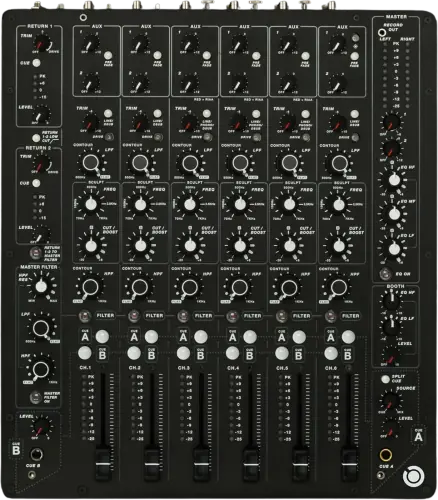
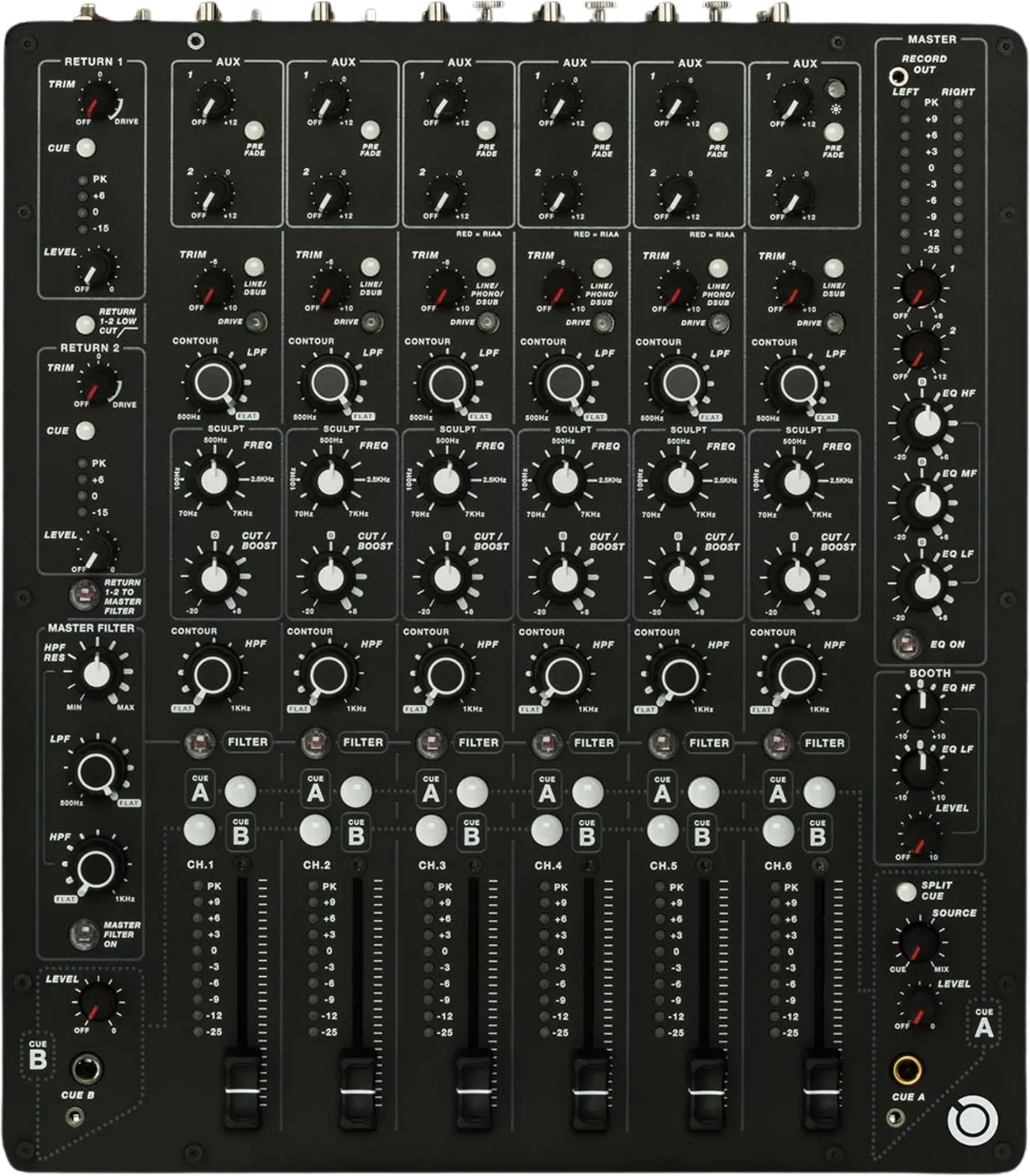
Booth briefing. The MODEL 1 has no crossfader, and there is no way to add one. Six analogue channels, and phono lives on channels 3, 4 and 5 only, so a deck in any other channel is thin and quiet with nothing to fix. There is no 3-band EQ and no bass kill: each strip gives you DRIVE, a swept SCULPT bell and non-resonant CONTOUR filters, and the resonant filter is a shared master block you assign a channel into with its FILTER switch. No USB, so a laptop needs its own interface. Two independent cue systems feed the two headphone sides.
When it goes wrong: No sound from the mixer
Fast Lane
The five things that decide your gig
The five things on the MODEL 1 that change what happens next, if you are reading this in the booth. All five are explained in full further down this page.
There is no crossfader, and no way to add one.
There is no crossfader. It is not fitted, not optional and not removable, and it is absent from the complete control list in the manual. Every transition happens on the channel faders.
That is the design rather than an omission, and it decides what kind of set this mixer is for before you touch anything else on it.
Phono is on channels 3, 4 and 5 only.
Phono is on channels 3, 4 and 5 only. Those three carry an RIAA pre-amplifier, and the manual states it plainly: "Channels 3, 4, and 5, are also equipped with an RIAA pre-amplifier for use with turntables." Three turntables is the limit, and a fourth needs an external phono preamp.
A deck in any other channel is thin and quiet, and there is nothing on the mixer to fix it. Move it, or bring a phono preamp.
There is no 3-band EQ and no bass kill.
There is no 3-band EQ on a channel and no bass kill. Nothing on the strip will remove a bassline the way a kill switch does.
Each strip gives you DRIVE, a swept SCULPT bell and non-resonant CONTOUR filters instead. PLAYdifferently call the pair that replaces it PLAYdifferently's unique Hybrid EQ.
The resonant filter is shared, and a channel only reaches it through its FILTER switch.
The resonant filter is a single SHARED MASTER filter, and a channel only reaches it through that channel's FILTER switch. A DJ who does not find that switch has no resonant filter at all.
So a DJ turning the filter knob with no switch thrown hears nothing and concludes the filter is broken. It is not; it is empty.
There is no USB, so a laptop brings its own interface.
There is no digital audio anywhere in this mixer. No USB port, no audio interface, no converters and no clock.
The computer connection is TASCAM DB25 out to the DJ's own audio interface. The mixer is the analogue end of that link and supplies no interface of its own, so a laptop set needs one in the bag.
If something goes wrong
The faders do not behave like the ones you know
What owners report. The MODEL 1 faders are the thing a new owner notices first. Two reviews report that most of the level arrives in the last part of the fader travel, so long slow blends need smaller movements than usual. That is a field observation rather than a published curve, and no fader law is documented by the manufacturer.
Why this is here at all. It is the one behaviour that will surprise your hands rather than your ears, and it does it on the control you use most. Two independent reviews describe the same thing, which is why it earns a line, and neither of them is the manufacturer, which is why it is not a specification.
What to do about it. Ride one channel from closed to open before the doors open and learn where the level actually arrives. Thirty seconds, and it changes every blend you make afterwards.
A turntable sounds thin and quiet and the cartridge is fine
Short answer. Look at which MODEL 1 channel it is in. Phono is on channels 3, 4 and 5 only. Those three carry an RIAA pre-amplifier, and the manual states it plainly: "Channels 3, 4, and 5, are also equipped with an RIAA pre-amplifier for use with turntables." Three turntables is the limit, and a fourth needs an external phono preamp.
Why this happens. A phono input is a socket with a preamplifier and RIAA correction behind it. It lifts a cartridge's very low output and puts back the bass the record cut removed. A line input does neither, so the deck is far too quiet and tonally wrong in a way that sounds like failing hardware. Nothing warns you, because nothing is faulty.
Fix it now. Move the deck to channel 3, 4 or 5 and set that channel's selector to PHONO. Two decks go on 3 and 4, a third goes on 5, and a fourth needs an external phono preamp you have brought with you.
Avoid it next time. Read the switch caps before you cable anything. A channel set up for a turntable says so from the front. Pressing the small red button on the rear makes that channel's LINE / PHONO / DSUB switch cap glow red, and the guide adds the condition in brackets: it glows "only in the up position". So a strip switched down to DSUB stops showing it, and a dark switch cap is not proof that the rear button is out.
The bass will not go away and there is no third knob
Short answer. The MODEL 1 does not have one. There is no 3-band EQ on a channel and no bass kill. Nothing on the strip will remove a bassline the way a kill switch does. Nothing is broken and no setting adds one.
Fix it now. Two ways, and they sound different from each other. Sweep the channel's CONTOUR high-pass up, which removes the bottom gently and keeps everything above it. Or press that channel's FILTER switch and use the master filter's high-pass, which is resonant and much more of a statement.
What you cannot do. Take a band to nothing while the rest of the track stays exactly where it was. That is what a kill switch does and this mixer has none.
Avoid it next time. If your transitions are built on three-knob EQ mixing, rehearse them on CONTOUR before the gig rather than translating in real time.
The filter knob is doing nothing to the channel you are playing
Short answer. That MODEL 1 channel is not assigned into the filter. The resonant filter is a single SHARED MASTER filter, and a channel only reaches it through that channel's FILTER switch. A DJ who does not find that switch has no resonant filter at all.
Why this happens. On almost every other mixer a filter knob belongs to the strip it sits on. Here the resonant filter is one shared block in the master section, and the only thing that connects a channel to it is that channel's FILTER switch. The knob was working the whole time; it was working on nothing.
Fix it now. Press FILTER on the channel you want. Check what else is already assigned before you sweep, because anything else in there moves with it.
Avoid it next time. Set your filter assignments during the line check, in the same pass as the gain, and glance at which switches are lit before your first build.
The computer cannot see the mixer
Short answer. It never will, on any MODEL 1. There is no digital audio anywhere in this mixer. No USB port, no audio interface, no converters and no clock. There is no driver to install and no setting to find, because there is no device for the computer to enumerate.
Fix it now. Put an audio interface between the two. Its outputs go into any line channel on RCA, or over DB25 if the room is wired that way. The computer connection is TASCAM DB25 out to the DJ's own audio interface. The mixer is the analogue end of that link and supplies no interface of its own, so a laptop set needs one in the bag.
If the room is already wired on DB25. Find out what is on which channel before you start, because the loom decides that and the front panel does not tell you.
Avoid it next time. The interface is part of the rig, not an accessory. On this mixer a laptop without one is a laptop with no way into the room.
Two mixers are linked and the second one is silent
Short answer. The MODEL 1 needs one of the two mixers assigned, and the cable alone does not do it. A link cable on its own does not pass the mix. One of the two mixers has to be assigned to send its bus down the cable to the PA and booth monitors connected to the other one, and the assign switch is not on the panel: turn the mixer over, find the 3 mm hole under the back right rubber foot, peel the foot back and press the switch through it with a thin blade. The guide also says to check that the same switch on the other mixer is not selected, and its own diagnostic is that a mix failing to reach the other mixer usually means this switch is wrong on one of them. Two assigned, or neither assigned, both fail. This is a load-in job with the mixer upside down, not something to attempt with a set running.
Why this happens. Linking looks like a cable job because the sockets are on the rear panel and the cable is a standard one. The switch that decides which mixer feeds the PA is underneath the unit, so nothing on either panel tells you it is set wrong.
Fix it now. Power both mixers down first. There is a stated order for power, and it is the same instruction at both ends of the gig. The guide: "Make sure the rear panel POWER SWITCH is in the OFF position before connecting or disconnecting the power supply." So the switch goes off before the supply goes in at load-in, and off again before the supply comes out at load-out. Then turn the mixer that should feed the PA over, press its assign switch in, and check the other one is switched out.
Avoid it next time. Set the assign switches at load-in, with the mixers on their backs and unpowered, and mark which unit is the assigned one before it goes into the booth.
Cue is only coming through one side of the headphones
Short answer. That is the MODEL 1 design, not a fault. DualCue is two fully independent cue systems, A and B, built for two DJs monitoring separately. Cue A routes to the right-hand headphone monitor and Cue B to the left-hand one, so hearing cue in one ear only is the design rather than a fault.
Why this happens. The two cue busses exist so two people can monitor independently, so each one is deliberately sent to one side. Selecting cue only on A gives you a right-hand side that is working and a left-hand side that has nothing to play.
Fix it now. Cue the channel on the bus that feeds the ear you want, or cue it on both. Nothing needs resetting and no lead needs swapping.
Avoid it next time. Decide which bus is yours before the first track, and if you are playing back to back, agree it with the other DJ at the same time.
What to watch for
You cannot buy one new, and nobody has said it is dead
What can be shown. The MODEL 1 is in the same position as its sibling here. No longer available new from mainstream retailers. Every shop checked lists both mixers as gone, while PLAYdifferently still publish the product page and the manual for each with no end-of-life notice of any kind.
What cannot. PLAYdifferently have published no end-of-life statement for either mixer, so this page does not say the manufacturer has discontinued them. It says what can be shown: they cannot be bought new from the retailers checked.
What that changes about buying one. Buy on condition and on a demonstration, in a room, with a deck plugged into one of the phono channels and a pair of headphones on each cue bus. Every part of this mixer that can be judged is judged by ear.
What is not documented, and will not be invented here
Faults. Nothing MODEL 1 specific has surfaced. No recalls, service bulletins or recurring hardware faults were found in public sources. That is a null result on a small owner base, not a clean bill of health, so this page does not turn it into a reliability claim in either direction.
Ageing. No pattern of age-related failure is documented anywhere reachable. Anything said about how these age would be reasoning rather than evidence, so nothing is said.
Power supply. Both manuals say "universal voltage" and neither prints an AC input range, so no voltage range appears on this site.
Rack mounting. Neither manual mentions rack mounting, rack ears or a rack kit. Rack mounting is not documented by the manufacturer, which is not the same as saying it is impossible, and this page says only the first thing.
The record output. The manual lists the 3.5 mm record output among the rear connectors and the product page describes it as front-mounted. Two manufacturer documents, two answers, so no physical location is stated here.
Why we say all this out loud. Numbers for boutique equipment circulate confidently and vary between the places they are repeated. A figure with no origin invites a comparison the evidence cannot support, and this mixer is expensive enough secondhand that somebody would buy on it.
Compatibility
There is no USB, so a laptop brings its own interface
Short answer. There is no digital audio anywhere in this mixer. No USB port, no audio interface, no converters and no clock. The computer connection is TASCAM DB25 out to the DJ's own audio interface. The mixer is the analogue end of that link and supplies no interface of its own, so a laptop set needs one in the bag.
Bit depth and sample rate. Bit depth and sample rate are not applicable rather than unknown. There is no digital path for either to describe. That is a different answer from "we could not find out", and it is worth being precise about: there is nothing to look up, because there is nothing there.
MIDI. The manual documents no MIDI, on either mixer, anywhere. One review describes the MODEL 1 as having MIDI capability; the manual is the primary source and it has none, so this site treats MIDI as absent.
Firmware, and the upside of having none. There is no firmware. No version, no update, no release notes, and no firmware section in either manual. A whole class of booth failure cannot happen here. There is no update to be behind on, no version that stops talking to a player, and no boot into a bad state, because there is no software in the audio path to do any of it.
Timecode. Timecode vinyl runs into the phono channels only if you bring the interface that decodes it. The mixer decodes nothing and is not a certified DVS desk for any platform.
Common mistakes. Arriving with a laptop and a USB cable and no interface. There is no socket to plug that cable into.
Handing the mix to a house engineer
The output ceiling is high. The MODEL 1 hands over more level than a house engineer expects. A +28 dBu balanced maximum is a very hot output ceiling. A house engineer used to consumer-level DJ mixers may want to pad or trim at the desk rather than assume the level that arrives is the level they expect.
The numbers, from the manufacturer's own table. Maximum output level +28 dBu balanced, +23 dBu unbalanced. Output impedance 50R balanced, 68R unbalanced. Dynamic range better than 112 dB. Frequency response 20 Hz to 40 kHz, +0 to minus 2 dB. Distortion 0.008 percent, line in to mix 1 out, 0 dBu unity gain. Inter-channel crosstalk less than minus 100 dB.
One figure that is quoted two ways. The specification table gives dynamic range as better than 112 dB. The product page separately quotes better than 110 dB for the balanced mix bus. They may be measuring different things, so the two are not merged and the table figure is the one printed.
Who is helping you. Assume the house engineer has not worked on one. This is a low-volume mixer with a channel strip that resembles nothing else in a booth, so the person who can help with the room may not be able to help with the desk. That is a judgement from how few of these were made and where they sit in the market, not a survey.
Features explained
There is no crossfader, and that is the design
Short answer. There is no crossfader. It is not fitted, not optional and not removable, and it is absent from the complete control list in the manual. Every transition happens on the channel faders.
Why it is missing. The mixer is built for layering many sources into one evolving mix. A reviewer put the intent as plainly as the manufacturer ever has: this is a mixer designed for blending and sculpting your overall sound from multiple sources, not mixing from finished track to finished track. Six channels and two returns exist so that a set can be assembled out of loops, stems and outboard, and a two-track cut is simply not the job this desk was built for.
What it costs you. A scratch or cut passage is not available on this mixer without an external fader, so any part of a set that depends on one has to be re-planned before the first track rather than during it.
Common mistakes. Planning a transition around a fader cut, then discovering at the desk that the cut has to become a blend. That is a rehearsal problem, not a booth problem, and the booth is the wrong place to find it.
Six channels, and the three that take a turntable
Short answer. Phono is on channels 3, 4 and 5 only. Those three carry an RIAA pre-amplifier, and the manual states it plainly: "Channels 3, 4, and 5, are also equipped with an RIAA pre-amplifier for use with turntables." Three turntables is the limit, and a fourth needs an external phono preamp.
Why this is near the top of the page. Nothing on the front of the other three channels looks different at a glance. They have the same strip, the same controls and the same source selector; the selector simply has no phono position behind it. A cartridge sent into a line input gets no RIAA correction, so it arrives quiet, bass-light and harsh, which reads as a worn stylus or a bad lead to anybody who has not been told.
How the source is chosen. Each channel picks its source on a LINE / PHONO / DSUB switch on the strip, but the control that turns a channel into a turntable input is on the rear panel: a small red button below that channel's earth binding post, which the guide introduces as "Press this switch to configure the channel for use with vinyl turntables." The front switch chooses between the RCA input and the DSUB system. The rear button decides whether that RCA input is line or phono.
The panel does tell you, once you know where to look. A channel set up for a turntable says so from the front. Pressing the small red button on the rear makes that channel's LINE / PHONO / DSUB switch cap glow red, and the guide adds the condition in brackets: it glows "only in the up position". So a strip switched down to DSUB stops showing it, and a dark switch cap is not proof that the rear button is out.
What the phono stage expects. The phono inputs load a cartridge at 47 kilohms with 250 pF of input capacitance. The guide gives a nominal input of 5 to 10 mV at 1 kHz and a maximum of 108 mV at 1 kHz, so a high output cartridge has room and a very low output one does not.
What each channel gives you. Six stereo input channels, plus two stereo return channels with their own simpler strips. Every strip carries DRIVE, the CONTOUR and SCULPT pair, a FILTER switch into the master filter, two AUX sends, two cue buttons and a 60 mm fader.
Common mistakes. Cabling two turntables into channels 1 and 2 because that is where the hands go, rather than into 3 and 4 because that is where the phono stages are.
No 3-band EQ and no bass kill: DRIVE, SCULPT and CONTOUR
Short answer. There is no 3-band EQ on a channel and no bass kill. Nothing on the strip will remove a bassline the way a kill switch does. The manufacturer calls the pair that replaces it PLAYdifferently's unique Hybrid EQ.
DRIVE, which is not a gain trim. DRIVE is not a gain trim. The manual describes it as varying "the maximum signal level the channel input pre-amplifier can pass", so it is an analogue overdrive stage that you set for tone as much as for level. Both ends are documented. Fully counter clockwise the distortion circuitry is disabled and the channel stays clean past +20 dBu. Fully clockwise, any signal above roughly minus 4 dBu triggers the distortion circuits. The illuminated shaft lights red when the clip threshold is reached, and post-fader level changes how bright it looks.
The meters will disagree, and that is documented. DRIVE quietly moves the level too. The guide: "The Drive control is also linked to the channel fader VCA and automatically adds make-up gain at extreme clip levels, therefore it is normal behaviour for there to be a discrepancy between the Channel and Master buss metering signal levels." A channel meter and the master meters disagreeing with the drive wound up is documented behaviour, not a fault to chase.
CONTOUR. CONTOUR is a pair of what the manual calls "low Q, High-Pass and Low-Pass filters". They are non-resonant and gentle: shaping filters, not the screaming DJ filter the name might suggest. Ducking a bassline here means sweeping the high-pass up rather than dropping a band to nothing, and it sounds like a different move because it is one.
SCULPT. SCULPT is a semi-parametric swept bell with two controls, FREQ setting the centre frequency and CUT/BOOST setting the gain there. The manual says it "covers almost seven octaves". It is deliberately asymmetric: maximum boost +8 dB, maximum cut minus 20 dB. Carving a hole is easy and over-boosting is hard, which is the whole idea.
What is not published, and we are not guessing. The manual gives the SCULPT range as almost seven octaves and prints no Hz endpoints. Figures of 70 Hz to 7 kHz circulate from a review; they are consistent with the octave count and they are not the manufacturer's, so they are not published here as a specification. No slope in dB per octave and no frequency range is published for the CONTOUR filters.
Common mistakes. Reaching for a bass kill that does not exist, three-quarters of the way through a build, with the drop already committed.
The resonant filter is shared, and you assign channels into it
Short answer. The resonant filter is a single SHARED MASTER filter, and a channel only reaches it through that channel's FILTER switch. A DJ who does not find that switch has no resonant filter at all.
How it is wired. The manual describes the channel switch in one line: This switch routes the channel signal through to the Master Filter section. The master filter is a high-pass and a low-pass with a RESONANCE control. Channels and returns are assigned into it, so two channels sent in together are filtered together by one set of controls. The two returns can be sent into it too.
The part people get wrong. This is one filter with several doors into it, not a filter per channel. Two channels assigned together move together, on one frequency knob and one resonance setting. That is a creative tool when you meant it and a surprise when you did not.
What the sweep actually covers. The ends of the sweep are published. The low-pass gives a virtually flat response up to about 20 kHz with the control fully clockwise, and progressively attenuates everything above 500 Hz with it fully counter clockwise. The high-pass is flat down to 30 Hz fully counter clockwise, and attenuates everything below 1 kHz fully clockwise.
Resonance is limited for you at the bottom. Resonance is taken away from you at the bottom of the sweep, on purpose. The guide: "Because high Q levels at low frequency can damage the PA system, high Q settings are automatically reduced as the HPF control is turned counter clockwise." So a screaming resonant peak thins out as you sweep down, and that is the mixer protecting the room rather than the filter running out.
Why the switching is silent. Zero-crossing detection is what keeps the switching silent, and the guide attaches it to four switches by name: a channel FILTER switch, RETURN 1-2 TO MASTER FILTER, MASTER FILTER ON and the master EQ ON switch. Those four are meant to be hit mid-track. Nothing else on the mixer is described that way.
What is not published. What is not published is the sharpness. No Q figure and no filter slope is given for the master filter, and no range is given for the resonance control, so there is no number here to compare its bite against another filter with.
The master section, and why it is not an isolator
Short answer. A three-band asymmetric master EQ with an ON switch. The manual: "Three-Band asymmetric EQ affects all mix outputs, including Booth and Record", and the switch "is controlled by zero-crossing detection circuitry which allows it to be used as a performance effect, as well as a frequency correction tool". PLAYdifferently print its response as a graph and put no cut or boost figure on it anywhere in either guide.
Read the second half of that sentence twice. The master EQ is on the booth feed and on the record feed as well as on the house. Cutting the top out of the room takes it out of your monitors and out of your recording at the same time.
It is not an isolator. It is not an isolator and the manual never calls it one. Asymmetric means the cut goes deeper than the boost, but PLAYdifferently publish that response as a graph rather than a number, so how deep is theirs to know. Either way it attenuates rather than kills, and a technique built on a full-kill isolator does not transfer.
Booth and metering. The booth has its own 2-band EQ and level. Two ten-point peak-reading LED meters, left and right.
Where the manufacturer wants the meters sitting. The guide sets a target rather than leaving the meters to taste: keep the average signal level between 0 and +6, treat occasional peaks to +9 as acceptable, and avoid operating with the PK LED on, because of the possibility of damaging connected PA systems or clipping soundcards and recording devices. The meter colours say the same thing, and the guide puts it that way too: play into the red and orange, and stay out of the white.
The record output. The record output is a 3.5 mm TRS socket carrying the post master EQ signal at a nominal minus 6 dBu, which is well below the level on the main outputs and needs input gain on whatever is recording.
Faders. The 60 mm channel fader is a VCA control. The manual: "The 60mm fader controls the DC level for the channel VCA", so the audio never passes through the fader element itself.
Two cue systems, one per ear
Short answer. DualCue is two fully independent cue systems, A and B, built for two DJs monitoring separately. Cue A routes to the right-hand headphone monitor and Cue B to the left-hand one, so hearing cue in one ear only is the design rather than a fault.
How they behave. Cue A auto-cancels: "selecting one channel Cue will automatically turn off the previous selection." Cue B does not auto-cancel, and the MODEL 1 guide says so in as many words: "CUE B does not auto-cancel, meaning that each channel Cue operates independently of the other Cue switches." So a second selection on the B bus adds to what is already in your left ear rather than replacing it, and the A bus behaves the opposite way.
What it is for. Two DJs playing together, each monitoring their own selection without touching the other's. On your own it is still useful: park a long build on B while you audition on A.
Headphone drive. Headphone A is 850 mW RMS into 45 ohms at 1 kHz, Headphone B is 500 mW RMS into 100 ohms at 1 kHz, over a 30 to 150 ohm headphone impedance range.
Professional tips
Before you open the first channel
Re-plan anything that needed a crossfader, now. There is not one and there is no way to add one at the desk. Doing that thinking at load-in costs you two minutes. Doing it mid-set costs you the transition.
Put the decks on 3, 4 and 5 while you are still cabling. Those are the only channels with a phono stage. A deck anywhere else is quiet and thin and will read as a hardware problem for as long as you let it.
Find the channel FILTER switches before your first build. The resonant filter is one shared block and a channel only reaches it through its own switch. Set the assignments during the line check and you never have to look for them under pressure.
Learn where the fader level actually arrives. Owners report most of it landing late in the travel. Ride one channel from closed to open before doors and your hands will know.
Carry the interface, and carry a spare DB25 lead if the room uses one. There is no soundcard in this mixer and a studio connector cannot be improvised from anything in a booth.
Connections and setup
The rear panel, and what is not on it
Inputs. RCA line on all six channels, phono on three of them, and two TASCAM DB25 connectors carrying balanced multichannel audio as the alternative source. There are no XLR line inputs on the channel strips.
Outputs. Master 1 on balanced XLR, "conventionally configured" with pin 1 ground and pin 2 hot. Master 2, booth, AUX 1 and AUX 2 on impedance-balanced quarter-inch TRS jacks. A DSUB output on TASCAM DB25. A 3.5 mm record output fed post master EQ. Headphones A and B each have both a quarter-inch and a 3.5 mm socket.
The one to check before you pack a loom. PLAYdifferently's product page describes both masters as XLR. Their manual describes Master 1 as balanced XLR and Master 2 as an impedance-balanced quarter-inch TRS jack. The manual is the specific document and it is the one to pack cables for.
There is no microphone input. There is no microphone input. The rear panel input list runs to the two returns, the RCA line inputs, the phono buttons and the DB25 connectors, and stops. A microphone needs its own preamp feeding a line channel, and there is no phantom power anywhere on the mixer to run one from. The MODEL 1 guide is explicit about it, describing the mixer as at home "as a compact outside broadcast desk that does not require microphone inputs".
Which master knob feeds which socket. The two master level controls do not feed the same socket. The guide: "Master 1 controls the XLR outputs and Master 2 the TRS outputs." If the house is on the XLRs, riding Master 2 changes nothing anybody can hear, and finding that out during a handover is a bad minute.
Sends and returns. Two stereo AUX sends on impedance-balanced TRS. AUX 1 is switchable pre or post fade, AUX 2 is post fade. AUX 1 carries a PRE FADE switch and its default is post fader, with the switch in the up position. AUX 2 is always post fader from the panel, and the guide notes an internal option that makes AUX 2 follow AUX 1 pre or post. That option is inside the mixer, so it is a service decision rather than something to find during a line check. Two stereo returns on TRS, each with TRIM, a drive circuit, metering, a LOW CUT filter, a CUE send, a LEVEL rotary and its own routing into the master filter.
The two return switches act on both returns. Neither return switch belongs to one return. LOW CUT is labelled RETURN 1-2 and attenuates the low frequency response on both Return 1 and Return 2, with a slope of 6 dB per octave set at 320 Hz at the minus 3 dB point. RETURN 1-2 TO MASTER FILTER sends both returns into the filter together. There is no way to treat one return and leave the other alone.
The returns distort earlier than the channels. The returns are built to distort and they start sooner than the channels do. Their peak LED lights above +8 dBu, which the guide says "is set lower than on the main channels due to the fixed Drive circuit", and it warns that "signal levels above PK will activate the distortion circuits". A return that has turned dirty is usually a return that is simply too hot, not an effects unit going wrong.
The return jacks may already have signal on them. The MODEL 1 return jacks are normalled to the DB25. The guide: "These Jacks are normalled to the DSUB2 IN connector, therefore if nothing is plugged into these sockets the Returns source their signal from the DSUB system." In an installed booth the returns may already be carrying whatever the house loom puts on DSUB IN 2, and plugging a jack into a return socket takes that away.
The DB25 ports. The two DB25 inputs are described by the manufacturer as receiving all eight stereo channels, and the DB25 output carries master, both AUX sends and Cue B. The pin-level mapping is in the manual and anybody wiring a loom should read it there rather than from any summary. TASCAM DB25 is a studio connector, not a booth connector. If an install is wired that way, a visiting DJ cannot improvise a replacement lead, and finding out what sits on which channel before the first track is the difference between a set and a search.
LINK is not a network. LINK IN and LINK OUT take a 9-pin female-to-female DSUB cable and let two of these mixers share a mix bus and cue between performers. It is a proprietary link, not Ethernet and not a player network, and it will not join a booth network of any kind. The cable is a 9 pin female to female DSUB. The guide accepts an inexpensive computer RS232 cable as long as it runs pin 1 to pin 1 and so on, because the mix bus connections are fully balanced, and it strongly recommends an audio grade cable for best performance.
Linking needs a switch, not just a cable. A link cable on its own does not pass the mix. One of the two mixers has to be assigned to send its bus down the cable to the PA and booth monitors connected to the other one, and the assign switch is not on the panel: turn the mixer over, find the 3 mm hole under the back right rubber foot, peel the foot back and press the switch through it with a thin blade. The guide also says to check that the same switch on the other mixer is not selected, and its own diagnostic is that a mix failing to reach the other mixer usually means this switch is wrong on one of them. Two assigned, or neither assigned, both fail. This is a load-in job with the mixer upside down, not something to attempt with a set running.
Power. An external 90 W 24 V universal-voltage PSU, converted internally to rails of just under plus and minus 20 V. Power consumption is 50 W maximum. A second power supply is an option, not a fitting. One supply is adequate on its own and goes into either the PSU 1 or the PSU 2 socket. With two connected, the guide describes one taking over automatically if the other loses power, and its example is a festival where each supply runs from a separate mains phase. With only one connected there is nothing to take over. PLAYdifferently document this for the MODEL 1 and say nothing either way about the MODEL 1.4, so it is not claimed there.
The power connector. The power connector locks and it goes in one way round. The flat face of the plug faces left as you look at the rear, the pins line up, and the plug pushes fully home until it latches. It comes out by pulling back the spring-loaded sleeve on the plug, which releases the lock. None of that is obvious in a dark booth, so it is worth doing once in daylight.
Safety
The warnings PLAYdifferently print, and what they leave out
Your hearing first. The MODEL 1 drives headphones harder than most club mixers. The guides carry one hearing warning and it is blunt: the headphone amplifiers are capable of driving sensitive headphones to very high sound pressure levels, which could result in permanent hearing damage. With 850 mW available on Cue A, the level control belongs down before the headphones go on.
Power, in the order the guide gives it. There is a stated order for power, and it is the same instruction at both ends of the gig. The guide: "Make sure the rear panel POWER SWITCH is in the OFF position before connecting or disconnecting the power supply." So the switch goes off before the supply goes in at load-in, and off again before the supply comes out at load-out.
Two things the guide tells you not to do. Two prohibitions come with the supply. The guide says the shipped supply was chosen for this mixer and not to use any other type, "as it could damage the mixer or impair its performance". And it says never to unplug the connector by pulling on the power lead, because that can damage the locking mechanism.
Where this equipment is meant to live. These are Class A devices, tested for use in a commercial environment. The compliance statement says operation in a residential area "is likely to cause harmful interference in which case the user will be required to correct the interference at his own expense", and it carries the Canadian classification CAN ICES-3 (A) / NMB-3 (A). That is a statement about where the equipment belongs, not a fault report.
Faders and the warranty. One line of the warranty is worth reading before buying a used one. Allen & Heath write that "The warranty does not cover fader wear and tear", on a mixer whose channel faders are the only transition control it has. The warranty runs one year from the date of original purchase, is not transferable, and asks for the unit to go back in its original carton.
What is not published, and is not invented here. Neither guide carries a cleaning, storage or servicing section. There is no fluid named, no interval given, and no operating temperature or humidity range printed anywhere, so none appears here. Neither guide mentions a fuse, a fuse rating or a fuse holder, on the mixer or in the external supply, so no fuse is named on this page.
Firmware, drivers and documents
There is no firmware, and the guide has a change history
Short answer. The MODEL 1 has no software to version. There is no firmware. No version, no update, no release notes, and no firmware section in either manual. What it does have is a paper trail, and that trail is dated. There is a dated change history for this guide. It exists as Issue 1, copyright 2016, and Issue 2, copyright 2021, and the two are not identical.
What changed between the two issues. The substantive change is about the cue system. Issue 1 said on the channel strip page that "Both Cue systems have an auto-cancel feature, where selecting one Cue will automatically cancel the previous selection." Issue 2 replaced that with "CUE A has an auto-cancel function", which is what both issues already said on the headphone page. So Issue 1 disagreed with itself, Issue 2 fixed it, and anybody working from the older document has the wrong idea about Cue B.
Why this is worth a section on a mixer with no firmware. A DJ who learned this desk from the older document believes both cue busses cancel themselves, sets up a back to back on that basis, and is wrong about half of it. A document version is the only version number this mixer has, so it is the one to check.
The conformity paperwork. Both guides state conformity with the European Electromagnetic Compatibility directive 2014/30/EU and the European Low Voltage directive 2014/35/EU, and both warn that changes or modifications to the equipment not approved by PLAYdifferently could void the compliance of the product and with it the user's authority to operate it.
Frequently asked questions
Quick answers
- Does it have a crossfader?
- No. There is no crossfader. It is not fitted, not optional and not removable, and it is absent from the complete control list in the manual. Every transition happens on the channel faders.
- Can I fit one?
- Not at the desk. A scratch or cut passage is not available on this mixer without an external fader, so any part of a set that depends on one has to be re-planned before the first track rather than during it.
- How many turntables can I run?
- Three. Phono is on channels 3, 4 and 5 only. Those three carry an RIAA pre-amplifier, and the manual states it plainly: "Channels 3, 4, and 5, are also equipped with an RIAA pre-amplifier for use with turntables." Three turntables is the limit, and a fourth needs an external phono preamp.
- Which channels take a turntable?
- Channels 3, 4 and 5, and no others.
- Is there a USB port?
- No. There is no digital audio anywhere in this mixer. No USB port, no audio interface, no converters and no clock.
- What bit depth and sample rate does it run at?
- Bit depth and sample rate are not applicable rather than unknown. There is no digital path for either to describe.
- Does it do MIDI?
- The manual documents no MIDI, on either mixer, anywhere. One review describes the MODEL 1 as having MIDI capability; the manual is the primary source and it has none, so this site treats MIDI as absent.
- What firmware version should it be on?
- There is no firmware. No version, no update, no release notes, and no firmware section in either manual. A whole class of booth failure cannot happen here. There is no update to be behind on, no version that stops talking to a player, and no boot into a bad state, because there is no software in the audio path to do any of it.
- How do I connect a laptop?
- The computer connection is TASCAM DB25 out to the DJ's own audio interface. The mixer is the analogue end of that link and supplies no interface of its own, so a laptop set needs one in the bag.
- Where is the bass kill?
- There is no 3-band EQ on a channel and no bass kill. Nothing on the strip will remove a bassline the way a kill switch does.
- Why is the filter not affecting my channel?
- The resonant filter is a single SHARED MASTER filter, and a channel only reaches it through that channel's FILTER switch. A DJ who does not find that switch has no resonant filter at all.
- Is the master EQ an isolator?
- It is not an isolator and the manual never calls it one. Asymmetric means the cut goes deeper than the boost, but PLAYdifferently publish that response as a graph rather than a number, so how deep is theirs to know. Either way it attenuates rather than kills, and a technique built on a full-kill isolator does not transfer.
- What are the LINK sockets for?
- LINK IN and LINK OUT take a 9-pin female-to-female DSUB cable and let two of these mixers share a mix bus and cue between performers. It is a proprietary link, not Ethernet and not a player network, and it will not join a booth network of any kind.
- Is there a microphone input?
- There is no microphone input. The rear panel input list runs to the two returns, the RCA line inputs, the phono buttons and the DB25 connectors, and stops. A microphone needs its own preamp feeding a line channel, and there is no phantom power anywhere on the mixer to run one from.
- Do I need to do anything before plugging or unplugging the power supply?
- There is a stated order for power, and it is the same instruction at both ends of the gig. The guide: "Make sure the rear panel POWER SWITCH is in the OFF position before connecting or disconnecting the power supply." So the switch goes off before the supply goes in at load-in, and off again before the supply comes out at load-out.
- Has the user guide changed since launch?
- There is a dated change history for this guide. It exists as Issue 1, copyright 2016, and Issue 2, copyright 2021, and the two are not identical. The substantive change is about the cue system. Issue 1 said on the channel strip page that "Both Cue systems have an auto-cancel feature, where selecting one Cue will automatically cancel the previous selection." Issue 2 replaced that with "CUE A has an auto-cancel function", which is what both issues already said on the headphone page. So Issue 1 disagreed with itself, Issue 2 fixed it, and anybody working from the older document has the wrong idea about Cue B.
- What fuse does it take?
- Neither guide mentions a fuse, a fuse rating or a fuse holder, on the mixer or in the external supply, so no fuse is named on this page.
- How big is it?
- 37 cm long, 32 cm wide, 11.5 cm high, 5.40 kg.
- Can it be rack mounted?
- Neither manual mentions rack mounting, rack ears or a rack kit. Rack mounting is not documented by the manufacturer, which is not the same as saying it is impossible, and this page says only the first thing.
- Is it still made?
- No longer available new from mainstream retailers. Every shop checked lists both mixers as gone, while PLAYdifferently still publish the product page and the manual for each with no end-of-life notice of any kind.
Commonly paired with
What you usually find beside it in working booths, from club, festival and rental installs rather than from a manufacturer document.
PLAYdifferently All brands Knowledge base FAQ and Fixes Dictionary
Playing soon and it is not working?
Start Emergency ModeKeep the Emergency Card
We will email you the printable PDF so it is on your phone before the next dark booth. Occasional notes that save gigs. No spam, unsubscribe in one click.
Registering is free and counts everywhere on Save My Gig. We send a confirmation email first. Your address is stored with Brevo, our email provider. Unsubscribe any time. Privacy
Sources: PLAYdifferently's own MODEL 1 User Guide, Issue 2, the earlier Issue 1 of the same guide, their FCC and Industry Canada compliance statement, their MODEL 1 product page and their launch release of 3 May 2016, checked 12 August 2026. Specifications theirs, priorities ours.