

DDJ-SR2, the field manual
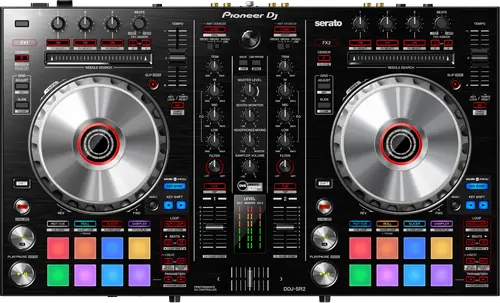
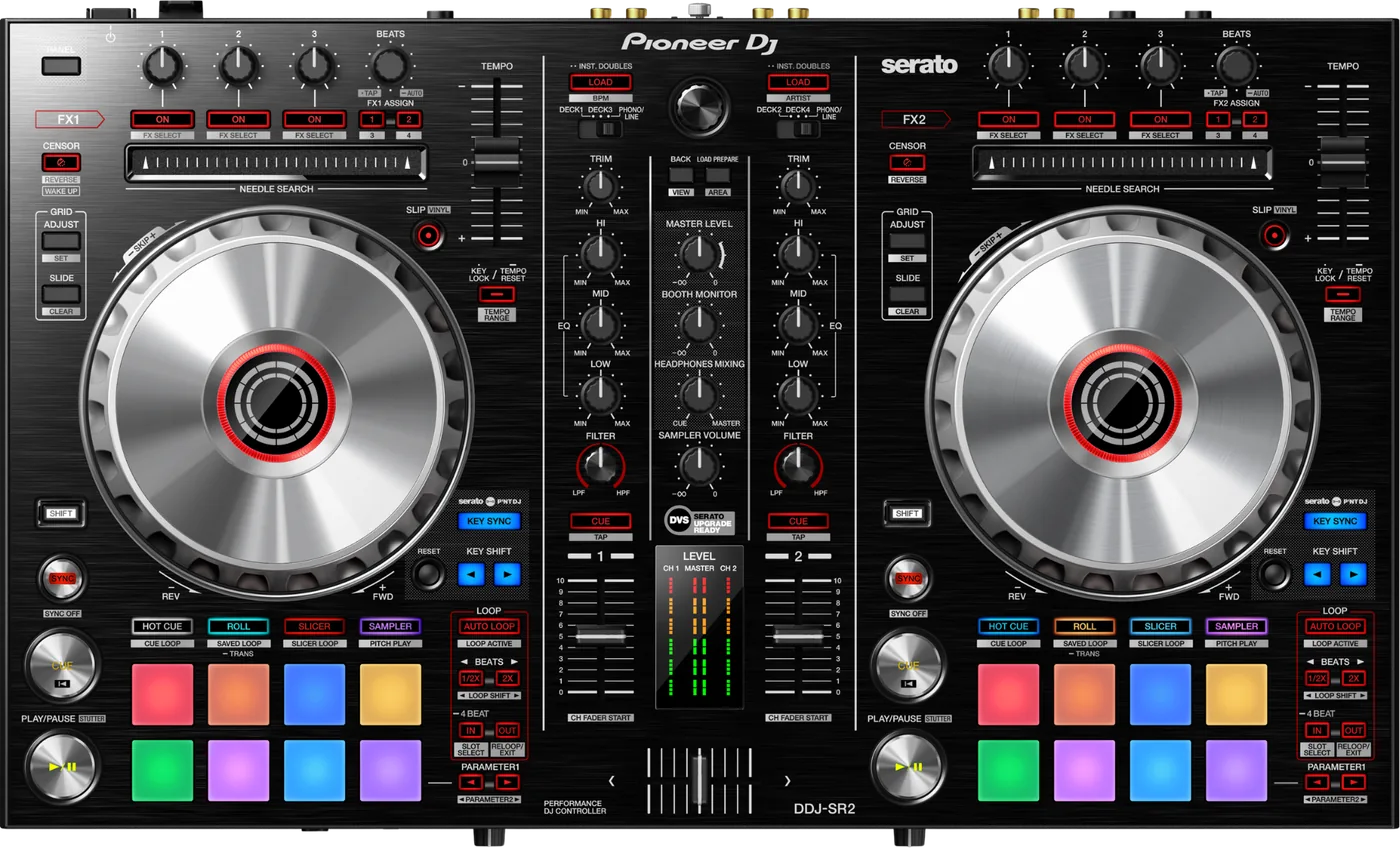
Booth briefing. The DDJ-SR2 is Pioneer's two channel Serato controller from 2017, sitting beside the DDJ-SX2 in the range. It is a computer controller for Serato, and unlike the DDJ-SX2 it uses a maker driver on both macOS and Windows; the macOS driver is current, version 4.0.2 of 16 June 2026 with Tahoe support. It runs from a DC 12 V supply, where the DDJ-SX2 and DDJ-SX3 run on DC 5 V and the DDJ-SZ2 takes mains directly with no adapter at all.
When it goes wrong: The computer cannot see the controller No sound from the controller
Fast Lane
The five things that decide your gig
The five things on the DDJ-SR2 that change what happens next, if you are reading this in the booth. All five are explained in full further down this page.
It needs a driver on both macOS and Windows. The DDJ-SX2 does not, and that tells you nothing.
Serato state it directly: "The Pioneer DJ DDJ-SR2 requires manufacturer-specific drivers on both macOS & Windows operating systems." AlphaTheta’s Drivers section for this model holds two articles, one for each platform. This is not a class compliant device on macOS, and the DDJ-SX2, which is, tells you nothing about it.
Your Mac update question has two answers and they disagree.
The hardware maker and the software maker disagree, and this site prints both. AlphaTheta shipped a DDJ-SR2 macOS driver on 16/Jun/2026 whose stated improvement is "macOS Tahoe support". Serato place the DDJ-SR2 in their "In testing" tier for macOS 26 Tahoe, which they describe as equipment "you should not currently update to macOS 26 Tahoe". AlphaTheta’s statement carries a date and Serato’s page does not, but Serato’s tier governs the Serato DJ Pro pairing, which is how nearly everyone uses this unit.
Serato cannot see the controller: it is usually a stale entry, not a cable.
When Serato DJ does not see the unit, AlphaTheta document a procedure per platform. On Windows: connect the unit and power it on, go to Control Panel, Hardware and Sound, set a different audio device as the default, restart the computer, then launch Serato DJ. On macOS: open Applications, Utilities, Audio MIDI Setup, go to MIDI Studio, disconnect the controller, remove its icon, reconnect it and restart Serato DJ. The stale MIDI Studio entry is a classic pre gig failure.
There is no firmware download for this model. It still has firmware.
AlphaTheta publish no firmware download and no version history for the DDJ-SR2. Its product page has no Firmware Update section at all, unlike the DDJ-SX2 page, and every former pioneerdj.com firmware path redirects away. The unit does have firmware: AlphaTheta’s own troubleshooting tells you to "use DDJ-SR2 Setting Utility to verify firmware version displays". What is missing is the download and the history, not the firmware.
DC 12 V. Do not grab the wrong adapter out of the bag.
It runs from a DC 12 V, 2 A adapter whose AC side is rated 100 V to 240 V, 50 Hz/60 Hz at 0.6 A.
The DDJ-SR2 runs on DC 12 V. The DDJ-SX2 and DDJ-SX3 run on DC 5 V, and the DDJ-SZ2 has no DC adapter at all because it takes AC mains. Do not generalise from one of these to another: the DC 5 V and DC 12 V adapters look alike, are not interchangeable, and swapping them is a plausible way to destroy a unit.
If something goes wrong
When Serato does not see it
Short answer. When Serato DJ does not see the unit, AlphaTheta document a procedure per platform. On Windows: connect the unit and power it on, go to Control Panel, Hardware and Sound, set a different audio device as the default, restart the computer, then launch Serato DJ. On macOS: open Applications, Utilities, Audio MIDI Setup, go to MIDI Studio, disconnect the controller, remove its icon, reconnect it and restart Serato DJ. The stale MIDI Studio entry is a classic pre gig failure.
Why the Mac procedure is on the list. AlphaTheta do not say why it works, only that it does. What the procedure amounts to is making the system enumerate the unit again from scratch, so it is worth trying before you conclude the cable or the port is dead.
If the computer does not see it at all. AlphaTheta’s separate article for that covers the driver not being installed, checking the firmware version displays in the Setting Utility, the cable, the hub, other applications and other USB devices. AlphaTheta are explicit: "A USB hub cannot be used. Be sure to connect this unit to a USB port on the computer that can supply power." They also say to exit all other applications including screen savers and resident software, and to remove external hard disks.
And one instruction that catches people. AlphaTheta state the "DDJ-SR2 works with other MIDI-compatible software besides Serato DJ Pro by assigning MIDI message" and publish the message list as a PDF. They add one caution: "Please do not run multiple DJ Software on your computer at the same time."
Audio that stops when you click on something else
Short answer. Serato document an issue that "can cause a loss of audio output when using some Pioneer DJ devices on macOS, with Serato DJ Pro, if application focus is changed to another application", and the DDJ-SR2 is on the affected list. The macOS versions named are Catalina, Big Sur and Monterey, and the resolution Serato give is Pioneer driver 4.0.1 or 4.0.1.1, or Serato DJ Pro 2.6.0 or higher. The current macOS driver is 4.0.2, which is past both of the versions Serato name.
What it looks like from the booth. Everything on the controller keeps responding and the sound is gone, and it happened right after you clicked on a browser window. That is not an obvious diagnosis under pressure, which is why it is worth reading before it happens.
What to do. Check your driver version. The current macOS driver is newer than either version Serato name as the fix, so a unit on the current driver is past the versions this was reported against.
What to watch for
The jog sensitivity setting that does not exist
Short answer. A Pioneer DJ staff member replied on the company forum that "the SR2 doesn’t have an option to change the response of rotation", and that what utility mode adjusts is touch sensitivity, not rotation. That is a forum reply rather than formal documentation, and it is worth knowing because it stops you hunting for a setting that does not exist.
Why that saves an evening. Somebody who has used another Pioneer controller will go looking for a rotation response setting in utility mode, not find it, and conclude their DDJ-SR2 is faulty or its firmware is wrong. It is neither. The setting is not on this model.
What you can change. Touch sensitivity, in utility mode. That is how firmly the wheel decides your hand is on it, and it is a different control from rotational response.
Why nothing on this page came from a DDJ-SR or DDJ-SX2 document
Short answer. AlphaTheta’s own DDJ-SR2 article contains the line "Connect the computer and DDJ-SR using the included USB cable", naming the DDJ-SR rather than the DDJ-SR2. It does not change the instruction, and it is direct evidence that even the manufacturer’s help centre carries text across this exact family.
Why that is worth telling you. If the manufacturer’s own help centre carries text between two models in this family, every third party article and forum answer that does the same is a coin toss. Treat any DDJ-SR and DDJ-SR2 cross reference with suspicion, including the ones on official sites.
Three places it would have gone wrong here. The DDJ-SX2 is class compliant on macOS and this unit is not. AlphaTheta call Flip free to DDJ-SX2 purchasers and a paid expansion for this one. The DDJ-SX2 runs on DC 5 V and this one runs on DC 12 V. Each of those was read from the document that states it for the model it is about, rather than assumed from a neighbour.
Compatibility
Drivers, and why both platforms need one
Short answer. Serato state it directly: "The Pioneer DJ DDJ-SR2 requires manufacturer-specific drivers on both macOS & Windows operating systems." AlphaTheta’s Drivers section for this model holds two articles, one for each platform. This is not a class compliant device on macOS, and the DDJ-SX2, which is, tells you nothing about it.
The macOS driver. Version 4.0.2, dated 16/Jun/2026, and its stated improvement is "macOS Tahoe support". A controller announced in 2017 received a macOS driver update in 2026.
One article, retitled repeatedly. AlphaTheta retitle one article as each new macOS ships rather than publishing a new one, so the same article was "DDJ-SR2 Audio Driver for macOS Sonoma" before it was the Tahoe article. Searching for a Sonoma driver and a Tahoe driver lands you on the same page, and the version on it is the current one.
What that article does not tell you. The article names macOS Tahoe as the new addition and no other version. The full list of macOS versions the 4.0.2 driver covers is not published on it.
Windows. Version 1.010, last updated 09/Dec/2021. AlphaTheta name no Windows version on that article at all; they point to a separate supported OS page. Only Serato name Windows versions for this model, listing "DDJ-SR2 1.010 driver (compatible with Windows 10 & Windows 11)". That is Serato’s statement and not the driver author’s.
The asymmetry, stated without a verdict. The macOS driver was updated in June 2026. The Windows driver has not been updated since December 2021. No source states why, and no source says Windows support has ended.
macOS Tahoe, and two makers who disagree
Short answer. The hardware maker and the software maker disagree, and this site prints both. AlphaTheta shipped a DDJ-SR2 macOS driver on 16/Jun/2026 whose stated improvement is "macOS Tahoe support". Serato place the DDJ-SR2 in their "In testing" tier for macOS 26 Tahoe, which they describe as equipment "you should not currently update to macOS 26 Tahoe". AlphaTheta’s statement carries a date and Serato’s page does not, but Serato’s tier governs the Serato DJ Pro pairing, which is how nearly everyone uses this unit.
Both can be true at once. A driver can support an operating system while the software maker has not finished testing the combination of that driver, that system and their own application. Nothing about the two statements is contradictory in the way it looks.
What to actually do. If you have a gig this month, do not update the Mac. If you have already updated, install the current driver and test a full set at home before you rely on it. That Serato page carries no visible date, so check it yourself rather than trusting this paragraph in six months.
rekordbox, TRAKTOR and other MIDI software
rekordbox. No article, statement or mention of rekordbox for the DDJ-SR2 was found on any source, and unlike the DDJ-SX2 this model has no rekordbox article at all. Nothing says it works and nothing says it does not.
TRAKTOR. No TRAKTOR article exists for the DDJ-SR2, and the MIDI compatible software article does not mention TRAKTOR. No source extends the DDJ-SX2’s TRAKTOR PRO 2 setting file to this model, and this page does not extend it either.
Everything else. AlphaTheta state the "DDJ-SR2 works with other MIDI-compatible software besides Serato DJ Pro by assigning MIDI message" and publish the message list as a PDF. They add one caution: "Please do not run multiple DJ Software on your computer at the same time."
Why this page says nothing more. A controller that speaks MIDI will physically work with most software. Whether the mapping is any good is a question no maker has answered for this unit, and this site does not answer it for them.
Features explained
Serato DJ Pro, and what it costs
The licence. AlphaTheta state users "can use the software without buying the license or activating the unit" when the DDJ-SR2 is connected to Serato DJ Pro. Serato list it as "Serato DJ Pro enabled" and a "hardware unlocked device".
The naming, which trips people up on second hand listings. AlphaTheta print the naming change on this model’s own article: "Serato DJ Intro and Serato DJ have been renamed and are now known as Serato DJ Lite and Serato DJ Pro, respectively." That is why older DDJ-SR2 material says Serato DJ and current material says Serato DJ Pro.
DVS, and here every source agrees. Every source that speaks agrees the DVS expansion pack has to be bought. Pioneer called the unit "Serato DVS Upgrade Ready" at launch, Serato’s hardware page says the expansion pack is needed for Control Vinyl or Control CDs, and Serato’s quickstart says "Serato DVS: Requires separate purchase and activation." This is not the DDJ-SX2 position and the two must not be read together.
Flip. AlphaTheta state "Serato Flip is compatible with DDJ-SR2" and describe it as a separately sold expansion pack. Serato agree it needs buying. That is the opposite of AlphaTheta’s position on the DDJ-SX2, where they say Flip is free to purchasers.
Pitch ’n Time, and this one is disputed. Pioneer said at launch that a Pitch ’n Time DJ Expansion Pack was included and Serato’s hardware page says the unit "Comes with a Serato Pitch ’N Time DJ license". Serato’s quickstart lists Pitch ’n Time among expansions that require separate purchase, and AlphaTheta describe it as compatible but needing separate activation. No source states whether a launch bundle follows a second hand unit.
The firmware nobody publishes
Short answer. AlphaTheta publish no firmware download and no version history for the DDJ-SR2. Its product page has no Firmware Update section at all, unlike the DDJ-SX2 page, and every former pioneerdj.com firmware path redirects away. The unit does have firmware: AlphaTheta’s own troubleshooting tells you to "use DDJ-SR2 Setting Utility to verify firmware version displays". What is missing is the download and the history, not the firmware.
What this means for you. You can read your unit’s firmware version and you cannot compare it against anything, because no version number is published anywhere. There is no update to chase and no known bug list to check yourself against.
Why the page states the absence rather than staying quiet. A page with no firmware section reads like an oversight. This is not an oversight: the DDJ-SX2 product page has a Firmware Update section and this one does not.
Professional tips
Before you play on one
Label the power supply. This unit is DC 12 V and the DDJ-SX2 and DDJ-SX3 are DC 5 V. Two identical looking bricks in one bag is a bad arrangement.
Learn the Audio MIDI Setup reset. On a Mac it is the single most useful thing on this page, and it takes a minute when you are calm and forever when you are not.
Do not update the Mac before a run of gigs. The hardware maker and the software maker do not currently agree about Tahoe on this unit.
Stop looking for a jog rotation setting. Pioneer staff have said it is not there. Touch sensitivity is the one you can change.
No USB hub. AlphaTheta say it plainly for this model, and the port has to be one that supplies power.
Connections and setup
What goes in and what comes out
Inputs. It has two sets of RCA PHONO/LINE inputs and a microphone input on a 6.3 mm TS jack.
Outputs. one set of XLR master outputs. The service manual lists MASTER 1 on XLR as one set and names no second master output, so this page does not claim one. A booth output and headphone outputs also exist, but those two lines come from a specification aggregator rather than from Pioneer’s own document, and no connector type is published for either.
To the computer. one USB type B port.
Power, and this is the one to get right. It runs from a DC 12 V, 2 A adapter whose AC side is rated 100 V to 240 V, 50 Hz/60 Hz at 0.6 A. The DDJ-SR2 runs on DC 12 V. The DDJ-SX2 and DDJ-SX3 run on DC 5 V, and the DDJ-SZ2 has no DC adapter at all because it takes AC mains. Do not generalise from one of these to another: the DC 5 V and DC 12 V adapters look alike, are not interchangeable, and swapping them is a plausible way to destroy a unit.
The physical facts. It measures 553 x 334.5 x 65.1 mm as width, then depth, then height, and weighs 3.7 kg. Its audio path is 44.1 kHz sampling rate, 24 bit A/D and D/A conversion, 20 Hz to 20 kHz. Pioneer describe it as approximately 18 percent lighter than its predecessor.
Where these figures come from. Pioneer’s own service manual, read on a third party mirror and cross checked against an aggregator, because the manufacturer’s specification addendum now 404s at every URL. The Operating Instructions contain no specifications section at all.
Firmware, drivers and manuals
What the maker still publishes
Less than you would expect, and the gaps are specific. The manuals article is live but its three document links, the operating instructions, the quick start manual and the specifications addendum, did not resolve during research. The driver articles for both platforms are live. The macOS one is current, from June 2026; the Windows one was last updated in December 2021 and names no Windows version at all.
There is no firmware section. AlphaTheta publish no firmware download and no version history for the DDJ-SR2. Its product page has no Firmware Update section at all, unlike the DDJ-SX2 page, and every former pioneerdj.com firmware path redirects away. The unit does have firmware: AlphaTheta’s own troubleshooting tells you to "use DDJ-SR2 Setting Utility to verify firmware version displays". What is missing is the download and the history, not the firmware.
What still works is below.
Official downloads and documents
Go to AlphaTheta for the files themselves. We link their pages instead of hosting a copy, because a manual copied here is a snapshot of release day and theirs is the one that stays current.
Manuals. Official Pioneer DJ manual page →
Broken link? Let us know and we'll fix it.
Frequently asked questions
Quick answers
- Do I need to install a driver?
- Yes, on both platforms. Serato state it directly: "The Pioneer DJ DDJ-SR2 requires manufacturer-specific drivers on both macOS & Windows operating systems." AlphaTheta’s Drivers section for this model holds two articles, one for each platform. This is not a class compliant device on macOS, and the DDJ-SX2, which is, tells you nothing about it.
- What is the current macOS driver?
- Version 4.0.2, dated 16/Jun/2026, and its stated improvement is "macOS Tahoe support". A controller announced in 2017 received a macOS driver update in 2026.
- What is the current Windows driver?
- Version 1.010, last updated 09/Dec/2021. AlphaTheta name no Windows version on that article at all; they point to a separate supported OS page.
- Can I use it on macOS Tahoe?
- The hardware maker and the software maker disagree, and this site prints both. AlphaTheta shipped a DDJ-SR2 macOS driver on 16/Jun/2026 whose stated improvement is "macOS Tahoe support". Serato place the DDJ-SR2 in their "In testing" tier for macOS 26 Tahoe, which they describe as equipment "you should not currently update to macOS 26 Tahoe". AlphaTheta’s statement carries a date and Serato’s page does not, but Serato’s tier governs the Serato DJ Pro pairing, which is how nearly everyone uses this unit.
- Where is the firmware download?
- AlphaTheta publish no firmware download and no version history for the DDJ-SR2. Its product page has no Firmware Update section at all, unlike the DDJ-SX2 page, and every former pioneerdj.com firmware path redirects away. The unit does have firmware: AlphaTheta’s own troubleshooting tells you to "use DDJ-SR2 Setting Utility to verify firmware version displays". What is missing is the download and the history, not the firmware.
- Do I get Serato DJ Pro for free?
- AlphaTheta state users "can use the software without buying the license or activating the unit" when the DDJ-SR2 is connected to Serato DJ Pro. Serato list it as "Serato DJ Pro enabled" and a "hardware unlocked device".
- Is Serato DVS included?
- Every source that speaks agrees the DVS expansion pack has to be bought. Pioneer called the unit "Serato DVS Upgrade Ready" at launch, Serato’s hardware page says the expansion pack is needed for Control Vinyl or Control CDs, and Serato’s quickstart says "Serato DVS: Requires separate purchase and activation." This is not the DDJ-SX2 position and the two must not be read together.
- Is Pitch ’n Time included?
- Pioneer said at launch that a Pitch ’n Time DJ Expansion Pack was included and Serato’s hardware page says the unit "Comes with a Serato Pitch ’N Time DJ license". Serato’s quickstart lists Pitch ’n Time among expansions that require separate purchase, and AlphaTheta describe it as compatible but needing separate activation. No source states whether a launch bundle follows a second hand unit.
- Does it work with rekordbox?
- No article, statement or mention of rekordbox for the DDJ-SR2 was found on any source, and unlike the DDJ-SX2 this model has no rekordbox article at all. Nothing says it works and nothing says it does not.
- Does it work with TRAKTOR?
- No TRAKTOR article exists for the DDJ-SR2, and the MIDI compatible software article does not mention TRAKTOR. No source extends the DDJ-SX2’s TRAKTOR PRO 2 setting file to this model, and this page does not extend it either.
- Can I adjust the jog wheel rotation response?
- A Pioneer DJ staff member replied on the company forum that "the SR2 doesn’t have an option to change the response of rotation", and that what utility mode adjusts is touch sensitivity, not rotation. That is a forum reply rather than formal documentation, and it is worth knowing because it stops you hunting for a setting that does not exist.
- Can I use the DDJ-SX2 power supply on it?
- No. The DDJ-SR2 runs on DC 12 V. The DDJ-SX2 and DDJ-SX3 run on DC 5 V, and the DDJ-SZ2 has no DC adapter at all because it takes AC mains. Do not generalise from one of these to another: the DC 5 V and DC 12 V adapters look alike, are not interchangeable, and swapping them is a plausible way to destroy a unit.
- Is it discontinued?
- AlphaTheta’s Help Center product page carries an "Archived" designation. Serato’s hardware page still presents it as current hardware, but Serato are not a product lifecycle authority.
Playing soon and it is not working?
Start Emergency ModeKeep the Emergency Card
We will email you the printable PDF so it is on your phone before the next dark booth. Occasional notes that save gigs. No spam, unsubscribe in one click.
Registering is free and counts everywhere on Save My Gig. We send a confirmation email first. Your address is stored with Brevo, our email provider. Unsubscribe any time. Privacy
Sources: AlphaTheta's Help Center articles for the DDJ-SR2, Pioneer DJ's 2017 launch announcement, Serato's hardware, compatibility and known issue pages, and Pioneer's own service manual read on a third party mirror, checked 10 September 2026. Specifications theirs, priorities ours.