

DDJ-SX2, the field manual
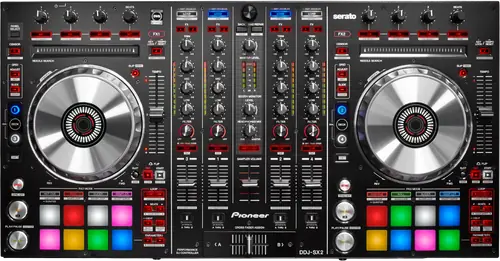
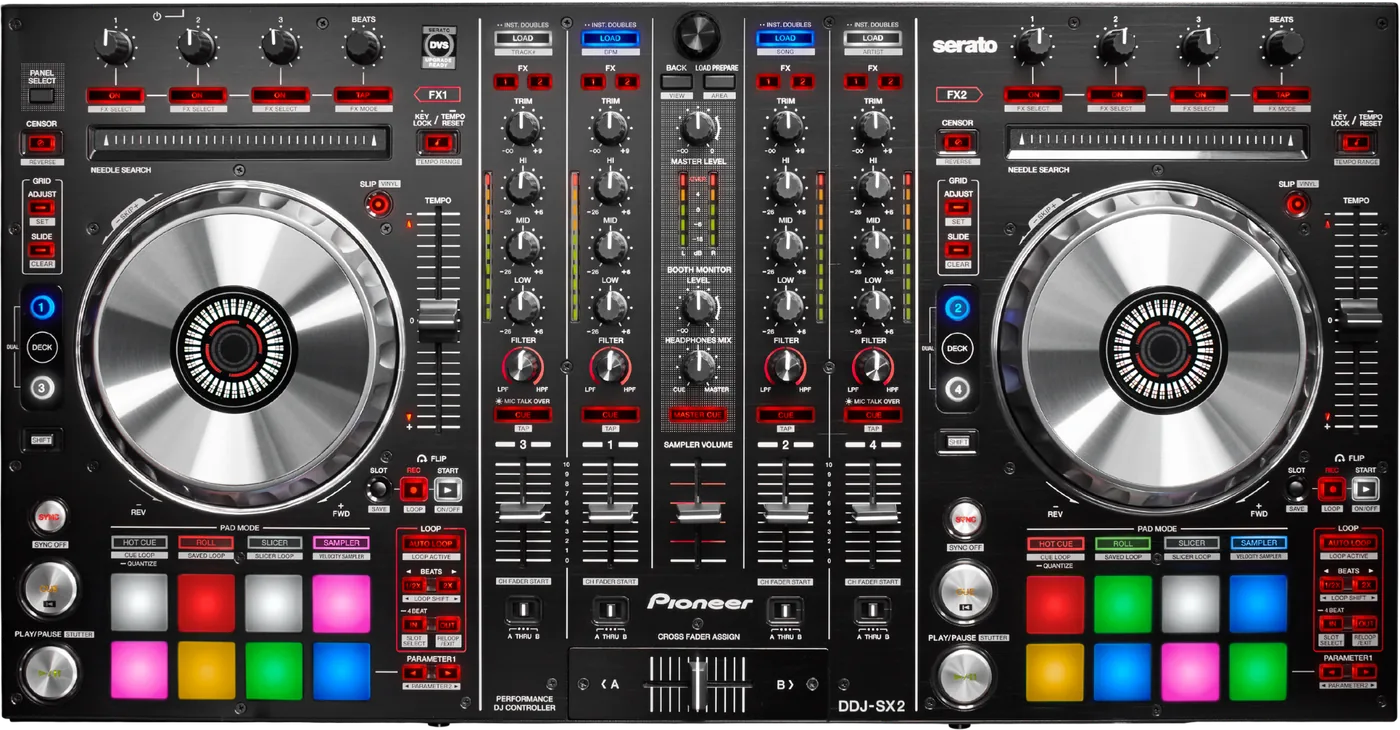
Booth briefing. The DDJ-SX2 is Pioneer's four channel Serato controller from 2014, the second of the SX line. It is a computer controller for Serato, and it is class compliant: on macOS there is no vendor driver because the Mac supplies its own, and on Windows a single driver, version 1.100 from 2016, does the job. AlphaTheta now list the unit as Archived, so it is a finished product in their catalogue rather than a current one.
When it goes wrong: The computer cannot see the controller No sound from the controller
Fast Lane
The five things that decide your gig
The five things on the DDJ-SX2 that change what happens next, if you are reading this in the booth. All five are explained in full further down this page.
There is no macOS driver to install, and that is by design.
AlphaTheta publish no macOS driver for this unit. Their Windows driver article states it plainly: "You don’t have to install this driver. Mac OS standard audio driver will be automatically installed when your DDJ is connected to your Mac with a USB cable." Serato corroborate it and name the model: "The Pioneer DDJ-SX2 is a class-compliant USB plug-and-play device."
So a Mac that will not pass audio is not a missing driver. Look at the USB port, the cable and the buffer size instead.
Whether it unlocks Serato DVS for nothing is disputed. Do not assume it does.
Two of the three sources say the DVS expansion pack must be bought separately: AlphaTheta call the unit "UPGRADE READY" and name the pack as a separate purchase, and Serato’s own hardware page says "To use this hardware with Serato Control Vinyl or Serato Control CDs, you will need the Serato DVS expansion pack." Serato’s quickstart guide says the opposite, that it "unlocks Serato DVS functionality when connected." None of the three pages carries a date. Do not travel to a timecode gig on the assumption that this unit unlocks DVS for nothing.
Quiet rather than silent is usually a setting in utilities mode.
AlphaTheta’s no sound article asks one question most people never think to ask: "Is the master output attenuator level set to -6 DB? Switch the master output attenuator level in the utilities mode." A unit that is quiet rather than silent is often this setting and not a fault.
It costs ten seconds to check and it is the first thing to rule out before you start swapping cables.
A jog wheel that will not scratch is usually VINYL mode, not a fault.
A user reported that two of the jog wheels "no longer scratch, stop or slow a track down" while playing but worked when stopped. A Pioneer DJ staff member replied that VINYL mode was off and the fix was to "press SHIFT + SLIP in order to toggle vinyl mode." The user confirmed that was it. This is a forum thread with a staff reply, not formal documentation, and it is recorded here because a dead jog wheel is the sort of thing that ends a set.
The Windows driver is from 2016 and names Windows 10. That is silence about Windows 11, not a refusal.
AlphaTheta name Windows 10, 8.1 and 7 on a driver article dated October 2016, before Windows 11 existed, so that list is silence rather than a denial. Serato list the same driver version as "DDJ-SX2 1.100 driver (compatible with Windows 10 & Windows 11)". Serato are not the driver’s author. Neither says the unit does not run on Windows 11.
If something goes wrong
No sound, or not enough of it
Check the attenuator first. AlphaTheta’s no sound article asks one question most people never think to ask: "Is the master output attenuator level set to -6 DB? Switch the master output attenuator level in the utilities mode." A unit that is quiet rather than silent is often this setting and not a fault.
Then the ordinary things, in AlphaTheta’s own order. Connect the cables properly, and clean the terminals and the plugs before you make the connection. Their no sound article says both in as many words, and a dirty plug on a DDJ-SX2 is not a theoretical problem.
If the sound is there but broken up. AlphaTheta’s guidance for clicks and dropouts is "Set the buffer size to the minimum value at which no interruptions in the sound occur." On a Mac that lives in SETUP inside Serato DJ; on Windows it is the [LAUNCH DRIVER PANEL] button on the Audio tab, which opens the ASIO settings utility.
And if it is noise rather than silence, their longer list is on a different article. The seven checks below come from AlphaTheta’s article on distortion, clicks and dropouts, not from the no sound one. Check the computer meets the requirements, connect the unit directly rather than through a USB hub, close other applications, turn off power saving, turn off wireless and Bluetooth, unplug other USB devices, and try a different USB port on the computer.
The jog wheels, and what people report about them
Short answer. A user reported that two of the jog wheels "no longer scratch, stop or slow a track down" while playing but worked when stopped. A Pioneer DJ staff member replied that VINYL mode was off and the fix was to "press SHIFT + SLIP in order to toggle vinyl mode." The user confirmed that was it. This is a forum thread with a staff reply, not formal documentation, and it is recorded here because a dead jog wheel is the sort of thing that ends a set.
Why this is worth its own section. A DDJ-SX2 jog wheel that spins freely while the track plays on regardless looks exactly like a dead sensor, and the difference between the two is one button combination. Rule the setting out before you conclude the hardware is gone.
The other jog complaint, and it is unresolved. Several users on Pioneer’s own forum report that the jog sensitivity adjustment appears to do nothing: the on screen indicator moves and the feel does not change. The main thread of that kind closed with no reply from the maker. Related threads exist and none of them records a resolution, so this site records the report and does not tell you what causes it.
A firmware update that got interrupted
Short answer. If the unit is turned off or the USB cable pulled during a firmware update, AlphaTheta’s documented recovery is to "Turn off the power, enter the update mode again, and then perform the update."
Why that is the whole answer. AlphaTheta’s recovery is to power the DDJ-SX2 off, put it back into update mode and run the update again. That is the documented remedy for an interrupted update, and it is worth trying before you go looking for a service centre.
Before you start one at all. Do it at home on mains power with nothing else plugged into the computer, and never on the afternoon of a gig.
What to watch for
Serato DVS, and the disagreement about it
Short answer. Two of the three sources say the DVS expansion pack must be bought separately: AlphaTheta call the unit "UPGRADE READY" and name the pack as a separate purchase, and Serato’s own hardware page says "To use this hardware with Serato Control Vinyl or Serato Control CDs, you will need the Serato DVS expansion pack." Serato’s quickstart guide says the opposite, that it "unlocks Serato DVS functionality when connected." None of the three pages carries a date. Do not travel to a timecode gig on the assumption that this unit unlocks DVS for nothing.
Why this page does not pick a side. None of the three DDJ-SX2 pages carries a date, so there is no way to say which statement is the current one. What is clear is the direction of the weight: the hardware maker sells the pack, and Serato’s own hardware page says you need it. The quickstart is the outlier.
What to do about it. Plug the unit in and open Serato DJ Pro at home, with time to spare, and see whether the DVS panel is there. That answers the question for your unit in a minute and no amount of reading will.
One known Serato issue that does not apply to this model
Short answer. Serato’s known issue about losing audio output on macOS when another application takes focus names thirteen Pioneer DJ units. The DDJ-SX2 is not one of them.
Why an absence is worth printing. That issue is widely discussed and the affected list is long enough that people assume every Pioneer unit is on it. This one is not, and knowing that stops you chasing a fix for a problem you do not have.
What the issue is, for context. Serato describe a loss of audio output on macOS when application focus moves to another program. It names thirteen units, including the DDJ-SR2, DDJ-SX3 and DDJ-SZ2, which is why the sibling pages on this site carry it and this one does not.
Compatibility
Drivers, and the one platform that needs one
macOS. AlphaTheta publish no macOS driver for this unit. Their Windows driver article states it plainly: "You don’t have to install this driver. Mac OS standard audio driver will be automatically installed when your DDJ is connected to your Mac with a USB cable." Serato corroborate it and name the model: "The Pioneer DDJ-SX2 is a class-compliant USB plug-and-play device."
What that is worth. There is no vendor macOS driver on this model that can go out of date, because there is no vendor macOS driver. What carries the audio on a Mac is Apple’s own class compliant driver.
Windows. Version 1.100, last updated 04/Oct/2016. AlphaTheta describe it as "Support for 64-bit version of Windows 10 / 8.1 / 7." There is no 32 bit build.
Do not read this across to the other Serato DDJs. The DDJ-SR2 requires a vendor driver on both macOS and Windows, and Serato say so in one sentence. Same range, three years apart, opposite answer.
Windows, and what the maker actually says
Short answer. AlphaTheta name Windows 10, 8.1 and 7 on a driver article dated October 2016, before Windows 11 existed, so that list is silence rather than a denial. Serato list the same driver version as "DDJ-SX2 1.100 driver (compatible with Windows 10 & Windows 11)". Serato are not the driver’s author. Neither says the unit does not run on Windows 11.
The version and the date. Version 1.100, last updated 04/Oct/2016. AlphaTheta describe it as "Support for 64-bit version of Windows 10 / 8.1 / 7." There is no 32 bit build.
What that means in practice. Nobody has published a statement that this unit does not run on Windows 11, and this site will not invent one. If you are on Windows 11 with this controller, the driver you want is the only one that exists.
macOS Tahoe, and where this unit sits
Short answer. Serato place the DDJ-SX2 in their "In testing" tier for macOS 26 Tahoe, which they describe as equipment "you should not currently update to macOS 26 Tahoe". Serato move units between tiers as testing finishes, so check their page before you update a Mac.
Read the tier for what it is. In testing is not the same as broken and it is not the same as supported. It means Serato have not finished checking this pairing, and their own advice for that tier is to wait.
Why there is no matching AlphaTheta statement. AlphaTheta publish no per model macOS support list for the DDJ-SX2 at all. There is a site wide compatibility list on one of their DDJ-SX2 articles and it is a site wide list, not a statement about this controller, so this page does not print it as one.
The date matters. Serato move hardware between tiers as testing finishes and their page carries no visible date. Check it yourself before you update a Mac you have to work on.
rekordbox, TRAKTOR and everything else
rekordbox. AlphaTheta host an article titled "DDJ-SX2 rekordbox" whose body makes no statement either way, so there is no per model statement to quote. What does exist is a list: on AlphaTheta’s rekordbox ver. 5 compatible units page the DDJ-SX2 appears in the Supported column of both the rekordbox dj row and the rekordbox dvs row. Supported is not the Bundled Licence column on that same page, which is where the DDJ-RZX and the DDJ-1000 sit, so being on the list does not mean a licence came with the hardware.
TRAKTOR. AlphaTheta state the DDJ-SX2 "supports the DJ Software TRAKTOR PRO 2 from Native Instruments", that "TRAKTOR PRO2 should be updated to Ver.2.6.8", and that the controller firmware must be "updated to ver. 1.03 or later". A setting file, version 1.00 dated October 8, 2014, has to be imported. No source names any TRAKTOR version above PRO 2.
And one side effect they document. AlphaTheta document one side effect and dismiss it: "Depending on your computer’s spec, the reaction of the [Preferences] window may get slow after importing the settings file", and "such behavior will not cause any problems with the application itself."
Features explained
Serato DJ Pro, Flip and the vouchers
The licence. AlphaTheta state "DDJ-SX2 users do not have to activate or buy Serato DJ Pro" and that "You can continue to use Serato DJ Pro for free." Serato list the unit as "Serato DJ Pro enabled".
Flip. AlphaTheta state that DDJ-SX2 purchasers can use Serato Flip features at no extra cost, and Pioneer shipped a Flip voucher at launch. Serato’s quickstart says Flip needs the expansion pack bought and activated. No source states whether the entitlement follows the hardware or the original voucher, and that is the question that decides it on a second hand unit. Nobody has answered it, so this page does not either.
Serato Video, and what it actually was. Both AlphaTheta and Pioneer describe a Serato Video Expansion Pack voucher given with the first ten thousand units shipped worldwide. That was a launch campaign with a unit count on it, not a feature of the hardware, and a unit bought second hand today has no claim on it.
DVS is the one to settle yourself. It has a section of its own, because the sources disagree.
Firmware, and the history that is gone
The version they publish today. Ver. 1.06 is the only version AlphaTheta still publish, and its single listed change is "FIXED - Multiple Channel Faders worked incorrectly when used at the same time."
Two dates, and this page prints both. AlphaTheta date Ver. 1.06 06/Feb/2020 and Pioneer DJ’s own news item dates the same version and the same fix 30 November, 2015. The two disagree and this site does not pick one.
Everything before it has been taken down. The change histories for Ver. 1.05 and earlier are no longer published anywhere retrievable. Pioneer’s change history and update guide PDFs now redirect to a generic AlphaTheta page.
Why that fix is worth reading twice. The one published fault AlphaTheta ever named on this controller was multiple channel faders behaving incorrectly when used at the same time. On a four channel controller that is the fault, not a fault. If you are buying one used, check the version before you buy.
Professional tips
Before you play on one
Check the firmware version before you buy a used one. The only published fix on this model is a channel fader bug, and it is the sort that shows up mid set.
Do not carry the wrong power supply. The DDJ-SX2 runs on DC 5 V. The DDJ-SR2 runs on DC 12 V. The two adapters are not interchangeable and swapping them is a plausible way to destroy a unit.
Settle the DVS question at home. Open Serato DJ Pro with the unit connected and look for the DVS panel. Do not find out in a booth with a bag of control vinyl.
Learn the VINYL mode toggle. SHIFT and SLIP. It is the difference between a jog wheel that scratches and one that appears to be dead.
Skip the USB hub. Direct connection to the computer, every time. It is on AlphaTheta’s own list for this model and it is the cheapest thing to get right.
Connections and setup
What goes in and what comes out
Inputs. It has two sets of RCA CD inputs, two sets of RCA PHONO/LINE inputs, a MIC1 on XLR or 6.3 mm jack and a MIC2 on 6.3 mm jack.
Outputs. MASTER OUT 1 on XLR, MASTER OUT 2 on RCA, a 6.3 mm BOOTH output, and 6.3 mm and 3.5 mm headphone outputs. The booth output and the 3.5 mm headphone jack are printed in the service manual and not in the Quick Start Guide, so they rest on one document rather than two.
To the computer. one USB type B port.
Power, and this is the one to get right. It runs from a DC 5 V, 3 A adapter whose AC side is rated 100 V to 240 V, 50 Hz/60 Hz at 800 mA. The DDJ-SX2 runs on DC 5 V. The DDJ-SR2 runs on DC 12 V. The two adapters are not interchangeable and swapping them is a plausible way to destroy a unit.
The physical facts. It measures 664 x 353.4 x 70.4 mm as width, then depth, then height, and weighs 5.8 kg. Its audio path is 44.1 kHz sampling rate, 24 bit A/D and D/A conversion, 20 Hz to 20 kHz.
Where these figures come from. Pioneer’s own Quick Start Guide and service manual, read on third party mirrors because AlphaTheta’s copies of both have gone. The two agree on every figure they both carry. Two output lines appear in the service manual only: the booth output and the 3.5 mm headphone jack.
Firmware, drivers and manuals
What the maker still publishes
Some of it is gone, and that is worth knowing before you go looking. Pioneer’s archived DDJ-SX2 support page now redirects to a generic AlphaTheta category rather than to anything about this model, and the firmware change history and update guide PDFs redirect away too. Three of the manual links AlphaTheta still list do not resolve.
What does still work is below. Go to AlphaTheta for the files themselves.
Official downloads and documents
Go to AlphaTheta for the files themselves. We link their pages instead of hosting a copy, because a manual copied here is a snapshot of release day and theirs is the one that stays current.
Firmware downloads. Official Pioneer DJ firmware page →
Manuals. Official Pioneer DJ manual page →
Broken link? Let us know and we'll fix it.
Frequently asked questions
Quick answers
- Do I need to install a driver on a Mac?
- No. AlphaTheta publish no macOS driver for this unit. Their Windows driver article states it plainly: "You don’t have to install this driver. Mac OS standard audio driver will be automatically installed when your DDJ is connected to your Mac with a USB cable." Serato corroborate it and name the model: "The Pioneer DDJ-SX2 is a class-compliant USB plug-and-play device."
- What is the Windows driver version?
- Version 1.100, last updated 04/Oct/2016. AlphaTheta describe it as "Support for 64-bit version of Windows 10 / 8.1 / 7." There is no 32 bit build.
- Does it work on Windows 11?
- AlphaTheta name Windows 10, 8.1 and 7 on a driver article dated October 2016, before Windows 11 existed, so that list is silence rather than a denial. Serato list the same driver version as "DDJ-SX2 1.100 driver (compatible with Windows 10 & Windows 11)". Serato are not the driver’s author. Neither says the unit does not run on Windows 11.
- Can I use it on macOS Tahoe?
- Serato place the DDJ-SX2 in their "In testing" tier for macOS 26 Tahoe, which they describe as equipment "you should not currently update to macOS 26 Tahoe". Serato move units between tiers as testing finishes, so check their page before you update a Mac.
- Do I get Serato DJ Pro for free?
- AlphaTheta state "DDJ-SX2 users do not have to activate or buy Serato DJ Pro" and that "You can continue to use Serato DJ Pro for free." Serato list the unit as "Serato DJ Pro enabled".
- Is Serato DVS included?
- Two of the three sources say the DVS expansion pack must be bought separately: AlphaTheta call the unit "UPGRADE READY" and name the pack as a separate purchase, and Serato’s own hardware page says "To use this hardware with Serato Control Vinyl or Serato Control CDs, you will need the Serato DVS expansion pack." Serato’s quickstart guide says the opposite, that it "unlocks Serato DVS functionality when connected." None of the three pages carries a date. Do not travel to a timecode gig on the assumption that this unit unlocks DVS for nothing.
- Is Serato Flip included?
- AlphaTheta state that DDJ-SX2 purchasers can use Serato Flip features at no extra cost, and Pioneer shipped a Flip voucher at launch. Serato’s quickstart says Flip needs the expansion pack bought and activated. No source states whether the entitlement follows the hardware or the original voucher, and that is the question that decides it on a second hand unit. Nobody has answered it, so this page does not either.
- Does it work with rekordbox?
- AlphaTheta host an article titled "DDJ-SX2 rekordbox" whose body makes no statement either way, so there is no per model statement to quote. What does exist is a list: on AlphaTheta’s rekordbox ver. 5 compatible units page the DDJ-SX2 appears in the Supported column of both the rekordbox dj row and the rekordbox dvs row. Supported is not the Bundled Licence column on that same page, which is where the DDJ-RZX and the DDJ-1000 sit, so being on the list does not mean a licence came with the hardware.
- Does it work with TRAKTOR?
- AlphaTheta state the DDJ-SX2 "supports the DJ Software TRAKTOR PRO 2 from Native Instruments", that "TRAKTOR PRO2 should be updated to Ver.2.6.8", and that the controller firmware must be "updated to ver. 1.03 or later". A setting file, version 1.00 dated October 8, 2014, has to be imported. No source names any TRAKTOR version above PRO 2.
- Which firmware version should it be on?
- Ver. 1.06 is the only version AlphaTheta still publish, and its single listed change is "FIXED - Multiple Channel Faders worked incorrectly when used at the same time." AlphaTheta date Ver. 1.06 06/Feb/2020 and Pioneer DJ’s own news item dates the same version and the same fix 30 November, 2015. The two disagree and this site does not pick one.
- Can I use the DDJ-SR2 power supply on it?
- No. The DDJ-SX2 runs on DC 5 V. The DDJ-SR2 runs on DC 12 V. The two adapters are not interchangeable and swapping them is a plausible way to destroy a unit.
- Is it discontinued?
- AlphaTheta’s Help Center product page carries an "Archived" designation. No source found uses the words discontinued or end of support for this model.
Playing soon and it is not working?
Start Emergency ModeKeep the Emergency Card
We will email you the printable PDF so it is on your phone before the next dark booth. Occasional notes that save gigs. No spam, unsubscribe in one click.
Registering is free and counts everywhere on Save My Gig. We send a confirmation email first. Your address is stored with Brevo, our email provider. Unsubscribe any time. Privacy
Sources: AlphaTheta's Help Center articles for the DDJ-SX2, Pioneer DJ's 2014 launch announcement, Serato's hardware and compatibility pages, and Pioneer's own Quick Start Guide and service manual read on third party mirrors, checked 10 September 2026. Specifications theirs, priorities ours.