

DDJ-SX, the field manual
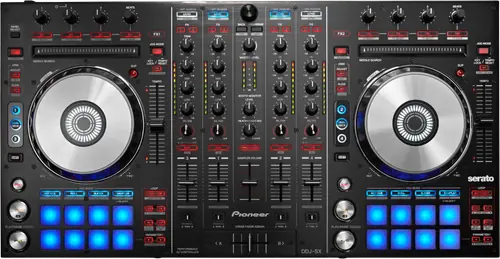
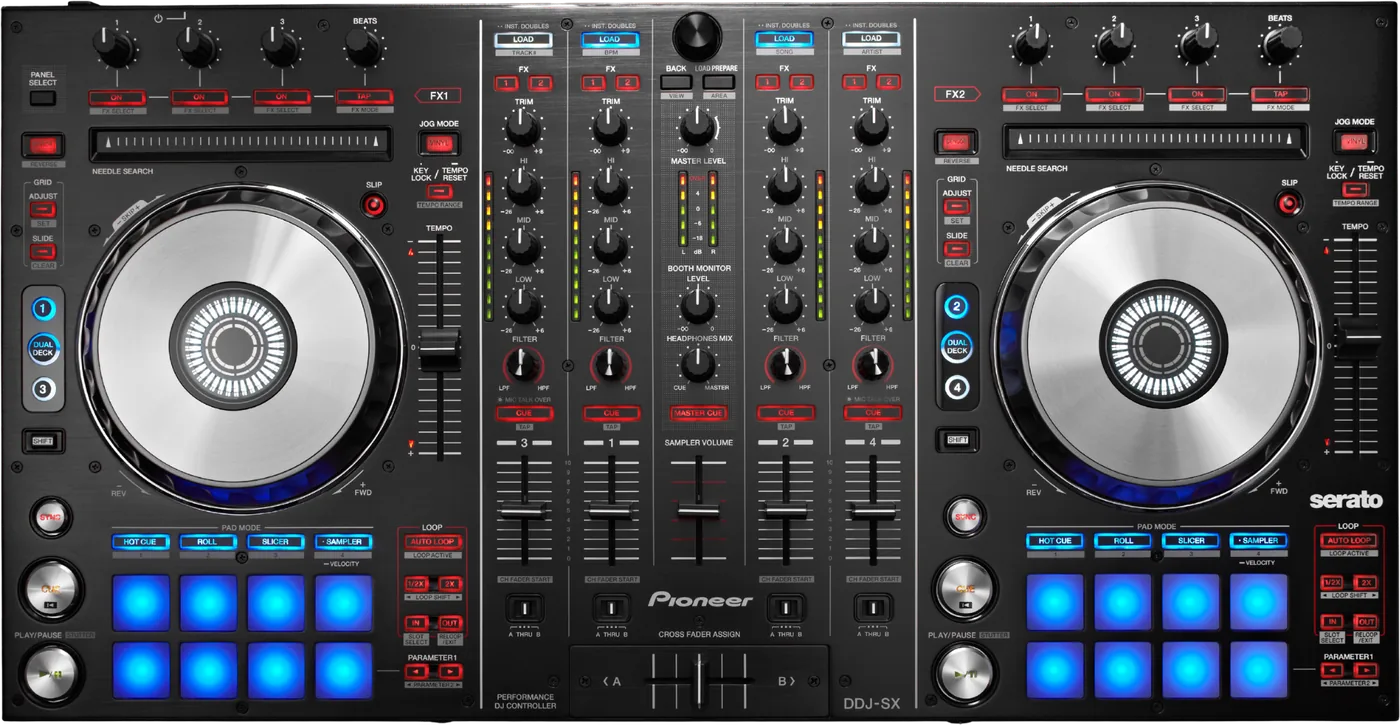
Booth briefing. The DDJ-SX is Pioneer's 2012 four channel Serato controller, the first of the SX line that the DDJ-SX2 and DDJ-SX3 followed. It is a computer controller for Serato, and on macOS it needs no driver at all and never did. It is not a DVS unit: Serato do not list it as timecode capable, unlike the SX2 and the SX3, so it is the model for a controller only rig rather than for timecode. Serato still keep it in their in testing tier for macOS Tahoe.
When it goes wrong: The computer cannot see the controller No sound from the controller
Fast Lane
The five things that decide your gig
The five things on the DDJ-SX that change what happens next, if you are reading this in the booth. All five are explained in full further down this page.
Serato do not list this one as DVS capable. The SX2 and SX3 they do.
Serato do not list the original DDJ-SX as DVS capable, and this is the trap in the range. Their own page of DVS capable hardware names the DDJ-SX2 and the DDJ-SX3 under paid upgrade, and the DDJ-SZ under hardware unlocked. The DDJ-SX with no suffix appears in neither list. Its Serato hardware page shows no DVS badge, its quickstart manual says nothing about DVS or control vinyl, and the archived Pioneer product page contains no sentence about vinyl control. That is an absence from a list rather than a printed denial, and it is the reason not to buy this model for timecode.
The firmware updater will not start without Java installed.
The firmware updater needs Java. AlphaTheta say it in one line: "Java is required to be installed on your computer before running the update file." On a modern Mac or PC with no Java runtime installed, that is why the update will not start, and it looks like a broken download rather than a missing dependency.
No macOS driver, and that is an advantage on a unit this old.
There is no macOS driver for the DDJ-SX and there never was one. AlphaTheta say it twice: the Windows driver article states "Mac OS users do not require manual driver installation", and their troubleshooting article repeats that Windows users must install the ASIO driver software and "Mac users do not need this". Nothing on the Mac side can go out of date, because nothing vendor written is in the path.
rekordbox works and it is a paid licence, not a bundle.
It does work with rekordbox, and it is a paid licence rather than a bundle. Pioneer's own archived product page: "You can use this product to control rekordbox dj software... Simply buy rekordbox dj, activate your licence key, and start DJing." On AlphaTheta's rekordbox ver. 5 compatible units list the DDJ-SX sits under rekordbox dj Supported, and it is absent from the rekordbox dvs row. That ver. 5 list is the highest numbered one it appears on: the DDJ-SX is not on the current rekordbox ver. 7 hardware unlock table, and nobody has published a statement that it was dropped.
No USB hub, ever. AlphaTheta say so in the manual.
AlphaTheta are explicit in the quickstart manual: "Connect this unit and the computer directly using the included USB cable. A USB hub cannot be used." The minimum environment requires USB 2.0, and the unit is not bus powered, so the adapter has to be in the bag.
If something goes wrong
When the computer will not see it
Short answer. AlphaTheta publish eight checks in their own order for a unit Serato DJ cannot see. Install the ASIO driver on Windows, and note Mac users do not need one. Verify the computer sees the controller with the DDJ Version Display Utility on Windows or System Profiler on a Mac. Use the included USB cable. Avoid USB hubs and use a port that supplies power. Close other programs, screen savers and resident software. Disconnect external drives and keyboards. Try another USB port. Then the sound settings: Control Panel on Windows, or on a Mac remove and re detect the device in Audio MIDI Setup.
The two that people skip. AlphaTheta are explicit in the quickstart manual: "Connect this unit and the computer directly using the included USB cable. A USB hub cannot be used." The minimum environment requires USB 2.0, and the unit is not bus powered, so the adapter has to be in the bag.
And the Mac specific one at the end of their list. Removing the DDJ-SX in Audio MIDI Setup and letting the system meet it again is the fix for a stale entry, and a stale entry looks exactly like a dead cable from where you are standing.
A firmware update that will not start
Short answer. The firmware updater needs Java. AlphaTheta say it in one line: "Java is required to be installed on your computer before running the update file." On a modern Mac or PC with no Java runtime installed, that is why the update will not start, and it looks like a broken download rather than a missing dependency.
Why it presents as something else. You download the DDJ-SX updater, you double click it, and nothing happens. No error, no window, no progress. The natural conclusion is a corrupt download, and the actual cause is that nothing on the machine can run the file.
Before you go any further. Ver. 1.07 is the last firmware and there has never been another. AlphaTheta say so directly: "If the firmware version of your unit is Ver.1.07, you don't need to update the firmware." Its change is "Optimized the jog platter sensitivity where the touch sensor level knob is close to max", and the document advises recalibrating the touch sensor levels afterwards. If your unit already reads 1.07 there is nothing to do and no reason to fight the updater at all.
Tracks that vanish, or files that will not edit
Short answer. Two library problems in the manual are settings rather than faults. Missing iTunes tracks means Library and Display is not enabled in the SETUP menu. Files that cannot be edited means Protect Library is on.
Why they are on a hardware page. From the booth both of these look like the DDJ-SX having lost your music, and both are settings in a menu.
The rest of the manual’s table. No sound means TRIM, the channel faders, the crossfader, the INPUT SELECT switch and MASTER LEVEL. Distorted sound means MASTER LEVEL and TRIM set so the orange indicators light at peak. Interrupted playback means the latency setting in the driver software.
What to watch for
DVS, and the list this model is not on
Short answer. Serato do not list the original DDJ-SX as DVS capable, and this is the trap in the range. Their own page of DVS capable hardware names the DDJ-SX2 and the DDJ-SX3 under paid upgrade, and the DDJ-SZ under hardware unlocked. The DDJ-SX with no suffix appears in neither list. Its Serato hardware page shows no DVS badge, its quickstart manual says nothing about DVS or control vinyl, and the archived Pioneer product page contains no sentence about vinyl control. That is an absence from a list rather than a printed denial, and it is the reason not to buy this model for timecode.
Why this is the thing to check before you buy. Three models in one range, near identical panels, and the two later ones are on Serato’s DVS list while the original is on neither of its two lists. A second hand listing that says DDJ-SX is telling you which one it is, and the difference is whether you can use control vinyl at all.
How to phrase it accurately. Serato do not list it. Nobody has published a sentence saying it cannot do DVS, and this site will not write one for them. What can be said is that the capability appears in none of the places it would appear if it existed.
And rekordbox agrees on its own side. On AlphaTheta’s rekordbox ver. 5 list the DDJ-SX is in the rekordbox dj row and absent from the rekordbox dvs row.
Firmware, and the dependency nobody expects
The dependency. The firmware updater needs Java. AlphaTheta say it in one line: "Java is required to be installed on your computer before running the update file." On a modern Mac or PC with no Java runtime installed, that is why the update will not start, and it looks like a broken download rather than a missing dependency.
Where it stands. Ver. 1.07 is the last firmware and there has never been another. AlphaTheta say so directly: "If the firmware version of your unit is Ver.1.07, you don't need to update the firmware." Its change is "Optimized the jog platter sensitivity where the touch sensor level knob is close to max", and the document advises recalibrating the touch sensor levels afterwards.
Two dates for the same version. The support page lists 1.07 with the date 06/Feb/2020 and the change history document dates the same version 13 May 2013. The 2013 date is contemporaneous with the release and the 2020 one is a re-posting date, and this page prints both rather than choosing.
The published history. Four versions in the published history. 1.07 of 13 May 2013 optimised jog platter sensitivity near maximum touch sensor level. 1.05 of 19 February 2013 enhanced pad behaviour in sampler velocity mode and reduced distortion from high microphone input levels. 1.02 of 4 December 2012 enabled scratching with vinyl mode disabled and audio stopped, and fixed a generic MIDI control issue. 1.01 of 1 November 2012 optimised the touch sensor sensitivity adjustment range and fixed a generic MIDI control issue.
One thing to do afterwards. The DDJ-SX change history advises recalibrating the touch sensor levels after updating, which matters because the update is about jog sensitivity in the first place.
Compatibility
Drivers, and the one platform that needs one
macOS. There is no macOS driver for the DDJ-SX and there never was one. AlphaTheta say it twice: the Windows driver article states "Mac OS users do not require manual driver installation", and their troubleshooting article repeats that Windows users must install the ASIO driver software and "Mac users do not need this". Nothing on the Mac side can go out of date, because nothing vendor written is in the path.
One thing to watch when you search. A search of AlphaTheta’s site for a DDJ-SX macOS audio driver returns the DDJ-SX3 article. That is a different model and it must not be applied to this one.
Windows. Version 1.100, 4 October 2016, and AlphaTheta name "64-bit version of Windows 10 / 8.1 / 7". Windows 10 is the highest Windows version named anywhere in their DDJ-SX material. Windows 11 is neither claimed nor excluded, it is simply unaddressed, and no 32 bit build is named.
And the line that decides whether to update a Mac. Serato place the DDJ-SX in their "In testing" tier for macOS 26 Tahoe, which they describe as equipment you should not currently update. That is a Serato tier rather than an AlphaTheta statement. The highest macOS AlphaTheta name anywhere alongside the DDJ-SX is Catalina, in the operating system block of its rekordbox article, and they publish no current macOS position for it, so Serato's tier is the only live guidance.
What that adds up to on an old machine. The Mac side has no vendor component that can rot, and the Windows side has one driver that has not moved since 2016. Neither is a moving target, which is unusual and worth something on a unit this age.
rekordbox, and what it costs on this unit
Short answer. It does work with rekordbox, and it is a paid licence rather than a bundle. Pioneer's own archived product page: "You can use this product to control rekordbox dj software... Simply buy rekordbox dj, activate your licence key, and start DJing." On AlphaTheta's rekordbox ver. 5 compatible units list the DDJ-SX sits under rekordbox dj Supported, and it is absent from the rekordbox dvs row. That ver. 5 list is the highest numbered one it appears on: the DDJ-SX is not on the current rekordbox ver. 7 hardware unlock table, and nobody has published a statement that it was dropped.
And what it cannot do. No source states that it works in rekordbox export mode or that it plays from a USB stick, and its specification lists no media slot of any kind. So there is nothing to play from and nothing published saying otherwise. It is a controller in performance mode.
Serato, for contrast. AlphaTheta: "Serato DJ Pro software is available free of charge" and "DDJ-SX users do not have to activate or buy Serato DJ Pro." Serato say the hardware unlocks Serato DJ Pro for free when plugged in, and that it also works with Serato Studio. Serato Flip and Pitch ’n Time DJ are each a separately sold expansion pack on this model. Nothing is bundled.
Features explained
Four channels, and what four channels means here
Short answer. Each of the four channels has an INPUT SELECT switch with positions for PC, PHONO, LINE and CD, so any channel can take a physical source instead of the software deck. That is what four channel operation actually means on this unit.
Why that is worth spelling out. A four channel controller can mean four software decks and nothing else. On this one every channel has a physical alternative, so a turntable, a CD player or a phone on the CD input can occupy a channel while the software runs the others.
What it still cannot do. No source states that it works in rekordbox export mode or that it plays from a USB stick, and its specification lists no media slot of any kind. So there is nothing to play from and nothing published saying otherwise. It is a controller in performance mode.
Professional tips
Before you play on one
Check the model number before you buy for timecode. Serato list the SX2 and SX3 as DVS capable and this one is on no DVS list at all.
Install Java before you try the firmware update. That is the whole reason the updater does nothing.
Read the version first. If it says 1.07 there is nothing to update and AlphaTheta say so themselves.
No hub, and bring the adapter. The manual forbids a USB hub and the unit is not bus powered.
Use the INPUT SELECT switches. Four channels that can each take a physical source is the part of this controller that ages best.
Connections and setup
What goes in and what comes out
Inputs. It has two sets of RCA CD inputs, two sets of RCA PHONO/LINE inputs, a MIC1 on XLR or 6.3 mm jack, a MIC2 on 6.3 mm jack and a signal ground post.
Outputs. MASTER OUT 1 on XLR, MASTER OUT 2 on RCA, a 6.3 mm TRS booth output, and 6.3 mm and 3.5 mm headphone outputs.
To the computer. one USB type B port. AlphaTheta are explicit in the quickstart manual: "Connect this unit and the computer directly using the included USB cable. A USB hub cannot be used." The minimum environment requires USB 2.0, and the unit is not bus powered, so the adapter has to be in the bag.
Power. It runs from a DC 5 V, 3 A adapter whose AC side is rated 100 V to 240 V, 50 Hz/60 Hz at 800 mA.
The physical facts. It measures 664 x 357 x 70.4 mm as width, then depth, then height, weighs 5.8 kg and is rated for +5 to +35 degrees C and 5 to 85 percent humidity with no condensation. Its audio path is 44.1 kHz with 24 bit A/D and D/A conversion, 20 Hz to 20 kHz, signal to noise ratios of 105 dB on USB, 95 dB on line, 92 dB on phono and 92 dB on the microphones, and total harmonic distortion of 0.003 percent on USB and 0.005 percent on line.
Firmware, drivers and manuals
What the maker still publishes
More than you would expect for a 2012 unit. The firmware article and its change history are live, the Windows driver is live, the Serato article is live, and there are dedicated TRAKTOR MIDI maps for both platforms.
What is dated rather than missing. The box shipped with a CD-ROM installation disc, and the manual is written for that era. Everything on it now comes off the download page instead.
Official downloads and documents
Go to AlphaTheta for the files themselves. We link their pages instead of hosting a copy, because a manual copied here is a snapshot of release day and theirs is the one that stays current.
Firmware downloads. Official Pioneer DJ firmware page →
Manuals. Official Pioneer DJ manual page →
Broken link? Let us know and we'll fix it.
Frequently asked questions
Quick answers
- Can I use it for Serato DVS?
- Serato do not list the original DDJ-SX as DVS capable, and this is the trap in the range. Their own page of DVS capable hardware names the DDJ-SX2 and the DDJ-SX3 under paid upgrade, and the DDJ-SZ under hardware unlocked. The DDJ-SX with no suffix appears in neither list. Its Serato hardware page shows no DVS badge, its quickstart manual says nothing about DVS or control vinyl, and the archived Pioneer product page contains no sentence about vinyl control. That is an absence from a list rather than a printed denial, and it is the reason not to buy this model for timecode.
- Does it work with rekordbox?
- It does work with rekordbox, and it is a paid licence rather than a bundle. Pioneer's own archived product page: "You can use this product to control rekordbox dj software... Simply buy rekordbox dj, activate your licence key, and start DJing." On AlphaTheta's rekordbox ver. 5 compatible units list the DDJ-SX sits under rekordbox dj Supported, and it is absent from the rekordbox dvs row. That ver. 5 list is the highest numbered one it appears on: the DDJ-SX is not on the current rekordbox ver. 7 hardware unlock table, and nobody has published a statement that it was dropped.
- Can it play from a USB stick?
- No source states that it works in rekordbox export mode or that it plays from a USB stick, and its specification lists no media slot of any kind. So there is nothing to play from and nothing published saying otherwise. It is a controller in performance mode.
- Do I get Serato DJ Pro for free?
- AlphaTheta: "Serato DJ Pro software is available free of charge" and "DDJ-SX users do not have to activate or buy Serato DJ Pro." Serato say the hardware unlocks Serato DJ Pro for free when plugged in, and that it also works with Serato Studio.
- Are Flip and Pitch n Time included?
- Serato Flip and Pitch ’n Time DJ are each a separately sold expansion pack on this model. Nothing is bundled.
- Do I need a Mac driver?
- No. There is no macOS driver for the DDJ-SX and there never was one. AlphaTheta say it twice: the Windows driver article states "Mac OS users do not require manual driver installation", and their troubleshooting article repeats that Windows users must install the ASIO driver software and "Mac users do not need this". Nothing on the Mac side can go out of date, because nothing vendor written is in the path.
- What is the Windows driver version?
- Version 1.100, 4 October 2016, and AlphaTheta name "64-bit version of Windows 10 / 8.1 / 7". Windows 10 is the highest Windows version named anywhere in their DDJ-SX material. Windows 11 is neither claimed nor excluded, it is simply unaddressed, and no 32 bit build is named.
- Can I use it on macOS Tahoe?
- Serato place the DDJ-SX in their "In testing" tier for macOS 26 Tahoe, which they describe as equipment you should not currently update. That is a Serato tier rather than an AlphaTheta statement. The highest macOS AlphaTheta name anywhere alongside the DDJ-SX is Catalina, in the operating system block of its rekordbox article, and they publish no current macOS position for it, so Serato's tier is the only live guidance.
- Which firmware version should it be on?
- Ver. 1.07 is the last firmware and there has never been another. AlphaTheta say so directly: "If the firmware version of your unit is Ver.1.07, you don't need to update the firmware." Its change is "Optimized the jog platter sensitivity where the touch sensor level knob is close to max", and the document advises recalibrating the touch sensor levels afterwards.
- The firmware updater does nothing when I run it.
- The firmware updater needs Java. AlphaTheta say it in one line: "Java is required to be installed on your computer before running the update file." On a modern Mac or PC with no Java runtime installed, that is why the update will not start, and it looks like a broken download rather than a missing dependency.
- Can I use a USB hub?
- No. AlphaTheta are explicit in the quickstart manual: "Connect this unit and the computer directly using the included USB cable. A USB hub cannot be used." The minimum environment requires USB 2.0, and the unit is not bus powered, so the adapter has to be in the bag.
- Can each channel take a turntable?
- Each of the four channels has an INPUT SELECT switch with positions for PC, PHONO, LINE and CD, so any channel can take a physical source instead of the software deck. That is what four channel operation actually means on this unit.
- iTunes tracks are missing from the library.
- Two library problems in the manual are settings rather than faults. Missing iTunes tracks means Library and Display is not enabled in the SETUP menu. Files that cannot be edited means Protect Library is on.
- Is it discontinued?
- AlphaTheta mark the Help Center product page "Archived", and Pioneer DJ serve their own product page from an archive path. Archived is their word and it is the only status word any maker source uses for this model, so this page says Archived and does not say discontinued.
Playing soon and it is not working?
Start Emergency ModeKeep the Emergency Card
We will email you the printable PDF so it is on your phone before the next dark booth. Occasional notes that save gigs. No spam, unsubscribe in one click.
Registering is free and counts everywhere on Save My Gig. We send a confirmation email first. Your address is stored with Brevo, our email provider. Unsubscribe any time. Privacy
Sources: AlphaTheta's Help Center articles for the DDJ-SX, the official firmware change history, Pioneer's Quick Start Guide DRH1193 and archived product page, Serato's hardware and DVS capability pages, AlphaTheta's rekordbox ver. 5 compatible units list, and the Operating Instructions read on a mirror, checked 10 September 2026. Specifications theirs, priorities ours.