

Mixtour Pro, the field manual
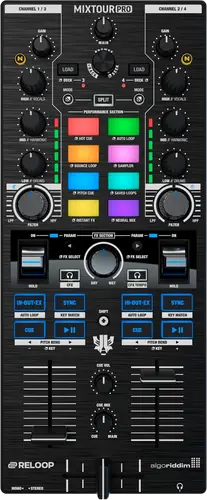
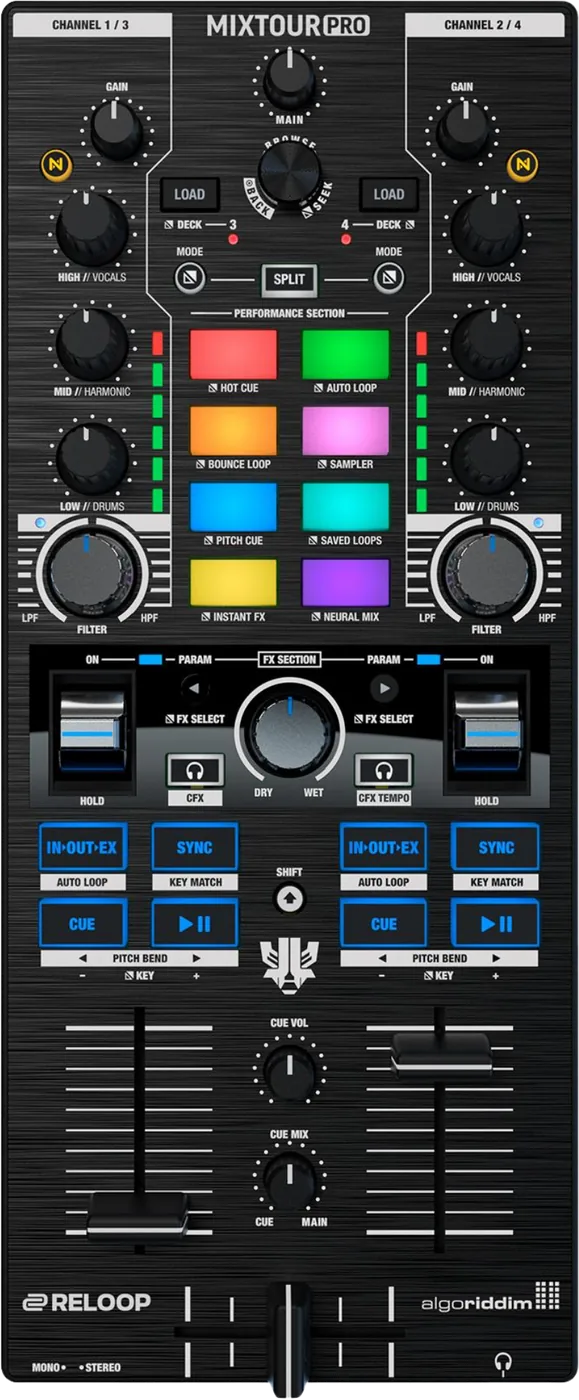
Booth briefing. The Reloop Mixtour Pro is a portable four deck controller for djay, with a built in sound card, an RCA master output, a headphone jack and no audio input of any kind, so everything you play comes from djay on the connected device. It is documented in English, German, French and Spanish editions and it carries firmware. The effects section has a dry/wet control and FX parameter buttons that act across both decks together. Portable here means the controller, its cable and the device running djay are the whole rig.
When it goes wrong: The computer cannot see the controller No sound from the controller
Fast Lane
The five things that decide your gig
The five things on the Mixtour Pro that change what happens next, if you are reading this in the booth. All five are explained in full further down this page.
The English connection instructions name the wrong ports. Follow them and your speakers go in the headphone jack.
The four language editions route the connections two different ways, so go by the parts list. That list is identical in all four languages and numbers 26 as headphones out, 27 as master out, 28 as the USB-C power delivery port and 29 as the USB-C charging and bus powering port. The German, French and Spanish editions match it: power adapter to 29, playback device to 28, speakers to 27. The English text sends the power supply to 28, the playback device to 27 and the speakers to 26, which taken literally would put the speakers in the headphone jack. Follow the parts list and the three editions that agree with it.
The correct arrangement, from the parts list and three of the four language editions: power adapter to the USB-C charging port, playback device to the USB-C power delivery port, speakers to the master RCA output.
There is firmware for this controller, and the manual never says so.
The manual contains no firmware section: no update procedure, no version number and no serial number condition. Reloop nevertheless publish a firmware update for this controller on its product page, v1.02, alongside two versions of a universal Windows ASIO driver. So there is firmware to apply and the document in the box does not tell you it exists, let alone how to apply it.
So the document in the box cannot tell you whether the unit in your bag is behind, and there is no version number printed anywhere in it to compare against.
Dry/wet and the FX parameter buttons are global. Setting up the incoming track changes the outgoing one.
The dry/wet control and the FX parameter buttons affect BOTH decks. Adjusting the wet amount for the incoming track changes it on the outgoing one at the same time.
That is a transition-shaped problem rather than a fault: the deck you are not listening to moves while you are preparing the one you are.
The FX paddle latches forward and springs back when retracted. One control, two opposite behaviours.
The FX paddle latches one way and springs back the other. Locked forward, the effect stays on until the paddle is returned to centre. Retracted, it lasts only as long as it is held and returns to centre on release.
Which direction you moved it in decides whether the effect is still running after you let go, and nothing on the panel reminds you which way you went.
Cue and Play carry a permanent key change under Mode and a temporary bend under Shift.
Cue and Play carry a permanent key change under the Mode button and a temporary pitch bend under Shift. Grabbing the wrong modifier transposes the track instead of nudging it. Shift plus Sync matches the musical key rather than the beat.
Two modifiers over the same two buttons, one of which transposes the track and one of which nudges it. Shift plus Sync belongs to the same family: it matches key, not beat.
If something goes wrong
Out of a cold van into a warm room
The Mixtour Pro is small enough to be carried in a rucksack rather than a flight case, so the temperature swing is bigger and faster than it is for a turntable, and the manual gives you no waiting time to plan around.
All five manuals forbid operating the unit after bringing it from a cold environment into a warm one, and require waiting until it reaches ambient temperature. None of the five states how long that takes, which is the one number a DJ loading in from a cold van actually needs.
What to watch for
Firmware exists, and the manual never mentions it
Every other Reloop manual in this set carries at least a version note or an update procedure, and the Mixtour Pro manual carries neither, so a reader has no way of knowing from the box that there is anything to check.
The manual contains no firmware section: no update procedure, no version number and no serial number condition. Reloop nevertheless publish a firmware update for this controller on its product page, v1.02, alongside two versions of a universal Windows ASIO driver. So there is firmware to apply and the document in the box does not tell you it exists, let alone how to apply it.
Numbering that runs one apart, and a Spanish page about another product
From item 10 onward the operation section headings are numbered one lower than the parts they describe, while the bracketed references inside the text stay correct. Two parallel numbering systems run one apart down the whole page, in every language.
So a heading number and a bracketed reference on the same page can point at two different controls, and the bracketed one is the reliable half.
The Spanish unpacking instruction tells the reader to remove the Keypad Pro from its packaging, which is a different Reloop product. The English correctly names the Mixtour Pro.
What the manual does not answer
The manual documents no operating mode other than with djay, and describes the unit as a USB sound card. It never says whether the Mixtour Pro produces audio without a host device, and never says it cannot. Neither claim can be made from this document.
This site therefore claims neither. If your gig depends on the unit playing without a host, that is a question for Reloop before the booking rather than a thing to discover at the venue.
The manual contains no troubleshooting section.
Several safety and warranty clauses present in all four other manuals are absent from this one, including the serial number warranty clause, the indoor application clause and the loudspeaker warm-up warning.
Compatibility
The sound card, the host, and the driver
A 4 output USB sound card with 24-bit D/A converters.
Reloop give no sample rate, and no bit depth for the input side. The 24-bit figure is quoted for the D/A converters only.
Reloop delegate the system requirements entirely to algoriddim.com and print none in the manual.
No macOS djay installation instructions are given, although Mac appears in the system requirements line. iPad and iPhone, Windows and Android each have one.
An ASIO driver for low latency is offered for Windows, and Reloop state it is optional and not required for operation. No latency figure is given.
Features explained
What it is, and why we have to say it ourselves
In practice it is a portable four deck controller that drives djay on iPadOS, iOS, Windows and Android, with a built in sound card and an RCA master output.
That sentence is ours, and it has to be, because of this: The English section of the manual never states what the product is. Its application in accordance with regulations section carries a single bullet and no product class sentence, unlike every other Reloop manual in this set. The nearest description anywhere in the document is the German section’s phrase Reloop Mixtour Pro Controller.
Worth naming rather than papering over. A manual that opens without a product class sentence leaves the reader assembling the answer from the connection diagram and the pad list, which is how people arrive at the wrong idea of what the unit does on its own.
The pads, the four decks and Neural Mix
Eight pad modes: hot cue, auto loop, bounce loop, sampler, pitch cue, saved loops, instant FX and Neural Mix.
The three band equaliser switches between conventional highs, mids and lows and djay’s Neural Mix elements of vocals, harmonic and drums.
A split button divides the eight pads so that the four on the left drive the left channel and the four on the right drive the right.
Holding the mode button while pressing the track load buttons switches to decks 3 and 4.
Dry/wet and the FX parameter buttons act on both decks
The dry/wet control and the FX parameter buttons affect BOTH decks. Adjusting the wet amount for the incoming track changes it on the outgoing one at the same time.
The practical consequence is that there is no such thing as preparing the effect on the incoming track in private. Whatever you set is already audible on the deck the room is listening to.
The filter is off at the 12 o’clock position, high pass clockwise and low pass anticlockwise, so a filter knob parked anywhere but dead centre is doing something.
The FX paddle, which latches one way and springs back the other
The FX paddle latches one way and springs back the other. Locked forward, the effect stays on until the paddle is returned to centre. Retracted, it lasts only as long as it is held and returns to centre on release.
One control with two opposite behaviours, chosen by the direction you moved it. If an effect is still running after you took your hand off, the paddle is locked forward and returning it to centre is what stops it.
Key change, pitch bend, and the two modifiers over the same buttons
Cue and Play carry a permanent key change under the Mode button and a temporary pitch bend under Shift. Grabbing the wrong modifier transposes the track instead of nudging it. Shift plus Sync matches the musical key rather than the beat.
So the recovery from a track drifting is Shift, and the deliberate musical move is Mode. Reaching for the wrong one in a hurry does not fail quietly: it changes the pitch of a record that is playing.
The shift chords that are not in the manual
Reloop publish a separate one page sheet of Laidback Luke signature features, revision 1.0, documenting shift chords that do not appear in the manual: track backspin on Shift and the FX pedal, loop half and loop double, loop in and out moves, tempo nudges in 0.1 BPM steps, moving a loop out point with the browse encoder, and two four-deck waveform view toggles.
Reloop publish an advanced mapping overview for this controller at its own address on reloop.com rather than in the manual.
Both are separate downloads. A reader working from the document in the box will not know that either exists, which is the same shape of problem as the firmware below.
Professional tips
The signature chords, written out
The combinations on that sheet, as Reloop print them: Shift and the FX pedal for a track backspin; Shift and the IN, OUT or EX button to halve a loop, with both modifiers for loop in and move; Shift and SYNC to double a loop, with both modifiers for loop out and move; both modifiers and CUE for tempo down and both modifiers and play or pause for tempo up, each in 0.1 BPM steps; the mode button and the browse encoder to move a loop out point while inside a loop; and the Neural Mix button with the first modifier to toggle four deck waveforms on channels 1 and 3 or the next view mode on channels 2 and 4.
Worth learning two or three rather than all of them. The tempo nudge and the loop halve and double are the ones that change what you can do in a mix; the rest are worth knowing exist.
Connections and setup
The English connection section names the wrong ports
The four language editions route the connections two different ways, so go by the parts list. That list is identical in all four languages and numbers 26 as headphones out, 27 as master out, 28 as the USB-C power delivery port and 29 as the USB-C charging and bus powering port. The German, French and Spanish editions match it: power adapter to 29, playback device to 28, speakers to 27. The English text sends the power supply to 28, the playback device to 27 and the speakers to 26, which taken literally would put the speakers in the headphone jack. Follow the parts list and the three editions that agree with it.
The correct arrangement, from the parts list and three of the four language editions: power adapter to the USB-C charging port, playback device to the USB-C power delivery port, speakers to the master RCA output.
This is the one place on this site where we tell you to ignore the English edition of a manufacturer's own document. The reason is the parts list: it is identical in all four languages, three of the four language editions match it, and only the English does not.
On four of these five models the English and the Spanish of the same manual give the same task in a different order. On two turntables the tone arm height procedure runs opposite ways: the English releases the ring lock before adjusting and the Spanish sets it, and the English order is the one that works on the hardware. On the Mixtour Pro it runs the other way round, and the Spanish, German and French editions are the ones that match the parts list.
Power, and the adapter that is not in the box
Minimum power USB-C DC in at 5 to 20 V and 20 W, with power delivery up to 45 W. No power adapter is included; the connection diagram labels it as not supplied.
The Mixtour Pro charges the connected playback device through itself, and Reloop require at least a 20 W supply to do it. It can alternatively be bus powered from a laptop or iPad with sufficient power output, and the manual never says in watts what sufficient means for that case.
Two things follow for a load in. You have to bring your own supply, and it has to be one you know the wattage of, because the unit is feeding the tablet or phone as well as itself.
What goes in, what comes out, and the figures as printed
None. The Mixtour Pro has no phono, line or microphone input of any kind, and the manual nowhere states this as a limitation.
Read that twice before a booking that involves a microphone or a guest with a record bag. There is nothing to plug either into, and the manual never frames it as a limitation, so nobody is going to warn you.
An unbalanced RCA master output and a 3.5 mm stereo headphone jack, plus the USB-C data port.
Reloop print the master RCA output as level 18 plus or minus 1 dBu, THD+N under 0.03 percent, S/N under minus 100 dB, frequency response plus or minus 2 dB over 20 Hz to 20 kHz and separation over 100 dB, and the headphone output at 32 ohms as level 4 plus or minus 1 dBu with the same distortion, noise and response figures.
Those figures are reproduced exactly as Reloop print them, and two of them carry their signs the other way round from the usual convention. A signal to noise ratio given as less than minus 100 dB reads inverted, and 18 dBu is a high figure for an unbalanced RCA master. This site prints manufacturer numbers as published rather than adjusting them.
The Spanish technical data block is printed in English, untranslated, with identical figures.
Firmware, drivers and manuals
Official downloads and documents
Go to Reloop for the files themselves. We link their pages instead of hosting a copy, because a manual copied here is a snapshot of release day and theirs is the one that stays current.
Manuals. Official Reloop manual page →
Broken link? Let us know and we'll fix it.
Frequently asked questions
How big is it, and what does it weigh?
129 x 310 x 51 mm, width by depth by height. 956 g
Minimum power USB-C DC in at 5 to 20 V and 20 W, with power delivery up to 45 W. No power adapter is included; the connection diagram labels it as not supplied.
What comes in the box?
A USB-C to USB-C cable and the instruction manual. No power adapter.
The Spanish unpacking instruction tells the reader to remove the Keypad Pro from its packaging, which is a different Reloop product. The English correctly names the Mixtour Pro.
Playing soon and it is not working?
Emergency Mode walks you through the checks in order, and it works with no signal once you have opened it.
Start Emergency ModeKeep the Emergency Card
We will email you the printable PDF so it is on your phone before the next dark booth. Occasional notes that save gigs. No spam, unsubscribe in one click.
Registering is free and counts everywhere on Save My Gig. We send a confirmation email first. Your address is stored with Brevo, our email provider. Unsubscribe any time. Privacy