

MP2015, the field manual
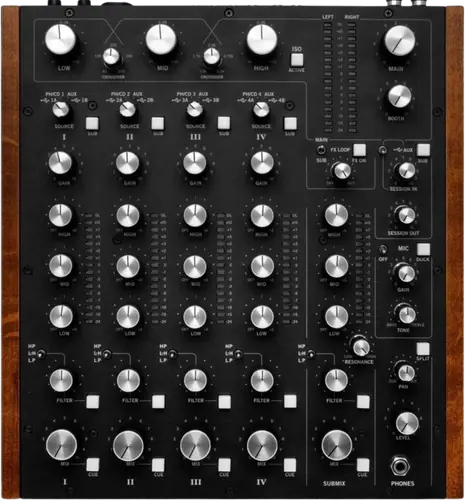
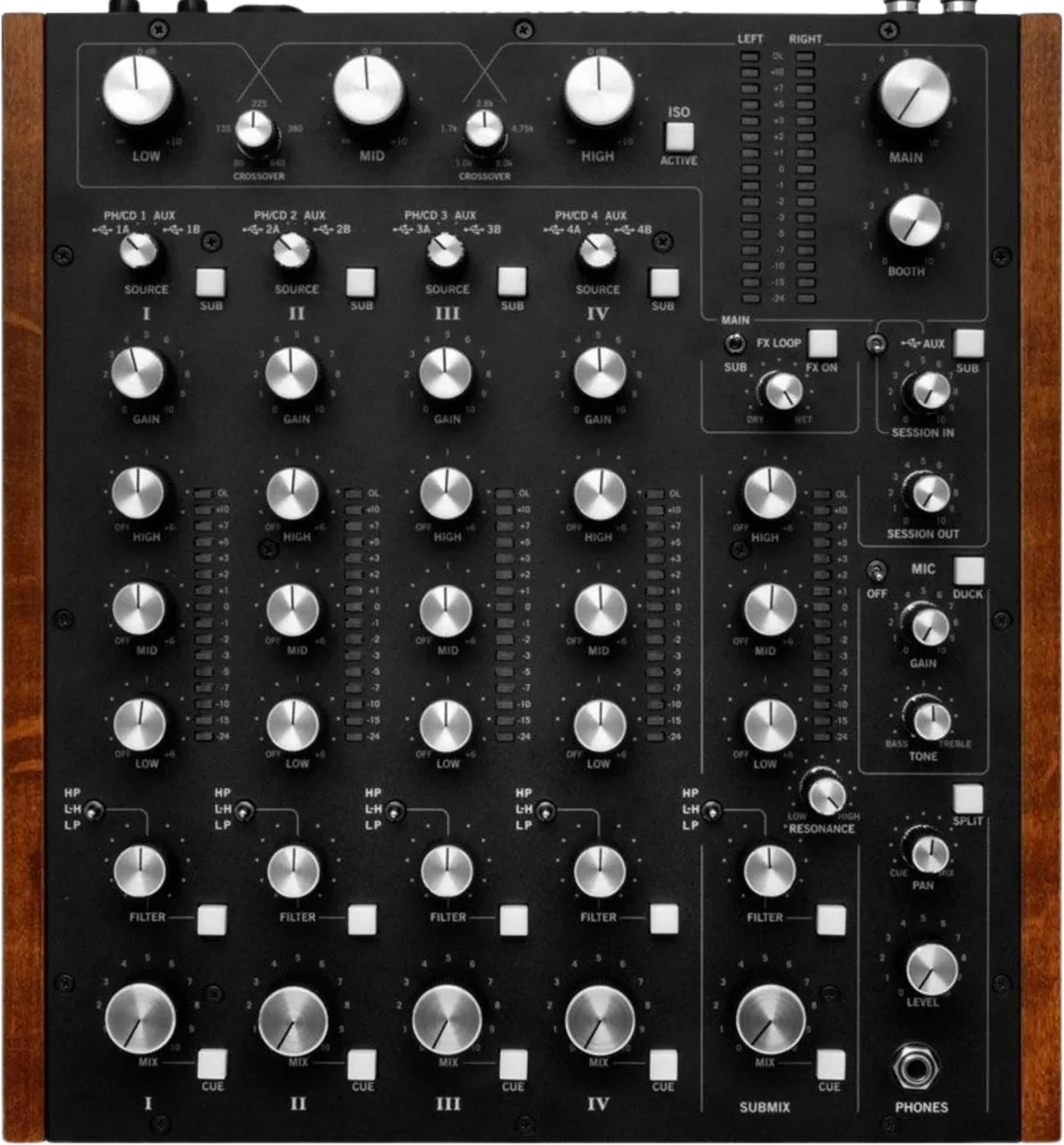
Booth briefing. The MP2015 is RANE's rotary club mixer, the 2015 step in a line their own white paper traces back to 1971. Rotary describes the controls, not the electronics: the signal path is digital. There is no crossfader anywhere in the manual. One Source Selector per deck picks between two computers, the rear phono or CD input and Aux, and the four channels feed a three band isolator with two crossover knobs on the top panel, plus a Submix that groups channels before the master.
When it goes wrong: No sound from the mixer
Fast Lane
The five things that decide your gig
The five things on the MP2015 that change what happens next, if you are reading this in the booth. All five are explained in full further down this page.
There is no crossfader, and no way to add one.
RANE's manual documents none anywhere, and the MIDI chart that lists every control on the top panel calls each channel level a Mix Level.
If your set is built on cuts, this is the wrong desk for it, and no amount of preparation changes that once you are behind it.
The Source Selector decides what each channel is listening to.
One knob per deck: USB A, PH/CD, AUX or USB B.
Set it wrong and the channel is silent, and nothing is broken. Check it before you check anything else.
Two computers stay connected at once, so the handover is a knob twist.
Two independent USB 2.0 ports, and Two computers connect at once, one per USB port, and a channel moves between them with one twist of its Source Selector.
Nothing is unplugged and no audio stops. Agree who is on port A and who is on port B before the next DJ is standing there.
The Submix is a fifth channel you build yourself.
Assign any combination of the four Deck inputs and the Session input, grouped onto one set of controls, with mix level, 3-band full-cut tone, a 16-segment meter, headphone cue and its own sweep filter.
It is the reason this desk handles four synced sources without four hands, and it is where the effects loop can be sent without touching the main mix.
One resonance control serves every filter on the mixer.
RANE state it plainly: "The Resonance control affects all Sweep Filters for Decks 1, 2, 3, 4 and the Submix."
So the resonance you set for a build on deck 2 is the resonance deck 4 and the Submix will have when you reach for them.
If something goes wrong
A channel is silent, or far too loud
Check the Source Selector first, every time. A silent channel on the MP2015 is a Source Selector pointed at an input with nothing on it far more often than it is a fault. Four positions, and only one of them is the one you meant.
Then the rear switch. PH, CD or SP for S/PDIF, set on rear panel slide switches, one per channel. A turntable on a CD setting is nearly inaudible. A line source on PH is distorted and far too loud, because the phono stage is adding RIAA +0.1/-0.2 dB, gain 31 dB at 1 kHz.
Then the effects loop. The FX ON button activates the effects loop when lit, receiving input from the FX RETURN jacks, and the WET / DRY control sets the ratio of FX to the mix. A MAIN / SUB switch decides what the loop processes, which RANE describe as choosing whether to add an effect to audio coming into the Submix or to the Main mix. So a lit FX ON with nothing plugged into the return, and the control turned toward WET, is a documented way to lose whichever of the two the switch is pointing at.
What to watch for
Firmware and known issues
Short answer. RANE document how to update this mixer and where to check, but publish no version list in the manual. The control panel shows the version installed, and enables an Update Firmware button only when the version on your computer is newer than the one in the mixer.
What that means in practice. There is no version threshold this page can tell you to sit above for the MP2015, because RANE publish no version list in the manual. This site will not invent one to fill the gap. What the manual does give you is where to look and how to check, which is the control panel on your own computer.
Do this. Open the control panel and read the version installed before a gig you care about, the same way you would on any other desk. If you find an official dated change history we have missed, tell us and it goes in.
Compatibility
Two computers, and handing over between them
Short answer. Two independent USB 2.0 ports, and each port carries 10 playback and 14 record channels. Two computers connect at once, one per USB port, and a channel moves between them with one twist of its Source Selector.
Why that is better than it sounds. On most desks a handover means one laptop coming out and another going in, with a gap in the middle. Here both are live at once, the incoming DJ takes a channel that is not playing, mixes in, and the outgoing DJ fades out. Nothing is unplugged while the room is listening.
Drivers. RANE's own sentence is "The USB ports are 100% class compliant, connecting to Mac OSX without the need for an additional driver." On the other side, a universal ASIO driver is provided for Windows, and RANE state the driver and its control panel require Windows 7-SP1, Windows 8 or 8.1. So a Mac is plug and play, a Windows machine is not, and the Windows versions RANE name stop where they stop. Worth knowing before you arrive rather than in the booth.
MIDI does not arrive switched on. Port MIDI Enable turns MIDI commands to and from the mixer controls on for the USB port you are looking at, and RANE state the default is off. It is set per port, so enabling it on your laptop does nothing for the DJ on the other one.
Your settings are not yours once you move desks. Settings are saved in the mixer rather than on your computer, and RANE warn what follows: when you connect to a different MP2015, that mixer's saved settings override your previous control panel settings. Exporting a settings file and importing it on arrival is the documented way round that.
What it can record, and what comes out of it
Short answer. Over USB you can capture the four decks, the Submix, the Session input and the main mix, all at once, on either port. The USB record channels are broadcast to both USB A and USB B at all times, so a computer on either port sees all seven stereo record feeds whatever the Source Selectors are doing.
What each deck records is a choice, and it is where DVS appears. The manual names no certified DJ software and no DVS partner for this mixer. Its one mention of DVS is a per-deck control panel setting: Phono / CD records the source before the Mix control and is what RANE point at for DVS applications, against the default of Deck Post, which records after the Mix control for multitrack.
Conversion. 24-bit at 44.1, 48 or 96 kHz, with 32-bit floating point processing, 116 dB A-weighted from digital or USB in to line out, and 113 dB line in to line out, and THD and noise of 0.0009%.
The outputs. MAIN on balanced XLR, BOOTH on balanced 1/4" TRS, SESSION on unbalanced RCA and on S/PDIF, each with its own level control, at 8 Vrms on the balanced outputs, 4 Vrms on the unbalanced. RANE note that "Main Out can be set to Stereo or Mono. The Booth and Session Outputs are always in stereo."
The level knobs only take away. RANE state that the Main, Booth and Session outputs have independent Level controls, and that their range is off to 0 dB. If the booth is quiet, the gain staging is upstream or downstream of this mixer, not on these three knobs.
The meter is a promise, not a suggestion. RANE put the meter to work as a guarantee: if the red overload LED is off, the mixer will not clip at any output level setting.
The cabling warning is theirs, not ours. "When using unbalanced 1/4" tip-sleeve cables from the Booth Outputs, or RCA cables from the analog Session Outputs, keep cables short, less than 3 meters (10 feet) to avoid hum and interference." Balanced XLR or 1/4" TRS runs further without trouble.
Features explained
No crossfader, and what is there instead
Short answer. The MP2015 has no crossfader. RANE's manual does not mention one anywhere, and the MIDI Control Change chart, which enumerates every control on the top panel, lists none: every channel level in it is called a Mix Level.
Why it matters. This is a club mixer for long blends, not a battle desk. A DJ who plans a set around cuts and reaches for a crossfader on instinct has a problem no soundcheck fixes. RANE's own white paper puts the unit in a rotary lineage rather than a scratch one, and titles itself "RANE'S MP2015 ROTARY MIXER TECHNOLOGY".
What replaces it. a 3-band full-cut EQ with two selectable crossover points, Linkwitz-Riley 2nd-order, and a 4th-order selectable low-pass, low/high-pass or high-pass sweep filter with mode, resonance and on/off. The mix happens on the EQ, the filter and the isolator, which is a different set of hands from a fader mix.
The Source Selector, and the switch behind it
Short answer. One Source Selector at the top of each of the four channels, with four positions: USB A, PH/CD, AUX or USB B.
The rear switch decides what PH/CD means. PH, CD or SP for S/PDIF, set on rear panel slide switches, one per channel. A turntable into a CD setting is almost inaudible; a line source into PH is distorted and far too loud. RANE's own advice for the ones you are not using is blunt: "Set unused inputs to CD."
The phono stage is real, and specified. RIAA +0.1/-0.2 dB, gain 31 dB at 1 kHz, with Butterworth 3rd-order infrasonic and 2nd-order low-pass filters, and a maximum phono input of 126 mV. Connect your turntable ground wires to the ground posts provided on the rear panel when using PH inputs.
The rear switch cannot be reached from a laptop. The rear PH, CD and S/PDIF switch is the mixer's to set. RANE say the control panel shows you the mode each of the four inputs is in, and that "This mode can only be changed on the mixer." So a DJ trying to fix a dead phono channel from the control panel is looking in the one place that cannot help.
Then set the level. The GAIN trim runs off to +15 dB with unity gain at 12 o'clock, and RANE's instruction for it is to get the signal into the yellow during peaks, and to prevent overload.
The Submix, and the effects loop that can be pointed at it
Short answer. The Submix takes any combination of the four Deck inputs and the Session input, grouped onto one set of controls. Channels assigned to it share mix level, 3-band full-cut tone, a 16-segment meter, headphone cue and its own sweep filter.
Why a DJ mixer has a bus at all. RANE's reasoning is about synced multi-source mixing: with three or four sources locked together, the Submix turns three or four sets of gain, EQ and filter moves into one. It is the feature that separates this desk from a four-channel mixer that happens to have four channels.
The effects loop is assignable. There is a stereo FlexFX send and return on unbalanced RCA, switchable between -10 and +4 on the rear panel, assignable to the Main Mix or to the Submix alone. The FX ON button activates the effects loop when lit, receiving input from the FX RETURN jacks, and the WET / DRY control sets the ratio of FX to the mix. A MAIN / SUB switch decides what the loop processes, which RANE describe as choosing whether to add an effect to audio coming into the Submix or to the Main mix. Pointing it at the Submix means an effect lands on the group you built rather than on the whole room.
The Session input can be the fifth. Unbalanced RCA, S/PDIF, or USB AUX playback channels 9-10, and assigned to the Submix it becomes a fifth input with its own tone and filter controls.
The sweep filter, the isolator, and the one shared control
Short answer. Each deck and the Submix get a 4th-order selectable low-pass, low/high-pass or high-pass sweep filter with mode, resonance and on/off. Across the master there is a 4th-order Linkwitz-Riley 3-band isolator with two crossover knobs on the top panel, low-mid adjustable from 80 Hz to 640 Hz and mid-high from 1 kHz to 8 kHz, running off to +10 dB with unity gain at 12 o'clock.
The detail that surprises people. Resonance is not per channel. RANE state it plainly: "The Resonance control affects all Sweep Filters for Decks 1, 2, 3, 4 and the Submix." So the resonance you set for a build on one deck is the resonance every other filter on the mixer will have when you reach for it.
Centre is flat, and that is the position to find in the dark. In the L-H position there is no effect at the centre, which is a flat response: turning counter-clockwise from centre brings in the low-pass and turning clockwise brings in the high-pass.
Two sets of crossover points, on two different surfaces. The EQ is a 3-band full-cut EQ with two selectable crossover points, Linkwitz-Riley 2nd-order, and those tone crossover points are a computer setting: The tone crossover points are the setting that lives in the computer control panel: 300 Hz and 3 kHz, or the default 150 Hz and 6 kHz, chosen per deck and again for the Submix. The isolator's crossovers are not. They are knobs you can reach: a 4th-order Linkwitz-Riley 3-band isolator with two crossover knobs on the top panel, low-mid adjustable from 80 Hz to 640 Hz and mid-high from 1 kHz to 8 kHz, running off to +10 dB with unity gain at 12 o'clock.
The microphone channel, and the switch that can kill a condenser
Short answer. The MP2015 has a combination XLR and 1/4" TRS jack switchable to LINE, MIC or +48 V phantom power, with level, one-knob tone, on/off and duck. The three-position switch is on the rear panel, so the level a microphone meets is decided behind the desk rather than in front of it.
Match the switch to the microphone before you open the channel. Line accepts the output of a wireless receiver, Mic suits a dynamic microphone, and +48 V phantom power is there for a condenser. Set that first, then set the level, and the guest MC is not the one who finds out it was wrong.
Duck is a real, specified amount. The Duck button momentarily ducks the other inputs by 10 dB, which RANE gloss as about a third. That is deep enough to talk over and shallow enough that the room knows the music is still running.
The recording does not have to carry the announcements. Mic Clean Feed, off by default, sends the microphone only to the Main Out and keeps it out of the USB main record, the Booth Out and the Session Out, which is how you record a set without the house announcements in it.
Cueing, and the one thing you will not hear
Short answer. The MP2015 gives you 3.5 mm and 1/4" jacks on the top plate and on the front panel, all carrying the same signal, with one Level control, one Cue and Main Pan, and a Split button.
How the Pan behaves depends on Split. With Split Cue off, the Pan control pans between stereo cue and the stereo main mix; with Split Cue on, it pans between mono cue in the left ear and mono main mix in the right. There are individual Cue buttons for decks 1 to 4 and the Submix, and more than one channel can be cued at once.
The isolator is not in your headphones. RANE add one note that catches people out: the Main Output Isolator is not heard in the headphones. So a master that sounds wrong in the room and right in the cans is the isolator doing exactly what it was told, and the fix is on the top plate rather than in the amplifier rack.
Professional tips
Before you play on one
Set unused channels to CD. It is RANE's own advice and it removes a whole class of surprise: a channel on PH with nothing connected is an input waiting to pick up noise.
Agree the ports out loud. Two laptops fit, so decide who is A and who is B before the handover rather than during it.
Set resonance once, deliberately. It is shared across every filter on the desk, so treat it as a desk setting rather than a per channel move.
Headphones. There are 3.5 mm and 1/4" jacks on the top plate and on the front panel, so you do not have to reach round the back in the dark.
Connections and setup
The outputs, and how far each one travels
Short answer. The MP2015 sends the same Main mix out of three places, each with its own level control, and they are not equally good over distance. MAIN is a pair of balanced XLR jacks. BOOTH is a pair of balanced quarter-inch TRS jacks. SESSION is a pair of unbalanced RCA jacks, and digitally on an S/PDIF RCA jack. RANE attach a distance rule to the unbalanced ones and it is specific rather than general: when using unbalanced quarter-inch tip-sleeve cables from the Booth outputs, or RCA cables from the analog Session outputs, keep the cables under three metres to avoid hum and interference, and use balanced TRS or XLR where the run is longer. So the cable you grab decides how far the booth feed can travel, and a long unbalanced booth run is a hum you brought with you.
The FX send level switch, and matching an outboard box
Short answer. The FX Loop send on an MP2015 has a level switch on the rear panel and it exists to match whatever you plug into it: SEND can be switched to -10 for unbalanced devices or +4 for balanced ones. The loop is the pairing of the FlexFX send output with the FX Return input, and the Main mix is what gets sent to the effects. A processor fed at the wrong one of those two settings comes back thin and noisy at -10 into a +4 box, or distorted the other way, and neither reads as a switch on the back of the mixer.
Cartridge level lives in the control panel, the input mode does not
Short answer. Cartridge level on an MP2015 is adjustable, and the adjustment is not on the mixer. RANE put a Phono Sensitivity control in the computer control panel to match source levels, which is how you bring a low-output cartridge up or a hot one down without living at the bottom of the GAIN trim. What the control panel cannot do is change the PH, CD or S/PDIF mode: RANE state that the panel shows the mode each of the four inputs is in and that this mode can only be changed on the mixer. So the two halves of a phono channel live in two different places, and knowing which is which is the difference between a fix and an hour.
Taking it abroad, and the cord that is all it needs
Short answer. The MP2015 travels better than most desks its size because of what is inside it: an internal universal switching power supply that runs on any AC mains from 100 to 240 volts, at 50 or 60 Hz, drawing 20 watts. RANE make the practical point themselves, that all that is required when travelling is the appropriate IEC line cord, available from a local electronics store. So an international booking needs a cord rather than a transformer, and the cord is the cheapest and most replaceable part of the rig. The mixer takes an IEC C5 line cord, which is the shape worth checking before you assume the spare in the bag fits.
Safety
Powering it, and the two warnings RANE print
The MP2015 has an order for switching on, and it is RANE's, not ours. RANE's advice on power is to connect everything else first: though this mixer has turn on and off muting, it is smart to leave the power unplugged until everything else is connected. Turn-on muting is a safety net for the moment you get it wrong, not a licence to cable a live desk.
The mains disconnect is the plug. The plug on the power cord is the AC mains disconnect device and must remain readily operable, so to disconnect the MP2015 from the mains completely you pull the power cord plug out of the AC receptacle. In a fixed installation that means the socket has to stay reachable, which is worth checking on a desk that has been built into a booth.
If you are recess-mounting it, the screw length is not a detail. RANE are blunt about the mounting ears: only use 6-32 x 3/8 screws, because longer screws will damage your mixer and void your warranty. The wood sides come off first, and the brackets take three screws a side.
Firmware, drivers and manuals
Official downloads and documents
Go to RANE for the files themselves. We link their pages instead of hosting a copy, because a manual copied here is a snapshot of release day and theirs is the one that stays current.
Manuals. Official RANE manual page →
Broken link? Let us know and we'll fix it.
Frequently asked questions
Quick answers
- Does the MP2015 have a crossfader?
- No, and there is no way to add one. RANE's manual documents none anywhere, including in the MIDI chart that lists every control on the unit.
- How many channels?
- 4 deck inputs, plus a Session input and a Submix that can act as a fifth.
- Can two DJs use it at once?
- Yes. Two independent USB 2.0 ports take one computer each, and a channel moves between them on its Source Selector.
- Do I need a driver?
- RANE state "The USB ports are 100% class compliant, connecting to Mac OSX without the need for an additional driver.", and a universal ASIO driver is provided for Windows, and RANE state the driver and its control panel require Windows 7-SP1, Windows 8 or 8.1.
- What can it record?
- Over USB, on either port: the four decks, the Submix, the Session input and the main mix, all at once.
- What are the outputs?
- MAIN on balanced XLR, BOOTH on balanced 1/4" TRS, SESSION on unbalanced RCA and on S/PDIF, at 8 Vrms on the balanced outputs, 4 Vrms on the unbalanced.
- Is there a known firmware issue?
- None is documented, and there is no threshold to sit above. RANE document how to update this mixer and where to check, but publish no version list in the manual. The control panel shows the version installed, and enables an Update Firmware button only when the version on your computer is newer than the one in the mixer.
- Does it need a computer?
- No. Four analogue deck inputs, a Session input, a microphone and every output work with nothing plugged into either USB port. Two settings do live on a computer: The tone crossover points are the setting that lives in the computer control panel: 300 Hz and 3 kHz, or the default 150 Hz and 6 kHz, chosen per deck and again for the Submix. Phono sensitivity is set there too. Everything else, the rear input switch included, is on the mixer.
- Can I use it for DVS?
- The manual names no certified DJ software and no DVS partner for this mixer. Its one mention of DVS is a per-deck control panel setting: Phono / CD records the source before the Mix control and is what RANE point at for DVS applications, against the default of Deck Post, which records after the Mix control for multitrack.
- Why is my MIDI mapping doing nothing?
- Port MIDI Enable turns MIDI commands to and from the mixer controls on for the USB port you are looking at, and RANE state the default is off.
- What does it weigh?
- 5.8 kg, at 35.5 cm x 33.3 cm x 8.3 cm. Power is 100 to 240 VAC, 50 or 60 Hz, 20 W maximum, so it travels anywhere with the right IEC cord.
Commonly paired with
What you usually find beside it in working booths, from club, festival and rental installs rather than from a manufacturer document.
Keep the Emergency Card
We will email you the printable PDF so it is on your phone before the next dark booth. Occasional notes that save gigs. No spam, unsubscribe in one click.
Registering is free and counts everywhere on Save My Gig. We send a confirmation email first. Your address is stored with Brevo, our email provider. Unsubscribe any time. Privacy
Sources: RANE's own MP2015 Mixer Manual, read in full, including its Technical Specifications, its Mounting Ears Accessory instructions and its MIDI Control Change chart, together with RANE's white paper "RANE'S MP2015 ROTARY MIXER TECHNOLOGY", checked 29 August 2026. Specifications theirs, priorities ours.