

euphonia, the field manual
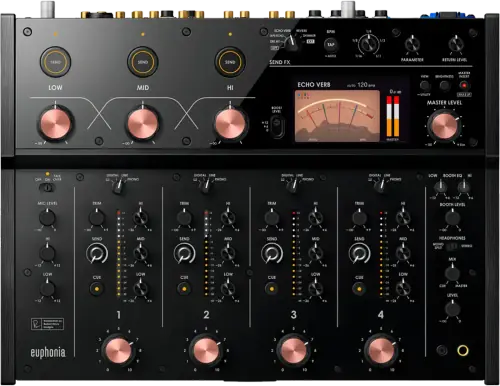
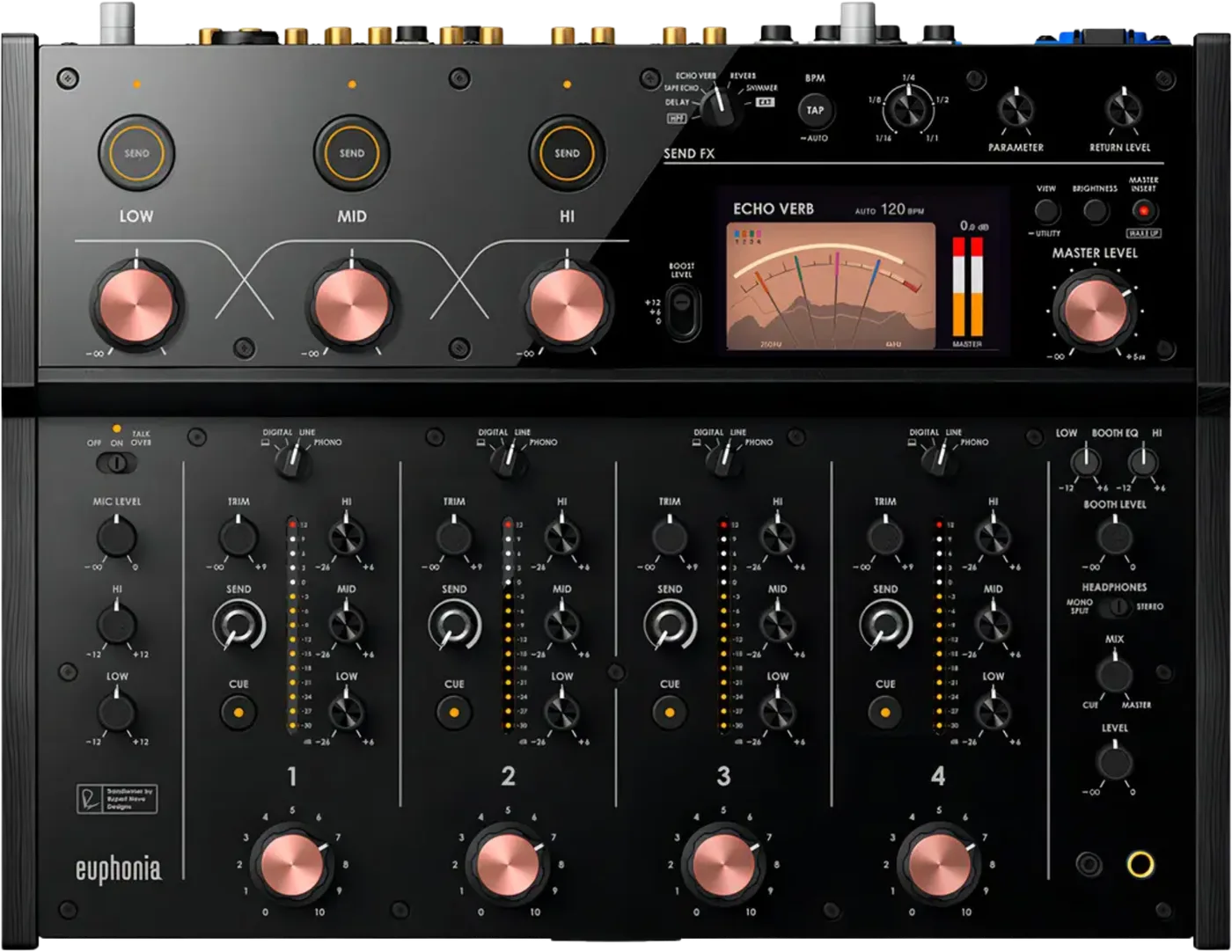
Booth briefing. The euphonia is AlphaTheta's 4 channel rotary mixer: the channel faders are knobs and there is no crossfader, so it is built for blending rather than cutting. Its master stage runs through a transformer circuit that AlphaTheta co-developed with Rupert Neve Designs, sitting in front of every output that carries the master. A Master Isolator works on the master bus, separate from the channel EQ, and the mixer carries a single USB-C port.
When it goes wrong: No sound from the mixer
Fast Lane
The five things that decide your gig
The five things on the euphonia that change what happens next, if you are reading this in the booth. All five are explained in full further down this page.
Rotary faders, and therefore no crossfader at all.
Each channel's level is a weighted knob. There is not even a channel fader curve to steepen, because there is no channel fader.
If cutting is central to your set, this is not your desk, and that is a question to ask when you take the booking rather than a discovery to make at load in.
The Master Isolator is not channel EQ. It acts on the room.
It sits where a DJ expects EQ to sit and it looks like EQ. On any DJM, three knobs in that region belong to a channel. Here they belong to the master output.
So a move that would have swapped the low end between two tracks removes the low end from both of them, and from everything else playing.
There is no PRO DJ LINK. That is a booking-stage fact.
AlphaTheta's own compatibility table lists the euphonia as no for Wi-Fi, no for USB and no for Ethernet, and the manual documents no LAN terminal at all.
Players cannot share a drive through this mixer, and track and BPM data do not cross it. A rig built around a shared USB has to be planned differently before anyone arrives.
One USB-C socket, so a laptop handover is physical.
One USB-C means one computer. It is not the only digital path in: four coaxial DIGITAL IN sockets take a player per channel.
A back to back where both DJs are on laptops is a cable swap between sets, not a switch, and that swap happens live. Agree who unplugs what before you start rather than negotiating it over a track.
Get an hour on a rotary before you play one.
Rotary is not an adjustment, it is a control you have not used. Everything else about this desk is learnable in soundcheck; the physical habit of levelling with a knob under pressure is not.
The first place most DJs discover that is in front of an audience who came for a listening room.
If something goes wrong
There is no crossfader, and the faders are knobs
Short answer. Correct, and nothing has been removed. The euphonia is a rotary mixer: each channel's level is a knob, and there is no crossfader at all.
Why this happens. Rotary is an older and different philosophy of mixing, built for long blends and level riding rather than cuts. It is the same family as the DJM-V5 and the DJM-V10-LF in what it will not let you do, and it goes further: there is not even a channel fader curve to steepen, because there is no channel fader.
Fix it now. Mix with what is there. Level with the knobs, shape with the channel controls, and let the Master Isolator carry the big moves. The high-pass filter is chosen on the SEND FX selector but acts per channel, so it IS the tool for pulling one track out of the way, and the per-channel SEND knob sets its cut-off frequency and PARAMETER sets resonance. What it costs you is the rest of the send section: Selecting HPF disables the SEND (LOW, MID, HI) buttons, the TIME knob and the RETURN LEVEL knob. If your set genuinely cannot survive without cutting, that conversation belongs with the technical manager before your first track, not during your third.
Avoid it next time. Ask which mixer is installed when you take the booking. On a rotary the answer changes how you prepare, not just what you expect.
The whole room changed when I touched one knob
Short answer. You are probably on the euphonia's Master Isolator, which is 3-band (low, mid, high) with Boost Send and a Boost Level of +12dB, +6dB or 0dB. It acts on the entire master output, not on one channel.
Why this happens. It sits where a DJ expects EQ to sit and it looks like EQ. On any DJM, three knobs in that region belong to a channel. Here they belong to the room, so a move that would have swapped the low end between two tracks removes the low end from both of them and from everything else playing.
Fix it now. Return the isolator to centre. If you are not certain which control you moved, centre the isolator first, because it is the one with the widest consequence.
Avoid it next time. Learn the isolator as a master effect rather than as EQ, and find it by feel in soundcheck. Note that Boost Send is part of it, with a Boost Level of +12dB, +6dB or 0dB, so it can add as well as remove.
A channel has no signal
Short answer. The usual order, with two extras on the euphonia: the send and return path, and the Master Insert.
Why this happens. The inputs are Digital (coaxial) x4, Line (RCA) x4, Phono (RCA) x4, Mic x1 (XLR / 1/4" TRS), so a channel can be selected to phono while you feed it a line source, or to the digital input while you feed it analogue. Beyond that, Send/Return plus a Master Insert means external gear can be sitting in either a single channel's path or across the entire master. A Master Insert with nothing returning takes the whole output with it, which reads as a dead desk rather than a dead channel.
Fix it now. Move the source to another channel to isolate it. If everything is silent rather than one channel, suspect the Master Insert before you suspect the mixer.
Avoid it next time. One routing pass before doors, including whatever the previous DJ left patched into send, return and insert.
For no sound or a level that is too low, AlphaTheta ask you to check the input selector switch first, then every cable, then to wipe dust off the terminals and plugs before reconnecting, and finally to look at MASTER ATT. in the utility settings. The selector is the one that catches people on this desk, because each channel can be sitting on digital, line or phono while you feed it something else.
The sound is distorting
On the euphonia distortion is a level decision, and the target on the channel side is a single indicator segment.
For a distorted master, set the MASTER LEVEL knob so the screen reads a peak around 0.0 dB and, if it still distorts, move MASTER ATT. in the utility settings to between minus 3 and minus 12 dB. For a distorted channel, the TRIM knob is the control, and the target is simple: the plus 12 dB segment of the channel level indicator should not light at all.
The external effects are not coming through
The euphonia has two separate external loops, and knowing which one you are in decides which knob is the answer.
The euphonia has two separate external loops and they fail differently. For SEND FX, check the SEND knob, check the external unit is on the SEND FX EXTERNAL SEND and RETURN terminals, and make sure the SEND FX selector is not sitting on HPF, because the SEND button does nothing there. If the effect is running but never reaches the room, the RETURN LEVEL knob is the one. For Master Insert, check the external unit is on the MASTER INSERT SEND and RETURN terminals, check its own output level, and check that the MASTER INSERT button is blinking, because blinking is how this desk says the insert is switched on.
The desk looks dead before doors
On the euphonia this is the failure most likely to make somebody call a technician who is not needed.
Power Management is on by default and puts the unit into Off mode after 20 minutes with no audio input. The give away is that the MASTER INSERT button lights up, and that same button is what wakes it: AlphaTheta label it MASTER INSERT/(WAKE UP) for exactly this reason. A euphonia that looks dead in a quiet booth before doors is almost always asleep rather than broken, and the button that fixes it is not the one anybody would guess.
What to watch for
Documented fixes, by firmware version
Short answer. There are none published, and that is the honest answer. AlphaTheta has released no firmware change history for the euphonia, checked 8 September 2026, so there is no documented fault to report and no version threshold to sit above.
Why we say so instead of leaving the section out. The CDJ-2000NXS page on this site lists sixteen versions of documented faults because the manufacturer published them. An empty section here is information: it says nobody has published a known problem, and it says this page is not filling a template with guesses.
One thing that is settled, and worth saying plainly. The euphonia does not support PRO DJ LINK. AlphaTheta's own compatibility table lists it as no for Wi-Fi, no for USB and no for Ethernet, and it is the only unit in that table unsupported on every connection. The manual documents no LAN terminal either. If your rig depends on Link, this mixer is not part of that plan, and that is a booking-stage fact rather than a soundcheck one.
Official documentation. AlphaTheta product page →
Launch article →
Found a change history we have missed? Tell us and we will add it.
Compatibility
What it works with, and what it will not join
Software. rekordbox and Serato DJ Pro, with DVS supported, over the single USB-C. Windows and macOS both connect to that one port. It is the only digital path for a computer, but not the only digital input: four coaxial DIGITAL IN sockets take a player per channel, chosen on the channel input selector.
PRO DJ LINK: no, and this is the booking-stage fact. AlphaTheta's own compatibility table lists the euphonia as no for Wi-Fi, no for USB and no for Ethernet, and the manual documents no LAN terminal at all. So players cannot share a drive through this mixer, track and BPM data does not reach it, and a rig designed around Link does not include this desk. If the booth spec assumes Link, raise it before the gig rather than at soundcheck.
What it expects instead. Four channels of analogue sources, with four phono inputs, which is a desk built for turntables in the plural and for players feeding it as audio rather than as a network. That is a design position, not a shortcoming, and it is why the outboard tends to be patched once and left on a resident rig.
The one computer limit. One USB-C is one computer, so a back to back between two laptop DJs is a physical cable swap mid-changeover. Agree who unplugs what before the first track rather than during it.
Features explained
Rotary faders, in practice
Short answer. 4 channels, each levelled with a weighted knob rather than a line fader.
Why it matters. A line fader is a single gesture you can make without looking. A rotary is a continuous adjustment you hold, which changes how you think about a transition: you are riding two levels against each other for the length of the blend rather than travelling from one to the other. DJs who have worked rotaries describe it as slower and more musical. DJs who have not usually find their first hour clumsy.
When professionals use it. Long form, house, disco, dub, anything where the mix is the performance rather than the cut. This is why rotary desks are installed in listening rooms and why they are unusual on a festival stage.
Common mistakes. Treating your first rotary set as a normal set on unfamiliar gear. Book an hour on one before you play one if you possibly can, and if you cannot, arrive early and practise the transition you rely on most.
The Rupert Neve master transformer
Short answer. The euphonia has a master transformer circuit AlphaTheta co-developed with Rupert Neve Designs, and every output carrying the master signal sits after it. Concretely: MASTER, BOOTH and REC OUT, the USB record feeds and the master cue in the headphones are all downstream of it, per the block diagram on page 55 of the instruction manual.
The conversion, exactly as AlphaTheta specify it. 96 kHz sampling, and 32-bit on the channel input A/D and on the master, booth and master-insert send D/A, 24-bit on everything else. The 32-bit figure is not blanket: it applies where the signal enters and where it leaves for the room, and the rest of the unit converts at 24-bit.
Why it matters. It is the reason the mixer exists and the reason it costs what it costs. Practically, it means the master path has a character of its own that is always present: you are not hearing your channels summed neutrally, you are hearing them through a circuit chosen for how it colours them.
When professionals use it. Always, because it is not switchable in the way an effect is. What professionals adjust is what they send into it, and the honest advice is to arrive with your levels conservative and let the master do its work rather than pushing into it and hoping.
Common mistakes. Assuming a premium master stage forgives a hot channel. It does not fix gain staging, it just makes bad gain staging sound expensive.
The Master Isolator, Boost and the send effects
Short answer. The isolator is 3-band (low, mid, high) with Boost Send and a Boost Level of +12dB, +6dB or 0dB. The built-in send effects are Delay, Tape Echo, Echo Verb, Reverb, Shimmer, HPF. The HPF sits on the same selector but it is not a send effect: AlphaTheta write "HPF is applied to each channel when [HPF] is selected with the SEND FX selector switch.", and the per-channel SEND knob sets its cut-off frequency and PARAMETER sets resonance.
Boost Send only sends while you are boosting. This is the part that catches people. AlphaTheta's condition is that "The corresponding [LOW], [MID], [HI] knobs for Master Isolator are set to the right of the center position." So a band is only sent to the effect while it is being boosted, above the centre detent, never while it is being cut. Cutting a band and expecting to hear it arrive in the effect is a move that does not exist on this desk.
Why it matters. Isolator plus Boost Send is the mixer's main performance gesture: you can lift a band out of the room and feed that band into an effect at the same time. That is a very large move, and on a big system it is the difference between a moment and a mistake.
When professionals use it. On the transition, not continuously, and rehearsed. The send effects are chosen for space and time rather than mangling, which tells you what the desk expects of you.
Common mistakes. Using the isolator as channel EQ, which is the single most common euphonia error. Leaving Boost Level somewhere the previous DJ set it, and discovering it on your first big move.
Professional tips
Get an hour on a rotary before you play one
Short answer. Rotary is not an adjustment, it is a control you have not used. Sixty minutes of practice removes almost all of the risk.
Why it matters. Everything else about this desk is learnable in soundcheck. The physical habit of levelling with a knob under pressure is not, and the first place most DJs discover that is in front of an audience who came for a listening room.
Do this. Ask which mixer is installed when you take the booking. If it is a rotary, find one: a shop, a studio, a friend's setup, or arrive two hours early. Practise the one transition you rely on most, then practise recovering from getting it wrong.
Connections and setup
Connections, and the single USB-C
Short answer. Inputs Digital (coaxial) x4, Line (RCA) x4, Phono (RCA) x4, Mic x1 (XLR / 1/4" TRS). Outputs Master (XLR), Booth (1/4" TRS), REC (RCA), Phones (1/4" and 3.5mm). USB Type-C x1. Software: rekordbox and Serato DJ Pro, with DVS supported.
Why it matters. One USB-C means one computer. A back to back where both DJs are on laptops is a physical cable swap between sets, not a switch, and that swap happens live. It is worth agreeing who unplugs what before you start rather than negotiating it over a track.
When professionals use it. Resident rigs where the outboard is patched once and left. Four phono inputs means this desk expects turntables, plural.
Common mistakes. Planning a laptop handover as if there were two sound cards. Arriving without knowing whether the venue has the cable you need.
Plugging in a computer, and the half Windows has to install
On the euphonia there is one USB-C port, so the computer question is settled per laptop rather than per booth.
AlphaTheta split the computer software by platform. Install the dedicated software on Windows and you get both the Setting Utility and the audio driver; on a Mac only the Setting Utility installs, because the operating system supplies the driver. With a single USB-C port on the desk, that install is a per laptop job and it is not something to discover during a changeover.
Firmware, drivers and manuals
Official downloads and documents
Go to AlphaTheta for the files themselves. We link their pages instead of hosting a copy, because a manual copied here is a snapshot of release day and theirs is the one that stays current. Their euphonia support page carries manuals, software information and drivers, and no firmware section at all.
Manuals. Official AlphaTheta manual page →
Broken link? Let us know and we'll fix it.
Frequently asked questions
Quick answers
- Does the euphonia have a crossfader?
- No. It is a rotary mixer, so channel levels are knobs and there is no crossfader.
- Can I scratch on it?
- Not in the usual sense. If cutting is central to your set, ask which mixer is installed before accepting the booking.
- How many channels?
- 4, with four phono and four line inputs.
- Does it support PRO DJ LINK?
- No. AlphaTheta's compatibility table lists the euphonia as no for Wi-Fi, no for USB and no for Ethernet, and the manual documents no LAN terminal.
- What is the transformer?
- In AlphaTheta's own words, "the transformer that we co-developed with Rupert Neve Designs". MASTER, BOOTH and REC OUT, the USB record feeds and the master cue in the headphones are all downstream of it, per the block diagram on page 55 of the instruction manual.
- Is the Master Isolator the same as channel EQ?
- No, and confusing the two is the most common mistake on this desk. The isolator acts on the whole master output.
- What effects are built in?
- Delay, Tape Echo, Echo Verb, Reverb, Shimmer, HPF. The HPF is chosen on the SEND FX selector and applied per channel: "HPF is applied to each channel when [HPF] is selected with the SEND FX selector switch." Send/Return plus a Master Insert handles outboard.
- Can two laptops share it?
- Not simultaneously. USB Type-C x1, so a laptop handover is a cable swap.
- Does it work with rekordbox and Serato?
- Yes, rekordbox and Serato DJ Pro, with DVS supported.
- Are there known firmware bugs?
- None published. AlphaTheta has released no firmware change history for this mixer. They do publish change histories for the macOS Setting Utility and the Windows audio driver, both starting at their March 2024 release, so a booth laptop has versions you can check even though the mixer itself has none.
Playing soon and it is not working?
Start Emergency ModeKeep the Emergency Card
We will email you the printable PDF so it is on your phone before the next dark booth. Occasional notes that save gigs. No spam, unsubscribe in one click.
Registering is free and counts everywhere on Save My Gig. We send a confirmation email first. Your address is stored with Brevo, our email provider. Unsubscribe any time. Privacy
Sources: AlphaTheta's official euphonia product page and launch article, checked 8 September 2026. Specifications theirs, priorities ours.