

CDJ-2000, the field manual
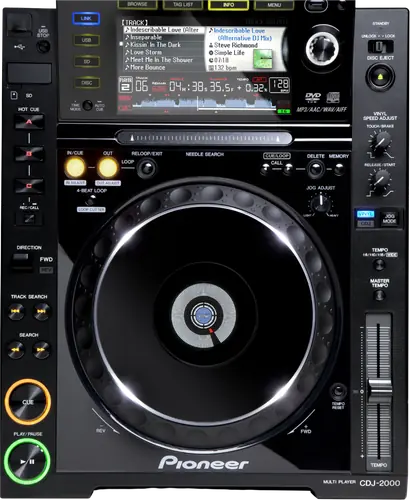
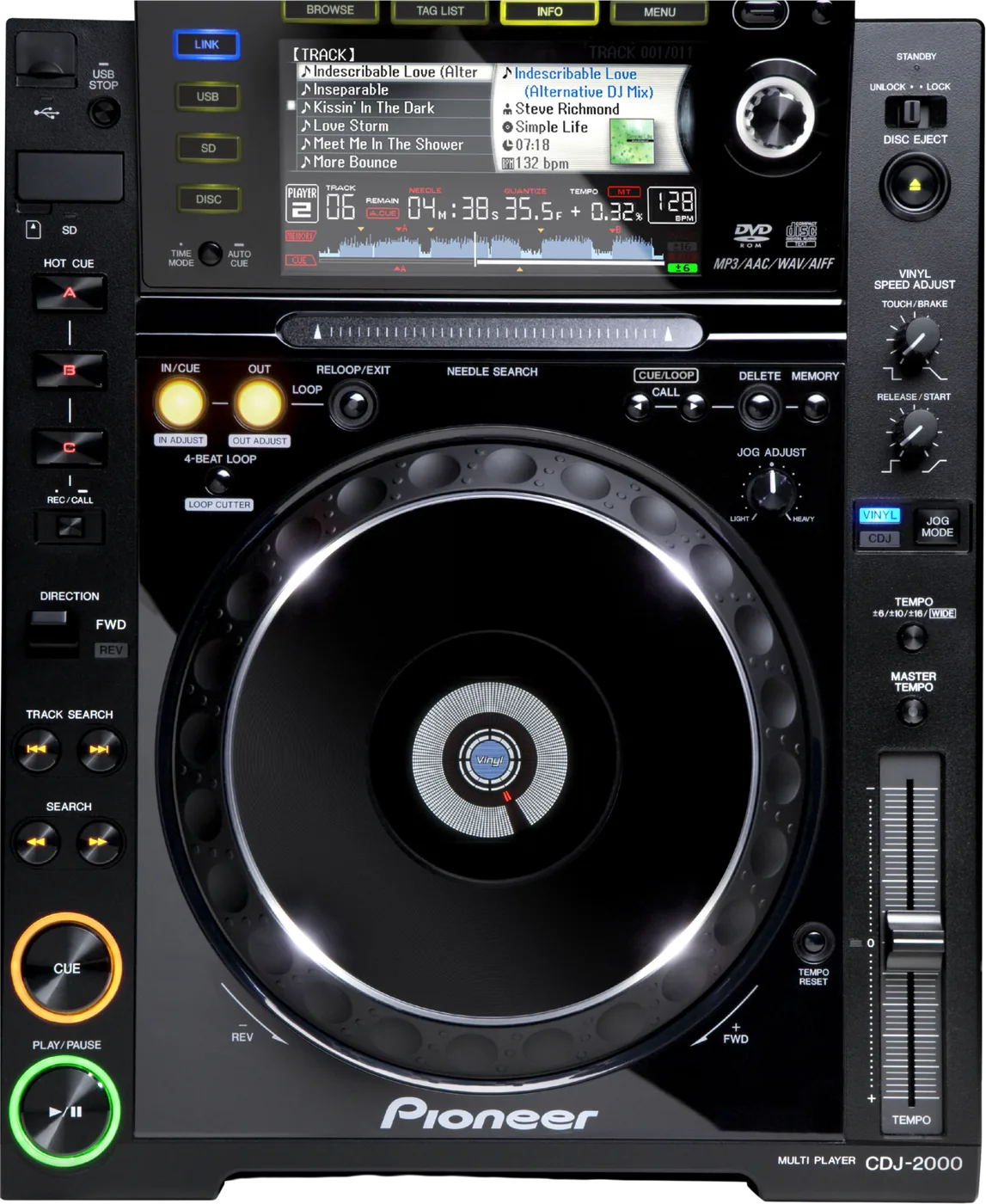
Booth briefing. The CDJ-2000 is the 2009 original of the Pioneer DJ CDJ-2000 line, the player that preceded the CDJ-2000NXS and the CDJ-2000NXS2. It is a networked club player with real PRO DJ LINK over Ethernet, so it joins a booth network, unlike every all-in-one on this site. It plays from USB sticks formatted FAT, FAT32 or HFS+, and a single FAT32 partition with an MBR scheme is the everyday setup. Check the badge before you rely on this page: it covers the 2009 model, not the NXS or NXS2 that followed it.
When it goes wrong: The CDJ will not read the USB CDJ error E-8302 Playlists not showing
Fast Lane
The five things that decide your gig
The five things on the CDJ-2000 that change what happens next, if you are reading this in the booth. All five are explained in full further down this page.
Make sure it is a CDJ-2000 and not an NXS or an NXS2.
This page is the CDJ-2000 released in 2009. The CDJ-2000NXS arrived in 2012 and the CDJ-2000NXS2 in 2016, and each has its own page here because their answers differ.
Three decks that look alike from a metre away give three different answers about formats and library.
No exFAT. The word does not appear in the manual at all.
The Operating Instructions list FAT, FAT32, HFS+.
exFAT support arrived on AlphaTheta players years after this deck, so this is not a firmware question and there is no version that adds it.
A second partition can make the whole drive invisible.
The manual is blunter than every later deck: "If multiple partitions are set for the USB device, the device may not be recognized."
Newer units say only the first partition can be used, which means a multi-partition drive still half works. Here it may not work at all.
It has real PRO DJ LINK over Ethernet.
It joins a PRO DJ LINK network over a LAN cable and shares a library and a clock with other players and a compatible mixer.
That is worth saying out loud, because several newer all-in-one units use the phrase for something narrower than what this deck actually does.
Format for this deck and you have formatted for all of them.
FAT32 with MBR plays on the CDJ-2000 and on everything newer. There is no reason to carry anything else on a gig drive.
One partition, not two. This deck and the CDJ-900 say a multi-partition drive may not be recognised at all. Newer players say only the first partition is used.
If something goes wrong
The CDJ-2000 will not read your USB
Short answer. On the CDJ-2000 the format is the first suspect, not the port. It reads FAT, FAT32, HFS+ and nothing else, and a second partition can hide the drive entirely.
Why this happens. A drive that works perfectly on your computer tells you nothing here. exFAT mounts fine on any laptop and is refused by this player, and that one is documented. A GPT partition map, which is what a Mac leaves behind if you erase the volume rather than the device, is the other repeat offender in the field. AlphaTheta name a GPT refusal for the CDJ-3000 and the XDJ-AN, not for this deck, so MBR here is our recommendation rather than their published requirement.
Fix it now. There is one USB slot on this deck, not two, so the sequence is other drive, other player, then the SD slot if you have a card. Take the drive out properly first, because the manual is explicit about the cost of not doing so: "Removing a USB device without following this procedure could erase the set’s management data and make it impossible to read the USB device." The way out is "Press [USB STOP] for over 2 second." Then check the format on a laptop if you have one. Get the music off before you reformat anything, never after.
Two causes that are not the format. "USB hubs cannot be used." And the port on this generation supplies 5 V/500 mA or less, a quarter of what the later decks give, so a bus-powered mechanical drive can sit right at the edge of what this player will feed it.
Avoid it next time. Carry two identical FAT32 and MBR drives, exported fresh.
Cue points will not save, or the ones you had are gone
Short answer. The CDJ-2000 says POINT FULL where the later NXS decks say CUE/LOOPPOINT FULL, and the ceiling behind that word is 100 cue or loop points per disc and 10 per track on an SD card or USB drive. A write-protected SD card shows CARD PROTECTED. A USB drive shows USB FULL both when it is write-protected and when it has no free space, so on the USB side one message covers two different problems. And points that were saved can stop appearing altogether if the card or drive was pulled without being stopped properly, or if the power was turned off.
Why this matters. Every one of those messages looks like a broken drive from where you are standing, and most of them are fixable in seconds once you know which word means what. POINT FULL is the one people misread, because it sounds like the media is full when it is the point count that is.
Fix it now. Read the word on the display before you touch anything. POINT FULL means delete some points, not swap the drive. CARD PROTECTED means the small switch on the side of the SD card. USB FULL means either the write-protect tab or free space, so check both before blaming the deck.
Avoid it next time. Stop the media properly before you pull it, every time, and let the deck finish writing before the power goes off.
A disc will not come out
Short answer. The CDJ-2000 has three ways to release a disc and most DJs know one. The switch is labelled UNLOCK/LOCK on this generation rather than EJECT/LOAD LOCK, and if it is set to LOCK the deck wants a pause first: press PLAY/PAUSE, then DISC EJECT. Or set UNLOCK/LOCK to UNLOCK and eject normally. And if DISC EJECT does nothing at all, the manual names a last resort that the front of the unit does not advertise: a disc force eject pin hole.
The pin, done safely. The pin is not a shortcut and the manual is specific about why. Turn the power off first and wait at least one minute before you use it, because a disc that comes out while it is still spinning can hit your fingers, and a clamp turning unevenly can scratch the disc on the way. Use the pin that came with the unit and nothing else. It is mounted on the bottom panel, and when it goes all the way in the disc moves 5 mm to 10 mm out of the slot, far enough to grip and pull.
Why this matters. A disc stuck in a venue deck at the end of your set is your problem to solve in front of the next DJ. The lock is a setting somebody else may have left on, and the pin hole exists precisely because the button can fail.
Avoid it next time. Take your disc out before the changeover rather than after, and if you play CDs on old decks, find the hole and the pin on one of them while nothing is at stake.
The screen is dark and the deck looks dead
Short answer. The CDJ-2000 ships with its power management turned on, and a deck nobody has touched for over four hours with no disc, no SD card, no USB drive, no PRO DJ LINK connection and no computer on the rear USB port puts itself into standby. A dark panel on a deck that was working earlier is usually this rather than a fault, and operating any control brings it straight back. The setting is AUTO STANDBY in the UTILITY menu, and OFF is what a permanent install wants.
Why this matters. This is one of the most common false alarms on old decks and it costs a soundcheck. A player that went to sleep during load-in is indistinguishable from a player with a dead power supply until you touch it.
Fix it now. Move the jog wheel or press a button before anything else. If it comes back, that was standby. If it does not, then look at the power.
Avoid it next time. In a fixed install, set AUTO STANDBY to OFF once and it stops happening.
PRO DJ LINK will not come up
Short answer. When PRO DJ LINK will not come up on a CDJ-2000, the manual gives four checks and none of them is the player itself. Player numbers first: set PLAYER No. to AUTO, or to a number nothing else on the network is using. Then whether the LAN cable is properly seated in the LINK terminal. Then whether the switching hub actually has power. Then whether something unnecessary is plugged into that hub, because the manual names an extra device on the switch as a cause on its own.
Why this matters. A booth network that half works burns time nobody has, and the instinct is to blame the deck that is showing nothing. Three of the four causes are outside the player entirely.
Fix it now. PLAYER No. to AUTO first, because a number collision is the quiet one. Then reseat the cable at both ends. Then look at the hub, both its power and what else is plugged into it.
One more thing on this deck. The manual warns against pulling the LAN cable while music or information is being shared, so stop the sharing or unplug at the hub instead.
A UTILITY setting keeps reverting
Short answer. The CDJ-2000 keeps a setting only if you give it time to write. The manual's own instruction is to wait at least 10 seconds after changing settings before turning the power off, and a change made in the last seconds before somebody hits the switch is the one that will not be there next time. This is the answer for a deck that keeps reverting a UTILITY setting somebody swears they changed.
Why this matters. It looks like failing memory on an old deck, which is an expensive conclusion. It is a timing rule that almost nobody reads.
Fix it now. Change the setting, back out of UTILITY, and leave the deck alone for a slow count of fifteen before the power goes anywhere near off.
What to watch for
Firmware, and what this site will not claim
What is in the record. Twelve dated versions, from December 2009 to 4.33 in February 2015, and nothing since. The ones a DJ would notice are below.
The one that stops the music. Fixed in 4.04: with certain hard drives that wake slowly from sleep, the player would stop playback with an E-8302 PLAYER ERROR when reaching for that drive across PRO DJ LINK. If you run a shared drive over Link on old players, this is the entry that matters.
- 4.33, February 2015
- Tracks in some folders on a 2TB hard drive were not displayed when browsing. A WAVE file with an incompatible header could not load and left the loading message on screen indefinitely. Needle Search fixes.
- 4.11, July 2012
- A particular USB 3.0 device did not work properly, and static noise was occasionally generated with a particular MP3 file.
- 4.10, January 2012
- Sound quality and stability with MASTER TEMPO on, and a fault when several CUE or HOT CUE points were set at the same time.
- 4.05, September 2011
- The beat grid could sit about 50 ms out with MASTER TEMPO on, a one-frame loop artefact, and click noise on a specific MP3.
- 4.04, June 2011
- The E-8302 stall over PRO DJ LINK described above, and a one-frame loop when changing a beat loop length with the loop cutter or the needle search strip.
- 4.01, March 2011
- Fader Start did not work correctly in some cases, playlist browsing had become slow since 3.20, and OUT ADJUST could stop working after a jog loop-out adjustment.
- 4.00, February 2011
- Playback stopped if a loop was created across a whole CD, and a specific CD produced noise in loop playback.
- 3.20, November 2010
- A rare fault accessing media devices, and an error after long play times that caused audio interruptions.
Do this. Read the firmware version off any CDJ-2000 you are handed and write it down. On a deck this age the version is also a rough proxy for how it has been looked after.
Four things it does that are not faults
The screen. Small black or bright points on a CDJ-2000 screen are inherent to liquid crystal displays and the manual says so outright. A screen that stays dark for a while after power-on in a cold room is the same story, and it reaches normal brightness on its own. And direct sunlight reflecting off the panel is not a failing backlight, it is sunlight, so block it rather than chase it.
The BPM. A BPM on the CDJ-2000 that does not match the number printed on the disc, or the number showing on the Pioneer DJ mixer beside it, is not a fault either. The manual states plainly that the measuring methods differ. Trust the deck you are beat matching on and stop reconciling the two.
After a static hit. And static electricity can put a CDJ-2000 into a state that looks like hardware failure. The manual's own recovery is to turn the power off, wait for the disc to come to a complete stop, then turn the power back on. The waiting is the part people skip.
And the discs it refuses. The CDJ-2000 refuses several kinds of disc by design and none of those refusals is a fault. Non-finalised CD-R and CD-RW, DVD-R and DVD-RW, DVD+R and DVD+RW and DVD dual layer discs will not play at all. Nor will anything that is not a standard 12 cm round disc, and the manual is blunt about that one: forcing a shaped disc leads to damage or accidents rather than to a polite refusal.
Two error codes worth recognising
Short answer. Two CDJ-2000 error codes point at things the other codes do not. E-9101, MECHANICAL TIME OUT, means the disc mechanism did not finish loading or ejecting inside the time it is given, which is a drive problem rather than a file problem. E-8306, NO FILE, means a track is still listed in a library or a playlist but has been deleted from the SD card or the USB drive, so the fix is on the computer that prepared the drive and not in the booth.
Why this matters. Both get filed under "the deck is broken" and only one of them is about the deck. E-8306 is a preparation fault that travels on the drive, so it follows you to the next player and the next venue until the library is fixed.
Fix it now. For E-9101, power the deck down and up, and if it repeats on more than one disc it is a service job. For E-8306, re-export the library from the computer that made the drive so the playlist and the files agree again.
The E-8302 family. E-8301, E-8302 and E-8303 are all PLAYER ERROR here, and this player’s own manual gives the causes as a disc or music files that cannot be played normally. Firmware 4.04 additionally fixed a case where a slow-waking hard drive triggered it across PRO DJ LINK.
Compatibility
Does the CDJ-2000 read exFAT
Short answer. No. The CDJ-2000 Operating Instructions list the supported file systems as FAT, FAT32, HFS+. The word exFAT does not appear anywhere in that document.
Why this happens. exFAT support arrived on AlphaTheta players years after this deck. It matters because most drives larger than 32GB ship exFAT from the factory, so a brand new stick of a sensible size is refused before you have put a single track on it.
Fix it now. Format FAT32 with an MBR partition scheme. Never format a drive that still holds your only copy of anything: get the music off first, then reformat.
Avoid it next time. Format for the oldest deck you might meet rather than the most recent one you own. FAT32 plays everywhere.
A second partition can make the drive invisible
Short answer. The CDJ-2000 manual is blunter than every later deck. Its words: "If multiple partitions are set for the USB device, the device may not be recognized."
Why that wording matters. Newer units say only the first partition can be used, which means a multi-partition drive still half works. This deck's sentence is about the device, not a partition, so the same drive that mounts and plays on an XDJ-RX2 can be completely invisible here, and the symptom looks like a dead port or a dead stick rather than a partition problem.
Fix it now. Try the other slot and another drive first to separate a drive fault from a player fault. If you have a laptop, check the partition map: anything other than a single MBR partition is your answer.
Avoid it next time. One partition, FAT32, MBR. Never format a drive that still holds your only copy of anything.
The other two limits from the same table. Files deeper than 8 folder levels cannot be played, and beyond 10,000 folders or files inside a single folder the rest are not displayed.
It has real PRO DJ LINK over Ethernet
Short answer. Yes, genuinely. The CDJ-2000 joins a PRO DJ LINK network over a LAN cable and shares a library with other players and a compatible mixer.
What it shares, exactly. The manual lists tracks, the TAG LIST, INFO, disc cue points and disc waveform displays, and nothing about tempo. This is a 2009 player and it has no SYNC control on its panel, so if you are expecting decks to lock tempo over the network the way a modern booth does, that is the later generations, not this one.
Why it is worth saying out loud. Several newer all-in-one units use the phrase PRO DJ LINK for something much narrower, a USB or LAN cable to one computer running rekordbox, and their manuals state they cannot connect to a PRO DJ LINK player. A 2009 CDJ-2000 can do the thing those units cannot.
When professionals use it. Four players sharing one drive, so the DJ handing over does not need to hand over a stick.
Common mistakes. Pulling the LAN cable mid-set. The manual warns against disconnecting it while music or information is being shared.
What an old CDJ-2000 does to the NXS beside it
Short answer. A CDJ-2000 below firmware 4.20 quietly limits the newer deck standing next to it. Firmware 4.20, October 2012, made this player send the extra data a CDJ-2000NXS needs when the NXS reads a library held on this deck across the LAN: WAVEFORM ZOOM, KEY indicators, ACTIVE LOOP, HOT CUE AUTO LOAD and MY SETTINGS SAVE/LOAD. Below 4.20 those five simply do not work on the NXS, and the NXS is where the DJ notices, so the deck that looks broken is not the deck that needs updating.
Why this matters. Mixed booths are normal and this is the least visible consequence of one. The DJ on the NXS reports that WAVEFORM ZOOM or HOT CUE AUTO LOAD does not work on their unit, a tech checks the NXS, finds nothing, and the actual answer is a firmware number on a different deck across the booth.
Fix it now. Read the version on every CDJ-2000 in the room, not only the one that is complaining. Anything below 4.20 is the candidate.
Worth saying plainly. This is a limit on what the older deck sends, not a fault in the newer one. Nothing on the NXS needs changing.
Features explained
Which CDJ-2000 is in front of you
Short answer. This page is the CDJ-2000 released in 2009. The CDJ-2000NXS arrived in 2012 and the CDJ-2000NXS2 in 2016, and each has its own page here because their answers differ.
Why it matters. AlphaTheta's own manuals index has an entry labelled CDJ-2000 whose document is the NXS manual, DRI1052. Anyone researching this deck will meet that and may end up reading the wrong specification for the machine they are standing at.
How to tell. The NXS badge is printed on the front of the unit beside the model name. If there is no NXS, this page is the right one.
Common mistakes. Assuming compatibility carries across the family. It does not: the NXS2 reads drives this deck refuses.
Auto cue, and why the deck can look like it is ignoring you
Short answer. A CDJ-2000 that just sits there when a disc is loaded is usually auto cue doing its job. Auto cue parks the deck at the first sound rather than at the physical start, so nothing happens until you press play. Hold AUTO CUE for at least one second to turn it off. The same function explains a track search that takes an age on a disc with long silences between tracks, and the manual adds a detail worth knowing: if the search cannot finish within 10 seconds, the deck sets the cue point at the beginning of the track and stops looking.
Why it is there. On a prepared library you want it, because it strips whatever silence the mastering left at the front. On a disc somebody handed you thirty seconds ago it is the thing that makes the deck look stuck, and that is when people start pressing buttons.
The detail most people never learn. That 10 second ceiling is the part worth carrying. A very quiet intro can run the search out of time, and the point the deck settles on is not the one you would have chosen. If a cue lands somewhere odd on a quiet track, this is why.
Professional tips
Before you rely on one in a booth
Format for this deck and you have formatted for all of them. FAT32 with MBR plays on the CDJ-2000 and on everything newer. There is no reason to carry anything else on a gig drive.
One partition. Not two. This deck and the CDJ-900 carry the same sentence: a multi-partition drive may not be recognised at all, rather than partly read. Every newer player here says only the first partition is used, which is a different and softer failure.
Keep the folders shallow. Nothing beyond 8 levels will play, and that limit is silent until a track will not load.
Use the network if the booth has it. This deck has real PRO DJ LINK, so a handover can be a cable rather than a stick swap. Just do not pull the LAN cable while it is sharing.
HISTORY holds 999, then it starts deleting
Short answer. HISTORY on the CDJ-2000 holds 999 tracks and then starts eating its own beginning. The manual's words are that when a 1 000th track is recorded, the oldest item in the history is deleted. On a house deck whose history nobody has cleared, the part that disappears is the start of your set, and the list still looks complete while it happens.
Why this matters. If you use HISTORY to reconstruct a set afterwards, for a radio submission, a royalties form or your own records, the thing it quietly loses is the opening. A list that ends where your set ended looks complete whether or not it begins where your set began.
Do this. Clear HISTORY on the house deck before you start, or export from your own drive rather than trusting a shared one.
Preventive maintenance
A deck out of a cold van will not play
Short answer. A CDJ-2000 carried from a cold van into a warm room can stop working for reasons that have nothing to do with the deck. Water forms inside the unit, on the moving parts and on the lens, and the manual states outright that the unit will not operate properly and will not play while it is there. The instruction is to leave it standing at room temperature for one to two hours without turning the power on, which is exactly the opposite of what a stressed crew does. It happens in summer too if the deck sits in the direct blast of an air conditioner, and the answer there is to move it.
Why this matters. It presents as a dead player at exactly the moment nobody has an hour, and the reflex, turning it on to see whether it works, is the one thing the manual tells you not to do.
Do this. Get the cases inside as early as you can and open them, so the gear warms with the room instead of after it. In summer, keep decks out of the direct path of an air conditioner.
Disc care, and the cleaner not to buy
Short answer. Most CDJ-2000 disc faults are the disc. Wipe from the centre outwards with a clean cloth, never in circles, and never with benzene, thinner, record spray or antistatic agents. For heavy dirt, water on a soft cloth wrung out well, then dry. Do not play cracked or warped discs, and do not put stickers or paper on a disc: the glue warps it. The manual singles out rental discs for this, because a label's glue can ooze out at the edges, so check the rim of a rented disc before it goes in. And a disc brought in from the cold can carry water on its own surface, which wipes off before loading.
The lens. AlphaTheta advise against lens cleaner discs for the CDJ-2000, which is not what the shelf they are sold on suggests. The manual's position is that the lens should not become dirty in normal use, that a genuinely dirty lens is a service job, and that some commercially available cleaners may damage the lens. So the cheap disc that promises to fix a skipping deck is a risk the maker does not endorse.
Storing them. Cases, stored upright, away from heat, damp, direct sun and extreme cold. A warped disc is a permanent loss and warping is what all four of those do to it.
Firmware, drivers and manuals
Official downloads and documents
Go to AlphaTheta for the files themselves. We link their pages instead of hosting a copy, because a manual copied here is a snapshot of release day and theirs is the one that stays current.
Manuals. Official Pioneer DJ manual page →
Broken link? Let us know and we'll fix it.
Frequently asked questions
Quick answers
- Does the CDJ-2000 read exFAT?
- No. Its Operating Instructions list FAT, FAT32, HFS+, and the word exFAT appears nowhere in the document. Format FAT32 with MBR.
- My USB works on my computer but not on the CDJ-2000. Why?
- Almost always the format or the partition map. exFAT mounts happily on a laptop and is documented as unsupported here. GPT is not named by AlphaTheta for this deck, but it is a repeat offender in the field, so we recommend MBR.
- Can I use a drive with two partitions?
- Not reliably. The manual says that if multiple partitions are set for the USB device, the device may not be recognised.
- Is this the same as the CDJ-2000NXS?
- No. The NXS is a 2012 deck with its own page and its own answers. Check the front badge.
- How deep can my folders go?
- Files beyond 8 folder levels cannot be played, and beyond 10,000 folders or files in a single folder the rest are not displayed.
- Does it have PRO DJ LINK?
- Yes, over a LAN cable. It shares tracks, the TAG LIST, INFO, disc cue points and disc waveform displays, and nothing about tempo.
- Can it show error E-8302?
- Yes, and this player's own Operating Instructions document it. E-8301, E-8302 and E-8303 are all PLAYER ERROR, and the causes given are a disc or music files that cannot be played normally, with "Format is wrong" as the action. Firmware 4.04 also fixed a specific case where a slow-waking hard drive triggered it over PRO DJ LINK.
- Does it have an SD card slot?
- Yes, and it is capped at 32 GB. The formats are narrower than the USB ones: SD memory cards: FAT12 and FAT16 (conforming to SD standards) / SDHC memory cards: FAT32 (conforming to SD standards). A card formatted on a computer or a camera may not work.
Where this sits in the line
- Next generation CDJ-2000NXS
Related players
Commonly paired with
What you usually find beside it in working booths, from club, festival and rental installs rather than from a manufacturer document.
Pioneer DJ All brands Knowledge base FAQ and Fixes Dictionary
Playing soon and it is not working?
Start Emergency ModeKeep the Emergency Card
We will email you the printable PDF so it is on your phone before the next dark booth. Occasional notes that save gigs. No spam, unsubscribe in one click.
Registering is free and counts everywhere on Save My Gig. We send a confirmation email first. Your address is stored with Brevo, our email provider. Unsubscribe any time. Privacy
Sources: the CDJ-2000 Operating Instructions, Pioneer DJ document DRB1475, read in full for the file systems, folder limits, partition behaviour and PRO DJ LINK, and the product page, checked 24 August 2026. Specifications theirs, priorities ours.