

RANE SYSTEM ONE, the field manual
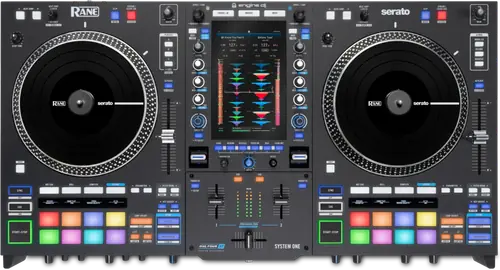
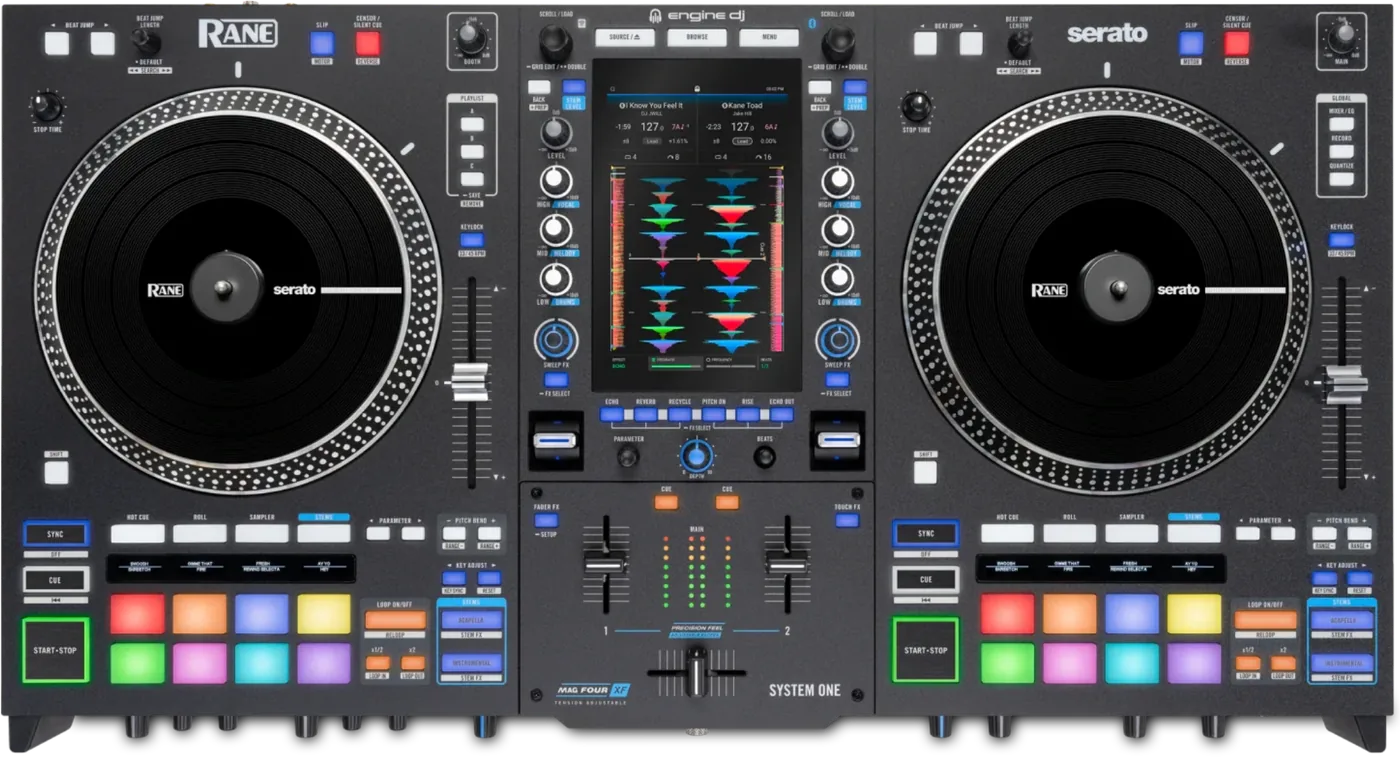
Booth briefing. The RANE SYSTEM ONE is RANE's standalone unit, the one RANE covered here that plays with the laptop shut, so the drive you bring is the library for the gig. RANE support exFAT and FAT32 across USB drives, SD cards and the internal drive alike, with no version condition attached. Stems are rendered on a computer and packed to the drive before the gig; the unit plays the rendered parts back rather than processing them itself. Booth outputs are on the rear panel.
When it goes wrong: Denon USB format, exFAT or FAT32 The Denon will not read the drive
Fast Lane
The five things that decide your gig
The five things on the RANE SYSTEM ONE that change what happens next, if you are reading this in the booth. All five are explained in full further down this page.
exFAT and FAT32. That is the whole allowlist, for every drive and card.
Supported file systems are exFAT, which RANE recommend, and FAT32. The guide prints the same list twice, once in Devices and File Analysis and again in the specification table, and the two agree exactly.
RANE frame it as an allowlist rather than a recommendation, and apply it to all three media classes in one sentence: make sure you are using only the supported file systems, for USB drives, SD cards, and the internal drive.
No firmware version, Engine version or serial number range is attached to that list anywhere. It is printed unconditionally in both places, which is unusual and worth knowing.
The guide never names a file system that is not supported.
The guide never names a single UNSUPPORTED file system. NTFS, HFS+, APFS and ext4 do not appear anywhere in the document, and there is no troubleshooting section. A DJ arriving with an NTFS or Mac-formatted drive gets no warning from this document at all: the only signal is the word only in that allowlist sentence.
Read that as a silence rather than a verdict. The document does not tell you what will fail, so the only safe reading is the allowlist itself: if your drive is not one of the two named, the guide has nothing to say about it.
The laptop-free unit cannot make its own stems.
The laptop-free unit cannot make its own stems. RANE state that track stems must be created using the Engine DJ software and packed to an external drive for use with SYSTEM ONE. Their FAQ says the same thing from the other direction: no stems licence needs buying, you simply need to render the stems in Engine Desktop beforehand.
Two separate RANE documents say it, from opposite directions, so this is not a reading of one ambiguous line. The rendering happens before you leave the house or it does not happen.
The rear panel says RCA on the booth outputs. The spec table says TRS.
The rear panel text tells you to use RCA cables on the booth outputs. The specification table gives those same outputs as two 6.3 mm TRS jacks, balanced. Pack TRS.
A booth feed is the one output an engineer will ask you for, and it is the one you cannot improvise a cable for at load-in.
Engine Remote Library refuses a remote track over 250 mb.
The Engine Remote Library caps a remote track load at 250 mb, in RANE’s own lower case, and fails with Failed to Download beyond it. Long DJ tools and high resolution files will not come across the network.
Nothing warns you before the transfer starts, so the failure lands when you reach for the track rather than when you queue it.
If something goes wrong
A new unit wants a network before it wants a gig
The RANE SYSTEM ONE is not ready to play the moment it comes out of the box.
RANE state the unit requires a day one Engine DJ update on first setup: power it on, join Wi-Fi, follow the prompts to update, and create an Engine DJ profile. A unit taken out of the box at a gig is a unit that wants a network first.
The export finished and the library is not right
The RANE SYSTEM ONE has one export mistake that RANE warn about by name.
RANE give one explicit warning about exporting from Engine Desktop: do not use the same drive as the source of your music during the export. They state that exporting to a drive sharing the location of your music source may lead to complications with the Engine Library and the database stored on the drive.
This is the one export mistake RANE call out by name, and it is easy to make on a laptop with one big music drive attached. Export to a different drive from the one your library lives on.
The stems are not there when the track loads
Engine Stems need no licence on this unit. RANE state the SYSTEM ONE unlocks them, and that the stems have to be rendered in Engine Desktop beforehand rather than on the deck.
Nothing has to be bought, and something has to be done in advance. A track that never went through Engine Desktop arrives on the unit without its stems.
What to watch for
What the guide never tells you about a drive it will not read
The other half of the SYSTEM ONE file-system story is a silence, and it is the half that costs people. The guide never names a single UNSUPPORTED file system. NTFS, HFS+, APFS and ext4 do not appear anywhere in the document, and there is no troubleshooting section. A DJ arriving with an NTFS or Mac-formatted drive gets no warning from this document at all: the only signal is the word only in that allowlist sentence.
No maximum drive size, no minimum, no partition scheme requirement, no partition count limit, no maximum track count and no library size limit are given. The FAT32 four gigabyte per file limit is never mentioned, even though FAT32 is listed as supported and 192 kHz 32-bit WAV and AIFF are listed as playable.
This site will not fill those gaps by inference. What the document supports is the allowlist and nothing beyond it, so the working rule is to prepare a drive to one of the two named file systems and to treat anything else as unaddressed by RANE rather than as ruled out by them.
Nothing in the guide can be dated to a release
The SYSTEM ONE guide carries a document version and no software version at all, which makes it impossible to tell from the paperwork whether a feature has arrived on your unit. The guide names no firmware version and no Engine version anywhere, so nothing in it can be dated to a release. RANE’s FAQ names Engine DJ 4.5.0 at initial setup and Serato DJ Pro support from version 4.0.3.
So the practical order is to check the unit itself and RANE's support articles for versions, and to treat the guide as a description of the panel rather than as a record of what a given machine is running.
What the guide does not answer
On the SYSTEM ONE the published record stops short of the panel in several places. The guide contains no troubleshooting section, no connection diagram and no box contents list.
The guide refers to a Hardware Setup section and a Global panel area that do not exist in it, and to a Pitch Play pad mode it never documents. The Device Storage exit procedure is printed twice and only one of the two copies mentions the reboot.
None of that is fatal, but it does mean the document cannot be used the way a DJ wants to use one at a changeover, which is to look up a symptom and read the answer.
Compatibility
What software it runs, and where RANE disagree with themselves
RANE state the SYSTEM ONE is compatible with Engine DJ at launch, that support for Serato DJ Pro is available as of version 4.0.3, and that support for Algoriddim djay and Virtual DJ is anticipated in a future update.
The same FAQ article contradicts itself on Serato. One answer says Serato DJ Pro support is available as of version 4.0.3, and the description of the Source menu says Serato DJ support is coming early 2026. This site records both and reconciles neither, because RANE have not.
Treat the Serato answer as unsettled until RANE settle it. On a unit bought for an Engine workflow that is a detail; on a unit bought to replace a Serato rig it decides whether it can do the job yet.
Drives, cards and the internal bay
RANE state the supported drive formats are FAT32 and exFAT, with exFAT recommended, and advise using only reputable USB 3.0 drives or Class U1 or U3 SD cards as source media.
The internal bay takes nearly any standard 2.5 inch SATA drive. RANE recommend an SSD rather than a hard disk for best performance, and say so specifically for stems.
RGB waveforms are available only in Engine Desktop 4.5.0 and, RANE state, exclusively on the SYSTEM ONE. They are not supported on Engine hardware from Denon DJ or Numark.
The file systems, printed twice and agreeing with themselves
The SYSTEM ONE is the RANE that reads your drive rather than your laptop's, so this is the paragraph to read before anything else on the page. Supported file systems are exFAT, which RANE recommend, and FAT32. The guide prints the same list twice, once in Devices and File Analysis and again in the specification table, and the two agree exactly.
RANE frame it as an allowlist rather than a recommendation, and apply it to all three media classes in one sentence: make sure you are using only the supported file systems, for USB drives, SD cards, and the internal drive.
No firmware version, Engine version or serial number range is attached to that list anywhere. It is printed unconditionally in both places, which is unusual and worth knowing.
That last point is worth more than it looks. A list with no version condition on it cannot go out of date under you between one gig and the next, and it means a drive prepared today is prepared on the same terms as a drive prepared a year ago.
The file formats, and the converter figures beside them
The SYSTEM ONE playable media list is broad, and it reaches further up than the converter row underneath it. AAC and M4A, AIF and AIFF at 44.1 to 192 kHz and 16 to 32-bit, ALAC, FLAC, MP3 at 32 to 320 kbps, MP4, Ogg Vorbis, and WAV at 44.1 to 192 kHz and 16 to 32-bit.
The playable media list allows 192 kHz and 32-bit files while the digital audio specification gives the converters as 24-bit PCM at 44.1 kHz. The guide never reconciles the two.
Which software runs on it, and where the version comes from
The SYSTEM ONE runs its library and its decks on board, so the software version is a hardware question here rather than a laptop one. Engine DJ runs on the unit. RANE’s FAQ names Engine DJ 4.5.0 at initial setup and states that Serato DJ Pro support is available from version 4.0.3.
The guide itself names no Engine DJ version, no Engine OS version and no firmware version anywhere, despite being a 4.5.0 document. It also calls the software three different things in three places: EngineOS, Engine OS and Engine DJ. Nothing in the guide can date a feature.
Stems, and the computer the laptop-free unit still needs
This is the one place where the SYSTEM ONE sends you back to a desk. The laptop-free unit cannot make its own stems. RANE state that track stems must be created using the Engine DJ software and packed to an external drive for use with SYSTEM ONE. Their FAQ says the same thing from the other direction: no stems licence needs buying, you simply need to render the stems in Engine Desktop beforehand.
The internal drive chapter recommends an SSD especially when using stems, which sits oddly beside the statement that stems must be rendered elsewhere and packed to a drive first.
Read together, the two statements are consistent enough to plan around: the rendering happens on a computer, the drive carries the result, and a faster internal drive helps with playing the result back rather than with making it.
The remote library, and the ceiling on a single track
The SYSTEM ONE can pull a track across the network from a computer, up to a point that is printed once and easy to miss. The Engine Remote Library caps a remote track load at 250 mb, in RANE’s own lower case, and fails with Failed to Download beyond it. Long DJ tools and high resolution files will not come across the network.
An hour-long recording, a long edit or a high resolution master can all sit above that line, and those are exactly the files a DJ reaches for when the room asks for something unusual.
Features explained
Professional tips
Which drive to put in it, and why an SSD
The internal bay takes nearly any standard 2.5 inch SATA drive. RANE recommend an SSD rather than a hard disk for best performance, and say so specifically for stems.
RANE state the supported drive formats are FAT32 and exFAT, with exFAT recommended, and advise using only reputable USB 3.0 drives or Class U1 or U3 SD cards as source media.
Three buttons that get you back to a playlist
Three playlist bank buttons, A, B and C, save and recall a playlist from the unit. Holding one while a playlist is on screen stores it, and RANE state it can be an Engine playlist of local tracks or a playlist from a streaming service.
The channel faders have three shapes, and one is for cutting
The channel fader contour knob on the front panel sets three shapes: turned left a logarithmic curve that opens sharply near the top and gives finer control low down, centred a linear curve, and turned right an exponential curve that opens rapidly from the bottom, which RANE describe as suited to quick transitions and cutting.
Connections and setup
Assembling the platters, and locking the Control Disc
Short answer. The RANE SYSTEM ONE arrives with its platters off, and the assembly steps double as the answer to two things that read as faults later. Each platter seats by aligning the pins in the bottom of the platter with the holes in the SYSTEM ONE's motor and pressing down firmly, and RANE ask you to check that it rotates uniformly and does not wobble excessively. A platter that wobbles is a platter that is not seated, not a bent one. Then the slipmat, then the Control Disc over the spindle with the Quick Release Adapter on top. The disc does not simply drop on: pinch the top of the spindle while slowly rotating the disc until you hear it click, and it is locked when the groove in the spindle lines up directly opposite the button on the side of the Quick Release Adapter. So a Control Disc that slips under the hand has usually never clicked, and the lock has a visual check that takes one second. RANE call the washers scratch washers on this model, and they go in at this step, over the spindle and under the slipmat: one to four of them, and the more they elevate the disc, the more spinback you get.
The order RANE print for switching it on
Short answer. The RANE SYSTEM ONE has a printed order for coming up, and on a standalone unit it runs further than the cable. Put it on a flat, stable surface. With the power switched OFF, plug the included power cable into the SYSTEM ONE first, and only then into the wall. Power it on with the power button. The unit then takes over: a Wi-Fi menu comes up first, then the firmware update prompt if one is available, then the Engine DJ profile prompt, and the unit restarts after a firmware update. Both of those screens can be dismissed each time or set never to show again. So the first power-up of a new unit is a sequence with a restart in the middle of it, which is a thing to do at home rather than in a booth with a support act finishing.
Where the music goes in, and the eject rule
The SYSTEM ONE has more places to put a drive than most, and two of them are already spoken for. Four media ports plus a card slot and an internal bay: one USB Type-A at USB 2.0, one USB Type-C at USB 3.0, two further USB Type-A at USB 3.0 that are shared with SoundSwitch DMX and with a keyboard, an SD slot taking SD, SDHC and SDXC, and a 2.5 inch SATA 3.0 internal bay.
Drives must be ejected before removal or data can be corrupted.
RANE recommend using only high quality name brand USB 3.0 drives or Class U1 or U3 SD cards, especially when cloud services are enabled. That advice is buried in the cloud settings section rather than in the media chapter where a DJ would look for it.
The internal bay, which arrives empty
A SYSTEM ONE out of the box has an internal bay and nothing in it, and that is a purchase to plan rather than a fault to report. The internal drive is a user purchase, not supplied. RANE say nearly any standard 2.5 inch SATA drive fits, recommend an SSD for best performance and especially for stems, and say drives should be formatted to exFAT before installation. An unformatted drive can be formatted on the unit, to exFAT only, through Setup Internal Drive in the source menu.
No drive capacity limit and no thickness limit are stated. The guide never distinguishes 7 mm from 9.5 mm drives.
The booth outputs, and the cable to pack
On the SYSTEM ONE the rear panel and the specification table describe the same pair of sockets differently. The rear panel text tells you to use RCA cables on the booth outputs. The specification table gives those same outputs as two 6.3 mm TRS jacks, balanced. Pack TRS.
The specification table is the one that names a connector type rather than a cable, and TRS to RCA adapts in a way RCA to TRS does not, so a pair of TRS leads in the bag covers both readings.
Firmware, drivers and manuals
Official downloads and documents
Go to RANE for the files themselves. We link their pages instead of hosting a copy, because a manual copied here is a snapshot of release day and theirs is the one that stays current.
Manuals. Official RANE manual page →
Broken link? Let us know and we'll fix it.
Frequently asked questions
What is it, and does it play without a computer?
RANE’s own FAQ calls it the world’s first all-in-one standalone DJ system with motorised platters, and describes laptop-free standalone DJ technology. The user guide gives no product-class sentence, but it does state the capability: in standalone operation, SYSTEM ONE can play music files from physical media such as USB drives, SD cards, or a drive connected to the Internal HD bay, as well as from streaming and cloud services.
That is the sentence this whole page is built on, and it comes from RANE's own two documents rather than from any product-page copy.
Is the rest of the paperwork like this?
The SYSTEM ONE guide shares three habits with every other RANE guide read for this site, so none of the three is a fault of this model in particular. None of the four user guides states what the product is. There is no sentence in any of them calling the unit a controller, a mixer, a standalone system or anything else, and each opens with the identical thank-you paragraph instead. Whatever a reader wants to know about the category of machine in front of them has to come from somewhere other than the manual in the box.
None of these guides contains safety or warranty text. All four delegate it to a separate Safety and Warranty pamphlet, which means the document a DJ actually keeps is not the one carrying the warnings.
RANE publish a real support knowledge base, with per-model FAQ articles, a downloads finder and Serato-specific setup articles. On several points it is more use than the manual, and where this site quotes it, it says so.
Related all-in-ones
Playing soon and it is not working?
Emergency Mode walks you through the checks in order, and it works with no signal once you have opened it.
Start Emergency ModeKeep the Emergency Card
We will email you the printable PDF so it is on your phone before the next dark booth. Occasional notes that save gigs. No spam, unsubscribe in one click.
Registering is free and counts everywhere on Save My Gig. We send a confirmation email first. Your address is stored with Brevo, our email provider. Unsubscribe any time. Privacy