

PRIME 4 G2, the field manual
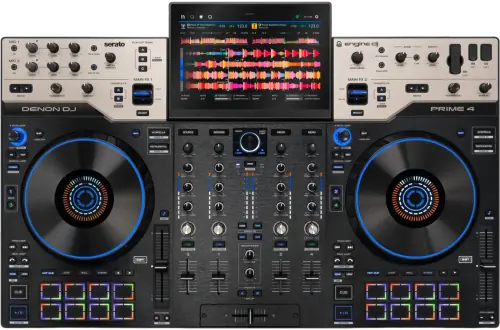
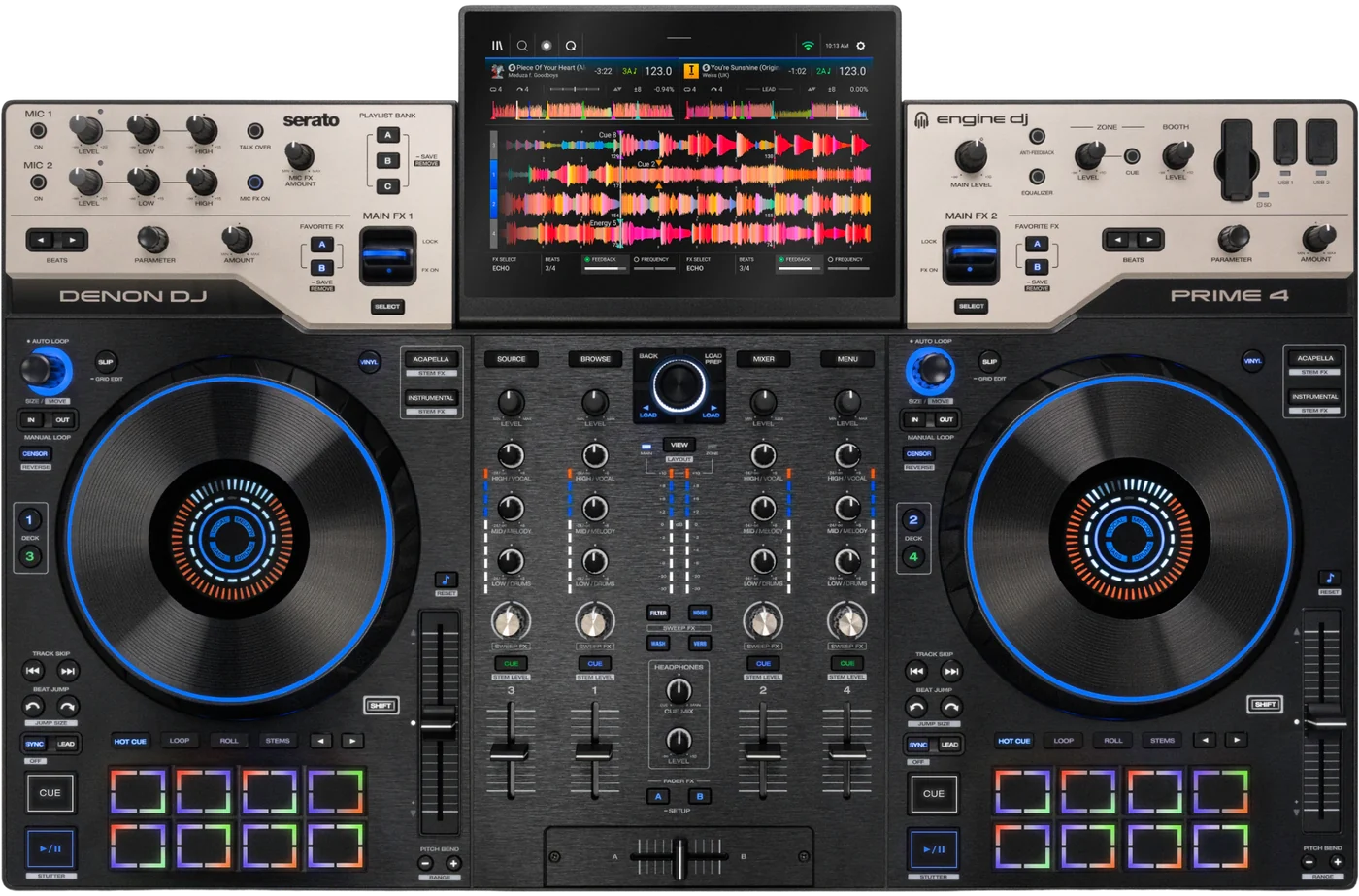
Booth briefing. The PRIME 4 G2 is Denon's four deck standalone all-in-one running Engine DJ. It carries a 10.1 inch touchscreen, eight inch jog wheels with their own displays, an internal SATA drive bay and a DMX output built into the unit. Engine DJ is the DJ software it works with at launch; Denon list Serato DJ Pro, Algoriddim djay and Virtual DJ as anticipated in future updates. Stems are created on the unit itself and rendered in the background, so a track's stems are ready once that render is done.
When it goes wrong: Denon USB format, exFAT or FAT32 The Denon will not read the drive
Fast Lane
The five things that decide your gig
The five things on the PRIME 4 G2 that change what happens next, if you are reading this in the booth. All five are explained in full further down this page.
At launch it runs Engine DJ and nothing else.
One DJ program is supported at launch. Denon: "Upon launch, the PRIME 4 G2 will be compatible with Engine DJ. SoundSwitch is also fully supported with the PRIME 4 G2."
Three more are promised and none is here yet. Denon: "Support for Serato DJ Pro, Algoriddim djay and Virtual DJ are anticipated in future update(s)." Anticipated is their word, there is no date attached to it, and a booth that needs one of those three today needs a different unit or a different plan.
A stem track cannot be used until the whole track has rendered.
Rendering happens while you work: tracks on the Stems list that have not been rendered before "are processed in the background as you use the PRIME 4 G2 and are saved on the current drive for future recall". Denon then state the limit plainly, and it is the one that bites in a booth: "Stems cannot be used until the entire track has been rendered."
A stem cannot be removed from a deck that is using it. Denon: "Stems cannot be removed if the track is loaded to a deck." Removing is done from the Stems list in editing mode, and it deletes the rendered stems along with the entry.
Denon's own article says two different things about turntables.
Denon’s own article says two different things about turntables. Its I/O list gives channels 3 and 4 as "Stereo Pair (RCA)" and never uses the word phono. Its effects section says Sweep FX "can be applied to audio from external line and phono sources connected to the PRIME 4 G2’s mixer channels" and names "connected turntables" among the devices. One passage describes a line input, the other describes a phono stage. Both are printed here and neither is chosen, because a phono stage is not something to assume from a sentence about effects.
Both passages are on this page and neither is chosen. If the booking depends on a turntable going straight into a channel, settle it against the unit in front of you before the doors open rather than against the article.
The computer port changed shape, so an older cable does not reach.
The computer connection changed shape. Denon give the PRIME 4+ as USB-B and the G2 as "USB-C with locking thread", so a cable that reached the older unit does not reach this one.
A locking USB-C cable is one of the eight items Denon list in the box, so the cable that fits arrives with the unit rather than out of a spares bag.
A SoundSwitch Control One switches the built-in DMX output off.
A SoundSwitch Control One takes over rather than adding to what is there. Denon: Engine Lighting "will prioritize the C1’s DMX outputs and disable the built-in DMX output". The onboard port stops being the way out.
Engine Lighting supports two DMX universes at most. The built-in port is universe one, and a SoundSwitch Micro DMX Interface adds universe two, for 1,024 channels in total.
If something goes wrong
The DJ software you expected is not there
Short answer. That is expected at launch. One DJ program is supported at launch. Denon: "Upon launch, the PRIME 4 G2 will be compatible with Engine DJ. SoundSwitch is also fully supported with the PRIME 4 G2."
Why this happens. Three more are promised and none is here yet. Denon: "Support for Serato DJ Pro, Algoriddim djay and Virtual DJ are anticipated in future update(s)." Anticipated is their word, there is no date attached to it, and a booth that needs one of those three today needs a different unit or a different plan.
Fix it now. There is nothing to install that would change it. There is nothing to install on a computer and nothing that would help. Denon: "At launch, the PRIME 4 G2 is designed as a standalone Engine DJ system. As a result, there are currently no computer drivers available or required for use with these DJ software platforms." They add that driver requirements, if any, will be confirmed when each software platform is officially supported. With a gig starting, play standalone from a drive or an SD card, which is the mode the unit is designed around, and keep the laptop out of the signal path.
Avoid it next time. Ask which software a booking requires before you accept the booth, and treat anticipated as a plan rather than a date.
A stem track will not play yet
Short answer. It is still rendering. Rendering happens while you work: tracks on the Stems list that have not been rendered before "are processed in the background as you use the PRIME 4 G2 and are saved on the current drive for future recall". Denon then state the limit plainly, and it is the one that bites in a booth: "Stems cannot be used until the entire track has been rendered."
Why this happens. Adding a track to the Stems list starts the work, it does not finish it, and the unit carries on doing everything else while that runs. A track added two minutes before you want it is a track that may not be ready when you reach for it.
Fix it now. Play the track without stems, and let the render finish in the background. Once it is done it is saved on that drive for future recall, so the wait happens once.
The other half of this. A stem cannot be removed from a deck that is using it. Denon: "Stems cannot be removed if the track is loaded to a deck." Removing is done from the Stems list in editing mode, and it deletes the rendered stems along with the entry.
Avoid it next time. Add the set list to the Stems list before the doors open, on the drive you are playing from, and let it work through them while you set up.
Bluetooth audio is late against the room
Short answer. That is documented rather than a fault. Bluetooth speakers and headphones work, with a warning attached. Denon: "there will be an inherent noticeable delay between the Prime 4 G2 and the Bluetooth audio device." That rules it out for cueing.
Why this happens. Denon state the delay plainly in their own article, so it is a property of the connection rather than something a setting removes.
Fix it now. Cue on wired headphones. The unit has a quarter inch stereo headphone jack and a 3.5 mm one, so there is a socket for whatever is in the bag.
Avoid it next time. Keep Bluetooth for the input side, where a phone between sets is what it is good at. Bluetooth audio comes in as a mixer source rather than a fixed channel. It is assigned to any channel in the Mixer Settings menu, and once assigned it answers to the channel fader, the EQ and the crossfader routing like any other input.
What to watch for
Updating it, and what is not published
Short answer. Denon document three ways to update a PRIME 4 G2. Over Wi-Fi, where the unit checks by itself and prompts. From a USB drive or SD card formatted exFAT or FAT32, for a booth with no network. And from a computer, using a firmware updater application over the locking USB-C connection with the unit in Firmware Update Mode, which Denon reserve for advanced troubleshooting, recovery from a failed update, or when their support asks for it.
What no version number is stated here. No firmware version is named anywhere in this article and no dated change history is published in it, so nothing on this page claims a version or a fix.
Why it matters. Anticipated software support arrives, if it arrives, in a firmware update, so the update path is the thing to have working before it is the thing you need. A booth with no network can still take one off a formatted drive.
Wi-Fi, Bluetooth and streaming
Short answer. The unit asks for Wi-Fi before anything else. A connection menu appears during startup, and it can be dismissed each time or told not to appear again, with the same settings reachable later from the Wi-Fi menu in the Control Center.
The profile that goes with it. An Engine DJ profile is offered at startup as one login for streaming and cloud services, and for crowd sourced metadata and beat grid information. It is joined by scanning a QR code or entering a code at device.enginedj.com, and it can be dismissed or turned off at startup like the Wi-Fi screen.
Bluetooth in. Bluetooth audio comes in as a mixer source rather than a fixed channel. It is assigned to any channel in the Mixer Settings menu, and once assigned it answers to the channel fader, the EQ and the crossfader routing like any other input. Bluetooth keyboards are supported as well as audio devices, which Denon offer as a way to search and browse a large library.
Bluetooth out. Bluetooth speakers and headphones work, with a warning attached. Denon: "there will be an inherent noticeable delay between the Prime 4 G2 and the Bluetooth audio device." That rules it out for cueing.
The streaming services. Amazon Music Unlimited, Apple Music, Beatport, SoundCloud Go+, TIDAL (+ DJ Add-On).
The turntable question Denon answer twice
What is documented. Denon’s own article says two different things about turntables. Its I/O list gives channels 3 and 4 as "Stereo Pair (RCA)" and never uses the word phono. Its effects section says Sweep FX "can be applied to audio from external line and phono sources connected to the PRIME 4 G2’s mixer channels" and names "connected turntables" among the devices. One passage describes a line input, the other describes a phono stage. Both are printed here and neither is chosen, because a phono stage is not something to assume from a sentence about effects.
What this page states. Both passages, and neither as the answer. This site prints a contradiction rather than resolving one when the two passages are equally official and nothing else in the document settles it.
Do this. If a turntable is part of the plan, treat the phono stage as unconfirmed until you have the unit in front of you. Bring a phono preamp, or route the deck through something that has one, and you are covered whichever passage turns out to describe the hardware.
The built-in DMX output has gone quiet
What is documented. A SoundSwitch Control One takes over rather than adding to what is there. Denon: Engine Lighting "will prioritize the C1’s DMX outputs and disable the built-in DMX output". The onboard port stops being the way out.
What that means in a booth. Adding a controller to a rig that was already lighting the room from the PRIME 4 G2's own XLR port moves the output, it does not double it. The fixtures on the onboard port stop answering, and nothing on the unit is broken.
Do this. Decide which interface is carrying the show before you patch the room, and remember that Engine Lighting addresses two universes at most. Engine Lighting supports two DMX universes at most. The built-in port is universe one, and a SoundSwitch Micro DMX Interface adds universe two, for 1,024 channels in total.
Compatibility
What software runs it, at launch
Short answer. One program, and it is Engine DJ. One DJ program is supported at launch. Denon: "Upon launch, the PRIME 4 G2 will be compatible with Engine DJ. SoundSwitch is also fully supported with the PRIME 4 G2."
What is promised and not here yet. Three more are promised and none is here yet. Denon: "Support for Serato DJ Pro, Algoriddim djay and Virtual DJ are anticipated in future update(s)." Anticipated is their word, there is no date attached to it, and a booth that needs one of those three today needs a different unit or a different plan.
There is nothing to install on a computer. There is nothing to install on a computer and nothing that would help. Denon: "At launch, the PRIME 4 G2 is designed as a standalone Engine DJ system. As a result, there are currently no computer drivers available or required for use with these DJ software platforms." They add that driver requirements, if any, will be confirmed when each software platform is officially supported.
Why it matters. A unit that will one day open in three more programs is not a unit that opens in them today. If the set depends on Serato DJ Pro, djay or Virtual DJ, plan the booth around something that runs them today and treat the G2 as a standalone Engine DJ system, which is what Denon describe it as.
Libraries from other software
Short answer. A library that lives in another DJ program comes across through Engine DJ Desktop rather than through the unit. Its Import Assistant brings tracks, playlists, cue points and library structure over, and the library is then converted to Engine DJ format for export.
Why it matters. That conversion is a computer job, so it belongs at home beside the stem rendering rather than in a booth an hour before a set.
What Denon mark as different from the PRIME 4+
Short answer. Denon publish a comparison table of the two units, and it is their marks that are reported here rather than a judgement made on this page.
What they mark the same. Denon mark both units the same on four deck standalone playback, the 10.1 inch touchscreen, the internal SATA drive bay, Wi-Fi streaming services, Bluetooth input and keyboard support, Stems included as standard, XLR main and booth out, and XLR zone output.
What they mark for the G2 alone. Denon mark seven rows for the G2 alone: full size eight inch jog wheels, FX paddles, stem level EQ and FX, onboard stems rendering, a dedicated DMX output for Engine Lighting, MPCe pads, and dedicated Stems controls, where the PRIME 4+ carries a cross annotated "(Secondary Pad Mode)" rather than a tick.
The cable. The computer connection changed shape. Denon give the PRIME 4+ as USB-B and the G2 as "USB-C with locking thread", so a cable that reached the older unit does not reach this one.
The row with a condition on it. One row is a tick with a condition on it. OmniSource support is marked for the G2 as "(post launch, TBA)" and crossed for the PRIME 4+. Denon do not say anywhere in this article what OmniSource is or when it arrives, so this site does not either.
Where music goes in, including the internal bay
Short answer. Denon count the storage connections as two USB-C ports, one SD card slot and two USB-A ports, and add that the drives themselves are not included.
Port by port. The article gives each port its own line rather than one figure: USB 1 is Type-A USB 2.0 High Speed at 1.0 A, USB 2 is Type-C USB 2.0 High Speed at 1.0 A, USB 3 is Type-A USB 3.0 SuperSpeed at 1.0 A, the computer and media port is a dual role Type-C at USB 3.0 SuperSpeed and 2.0 A, the card slot takes SD, SDHC and SDXC, and the internal bay is SATA 3.0.
The internal bay. Almost any standard 2.5 inch SATA drive fits. Denon recommend a solid state drive "for the best performance, especially when using Stems", allow a hard disk drive, and ask for exFAT formatting before installation. An mSATA drive works with an adapter that fits it into a 2.5 inch interface.
A drive that arrives blank. A drive that arrives unformatted is handled on the unit rather than on a computer. An option titled Setup Internal Drive appears in the Connect New Sources section of the Source menu and leads to Device Storage mode, where the drive is formatted to exFAT.
The format. Denon print one line for this: "File Systems: exFAT (recommended), FAT32."
What it plays. AAC/M4A, AIF/AIFF, ALAC, FLAC, MP3, MP4, Ogg Vorbis, WAV. Denon qualify two of them: AIF and AIFF at 44.1 to 192 kHz and 16 to 32 bit, WAV at the same, and MP3 from 32 to 320 kbps.
Features explained
Stems, made on the unit
Short answer. Stems can be made on the unit itself, which is the change from the PRIME 4+. Partially swipe a track to the left and tap Stem to add it to the Stems list.
No licence to buy. No licence and no purchase. Denon: "No, the PRIME 4 G2 unlocks Engine Stems without having to purchase a license."
The wait is the part that bites. Rendering happens while you work: tracks on the Stems list that have not been rendered before "are processed in the background as you use the PRIME 4 G2 and are saved on the current drive for future recall". Denon then state the limit plainly, and it is the one that bites in a booth: "Stems cannot be used until the entire track has been rendered."
Taking one back off. A stem cannot be removed from a deck that is using it. Denon: "Stems cannot be removed if the track is loaded to a deck." Removing is done from the Stems list in editing mode, and it deletes the rendered stems along with the entry.
What the hardware gives you. Denon name three ways the hardware reaches Stems: Stems pad modes with Stem FX, Acapella and Instrumental buttons, and Stem level EQ.
Reading it off the platter. The jog wheel display shows which stems are live. Icons in the centre of the platter display indicate whether a Vocal, Melody, Bass or Drums stem is activated, lit blue when the part is on and off when it is not.
The screen and the jog wheel displays
Short answer. A 10.1 inch HD multi-touch display, which Denon describe as carrying browsing, waveform views, performance controls, mixer settings, FX, streaming, Engine Lighting and device configuration.
The platters. 2 jog wheels at 8 inch each, and each one is a display in its own right. The jog wheels carry colour displays with four elements. The outermost needle ring shows the playhead, the ring inside it shows track progress, a solid deck ring shows the active deck colour, and the icons at the centre show which stems are on.
Slip mode adds a second marker. Slip mode adds a second marker. Two blue segments appear on the needle ring showing where the timeline has actually reached, which is where playback resumes when slip is switched off.
The hot cue countdown. With Hot Cue Countdown switched on in Settings and Device, the needle ring fills in the colour of the approaching hot cue from the bottom upward, then returns to white on the way down once the cue has passed.
A white ring is not a fault. A deck set to Line or Bluetooth lights the whole needle ring white. Denon add that some Bluetooth sources supply track progress and some do not.
The end of a track. The track progress ring flashes when a track is near its end, if Track End Warning is on in the Profile and Display menu.
The pads, including the MPCe modes
Short answer. Eight pads on each deck, with eight classic pad modes, six MPCe pad modes and five pages of Engine Lighting pad modes.
The classic modes. Hot Cue, Saved Loop, Auto Loop, Roll, Slicer, Slicer Loop, Sampler, Stems.
The MPCe modes. Filter Roll, Auto Loop Stems, Hot Cue Stems, Hot Cue Roll, XY FX, Roll FX. The MPCe pad modes use 3D sensing, so where the pad is struck changes what happens. Filter Roll puts a low pass filter on the left of the pad and a high pass on the right, and the pad icon in the selection menu shows which areas of the pad the current mode uses.
The one default worth knowing. Pressing Loop for the first time always enters Saved Loop Mode.
The effects, and which ones reach an external input
Short answer. There are four families of effect on this unit and they do not all reach the same audio. External inputs do not get all three. Sweep FX work on them. Main FX can be assigned, but Denon warn that external sources carry no analysed BPM or beat grid, so beat synchronised effects "may not function in the same way" and some need adjusting by hand. Touch FX are refused outright: "No. Touch FX are only available for audio played through the PRIME 4 G2’s internal digital decks and supported software integrations."
Main FX. 26 of them: Echo, Echo Out, Swell Verb, Delay, Flanger, Phaser, Hold Echo, Ping Pong, Recycler, Roll, Stutter Out, Riser, Pitch Down, Scale Down, Reverb, LFO Verb, Reverb Drop, Reverse Verb, Reverb Rise, Flanger (minus), Flex Gate, BeatBreak, LFO Filter, Backspin, Brake, Crush.
Sweep FX. Four Sweep FX sit on knobs that start at twelve o'clock. Filter goes low pass anticlockwise and high pass clockwise. Noise adds pink anticlockwise and white clockwise. Wash gives a one beat echo that mutes the channel at minimum and a half beat echo at maximum. Reverb grows the room in either direction, lowering the pitch to the left and raising it to the right.
Fader FX. Fader FX fire from fader movement rather than a button: Fader Echo, Echo Down, Stutter Verb and Reverb Down. A Trigger setting chooses the crossfader, the channel faders or both, and Disarm After Trigger decides whether the effect switches itself off afterwards.
Touch FX. Touch FX are driven from an XY pad on the touchscreen, moving several parameters at once, and can be put on one deck or on the master. There are 10: LFO Echo, Filter Roll, Filter Echo, Filter Dub Echo, Filter Gate, Noise Gate, Filter Reverb, Flanger, LFO Filter, Filter.
The DMX output and Engine Lighting
Short answer. The DMX interface is inside the unit and isolated, and Denon give it as one universe of 512 channels reached through a standard three pin XLR DMX cable.
How far it goes. Engine Lighting supports two DMX universes at most. The built-in port is universe one, and a SoundSwitch Micro DMX Interface adds universe two, for 1,024 channels in total.
The interface that takes over. A SoundSwitch Control One takes over rather than adding to what is there. Denon: Engine Lighting "will prioritize the C1’s DMX outputs and disable the built-in DMX output". The onboard port stops being the way out.
Without a DMX rig. Onboard smart lighting covers Philips Hue and Nanoleaf, alongside the SoundSwitch DMX Micro and SoundSwitch Control One as supported DMX interfaces.
The two layouts. Engine Lighting opens with a choice of two layouts. Basic covers smart lights, colour, blackout and strobe. Pro covers all lighting effects for DMX and smart lights, including movement control.
Where the show is built. The lighting project is built on a computer first. Fixtures are added and addressed in SoundSwitch, arranged in the venue, and the project is saved to the same drive as the music, after which the unit sends DMX in time with tracks that carry lighting data.
The mixer, the crossfader and the recorder
Short answer. Every channel picks its own source. Denon list Engine DJ standalone playback, Bluetooth audio, computer audio from DJ software and external line inputs, available at once, and each channel can be assigned to crossfader side A, side B, or Thru to bypass the crossfader entirely. Channels are also assigned to FX1 or FX2 here.
The crossfader. Crossfader Reverse swaps the sides, so the left of the fader plays Channel B and the right plays Channel A. The crossfader is meant to be changed. Denon: "the Prime 4 G2 crossfader is user serviceable and replaceable."
Recording the set. Recording is WAV or MP3, captured from the master output. Recordings go to whichever drive was chosen when recording started, a USB drive, an SD card or the internal drive, and land in a folder called Sessions.
Why it matters. The source of a channel, the side of the crossfader it answers to and which FX unit it feeds are all set in the same menu rather than on the surface, so a fader that appears to do nothing is worth checking there before it is treated as a fault.
In the box, and on the table
Short answer. Denon list eight things in the box: the PRIME 4 G2, a locking IEC power cable that is region specific, a locking USB-C cable, a QuickStart Guide, a Safety and Warranty Manual, a display cover, a display cleaning cloth and a SoundSwitch free trial voucher.
Size and weight. It measures 76.20 by 49.71 by 10.49 cm and weighs 9.9 kg, which Denon also give as 21.83 lb.
Power. The power supply is internal and auto switching, taking 100 to 240 volts at 50 or 60 Hz through an IEC inlet and drawing 100 W, so it travels on a plug adapter rather than a voltage switch.
Why it matters. The power cable and the computer cable are both locking and both region or shape specific, so they are the two things worth checking are still in the case before a booking rather than after one.
A recording that contains streamed music
What is documented. Recording a set that contains streamed music is not a settled yes. Denon: "Many streaming providers restrict recording due to licensing agreements", and users "should assume that recordings containing streamed content may not be permitted unless explicitly allowed by the streaming provider." The restriction belongs to the service, not to the unit.
What that means in a booth. The PRIME 4 G2 will record the master whatever is feeding it, so a set recorded for a client or a podcast is a question about the service's terms rather than about the hardware.
Do this. If the recording is the deliverable, play those tracks from a drive. Recordings go to whichever drive was chosen when recording started, a USB drive, an SD card or the internal drive, and land in a folder called Sessions.
Professional tips
Before you load in on one
Settle the software question before anything else. One DJ program is supported at launch. Denon: "Upon launch, the PRIME 4 G2 will be compatible with Engine DJ. SoundSwitch is also fully supported with the PRIME 4 G2." Everything else on this page assumes you are playing standalone, because at launch that is what the unit does.
Render your stems while you are setting up, not while you are playing. Rendering happens while you work: tracks on the Stems list that have not been rendered before "are processed in the background as you use the PRIME 4 G2 and are saved on the current drive for future recall". Denon then state the limit plainly, and it is the one that bites in a booth: "Stems cannot be used until the entire track has been rendered." The renders are saved on the drive, so the tracks you play often only cost you that wait once.
Carry the cable that fits. The computer connection changed shape. Denon give the PRIME 4+ as USB-B and the G2 as "USB-C with locking thread", so a cable that reached the older unit does not reach this one. The one in the box locks, and a spare that does not lock is still better than none.
Format the internal drive on the unit. A drive that arrives unformatted is handled on the unit rather than on a computer. An option titled Setup Internal Drive appears in the Connect New Sources section of the Source menu and leads to Device Storage mode, where the drive is formatted to exFAT. Denon ask for exFAT before installation, so a drive prepared on a computer wants the same format. Denon print one line for this: "File Systems: exFAT (recommended), FAT32."
Decide who owns the DMX line. A SoundSwitch Control One takes over rather than adding to what is there. Denon: Engine Lighting "will prioritize the C1’s DMX outputs and disable the built-in DMX output". The onboard port stops being the way out. Where the lighting rig is somebody else's, that is a conversation to have at load in.
Set the output EQ for the room, not for the track. Output EQ is a tone control on the whole master, not a channel control. Denon describe it as adjusting the low, mid and high frequencies sent to the sound system, "making it ideal for tailoring your sound to different venues, speaker systems, and room acoustics without altering individual deck settings".
Check the channel sources before the first track. Every channel picks its own source. Denon list Engine DJ standalone playback, Bluetooth audio, computer audio from DJ software and external line inputs, available at once, and each channel can be assigned to crossfader side A, side B, or Thru to bypass the crossfader entirely. Channels are also assigned to FX1 or FX2 here. All of that lives in a menu rather than on the surface, which makes it quicker to check cold than to diagnose warm.
Connections and setup
The inputs, the outputs and the output EQ
Short answer. Mic 1 and Mic 2 are XLR and quarter inch combo jacks, Mic 2 doubling as an instrument input, and channels 3 and 4 each take a stereo RCA pair.
The microphones. 2 of them, and they have their own ducking. The microphone inputs have Talkover, which drops the master automatically while somebody is speaking.
The outputs. Two main XLR, two booth XLR, two zone XLR, a stereo RCA pair, a quarter inch stereo headphone jack alongside a 3.5 mm one, and a DMX output for Engine Lighting.
All at once. Everything can run at once. Denon: "Yes, all outputs can be used simultaneously, including the Zone Output." The zone carries the master by default, and the Zone Channel Assign button sets Deck 4 as a zone playlist for a separate mix.
The output EQ is a room control. Output EQ is a tone control on the whole master, not a channel control. Denon describe it as adjusting the low, mid and high frequencies sent to the sound system, "making it ideal for tailoring your sound to different venues, speaker systems, and room acoustics without altering individual deck settings".
Firmware, drivers and manuals
Official downloads and documents
Go to Denon DJ for the files themselves. We link their pages instead of hosting a copy, because a manual copied here is a snapshot of release day and theirs is the one that stays current.
Manuals. Official Denon DJ manual page →
Broken link? Let us know and we'll fix it.
Frequently asked questions
Quick answers
- Does it work with Serato DJ Pro, djay or Virtual DJ?
- Not at launch. Three more are promised and none is here yet. Denon: "Support for Serato DJ Pro, Algoriddim djay and Virtual DJ are anticipated in future update(s)." Anticipated is their word, there is no date attached to it, and a booth that needs one of those three today needs a different unit or a different plan.
- What software does it run at launch?
- One DJ program is supported at launch. Denon: "Upon launch, the PRIME 4 G2 will be compatible with Engine DJ. SoundSwitch is also fully supported with the PRIME 4 G2."
- Are there computer drivers to install?
- There is nothing to install on a computer and nothing that would help. Denon: "At launch, the PRIME 4 G2 is designed as a standalone Engine DJ system. As a result, there are currently no computer drivers available or required for use with these DJ software platforms." They add that driver requirements, if any, will be confirmed when each software platform is officially supported.
- Can I connect turntables to it?
- Denon's own article answers that twice and not the same way, so this page prints both passages and picks neither. The I/O list gives channels 3 and 4 as stereo RCA pairs without using the word phono, and the effects section refers to external phono sources and to connected turntables.
- Can it make stems on the unit itself?
- Yes. Stems can be made on the unit itself, which is the change from the PRIME 4+. Partially swipe a track to the left and tap Stem to add it to the Stems list. Rendering happens while you work: tracks on the Stems list that have not been rendered before "are processed in the background as you use the PRIME 4 G2 and are saved on the current drive for future recall". Denon then state the limit plainly, and it is the one that bites in a booth: "Stems cannot be used until the entire track has been rendered."
- Do I have to buy a Stems licence for it?
- No licence and no purchase. Denon: "No, the PRIME 4 G2 unlocks Engine Stems without having to purchase a license."
- Why can I not remove a stem?
- A stem cannot be removed from a deck that is using it. Denon: "Stems cannot be removed if the track is loaded to a deck." Removing is done from the Stems list in editing mode, and it deletes the rendered stems along with the entry.
- What drive format does it need?
- Denon print one line for this: "File Systems: exFAT (recommended), FAT32." The same two apply to a drive fitted in the internal bay.
- Can I cue on Bluetooth headphones?
- Bluetooth speakers and headphones work, with a warning attached. Denon: "there will be an inherent noticeable delay between the Prime 4 G2 and the Bluetooth audio device." That rules it out for cueing.
- Does the built-in DMX output always work?
- A SoundSwitch Control One takes over rather than adding to what is there. Denon: Engine Lighting "will prioritize the C1’s DMX outputs and disable the built-in DMX output". The onboard port stops being the way out.
- What is the computer port?
- The computer connection changed shape. Denon give the PRIME 4+ as USB-B and the G2 as "USB-C with locking thread", so a cable that reached the older unit does not reach this one.
- When was it released?
- Denon name no release date in the article this page is built from: they write of launch and of post launch, and nothing more precise than that. The year at the top of this page is 2026, and Denon have published no exact date to go with it.
- Which firmware version is it on?
- No firmware version is named anywhere in this article and no dated change history is published in it, so nothing on this page claims a version or a fix.
Commonly paired with
What you usually find beside it in working booths, from club, festival and rental installs rather than from a manufacturer document.
Keep the Emergency Card
We will email you the printable PDF so it is on your phone before the next dark booth. Occasional notes that save gigs. No spam, unsubscribe in one click.
Registering is free and counts everywhere on Save My Gig. We send a confirmation email first. Your address is stored with Brevo, our email provider. Unsubscribe any time. Privacy
Sources: Denon DJ's own PRIME 4 G2 Frequently Asked Questions article, checked 2 September 2026. There is no user guide for this unit yet. Specifications theirs, priorities ours.