

ELITE, the field manual
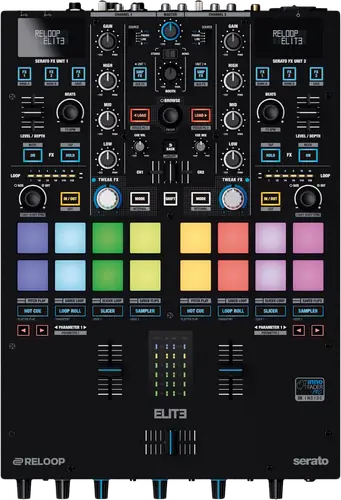
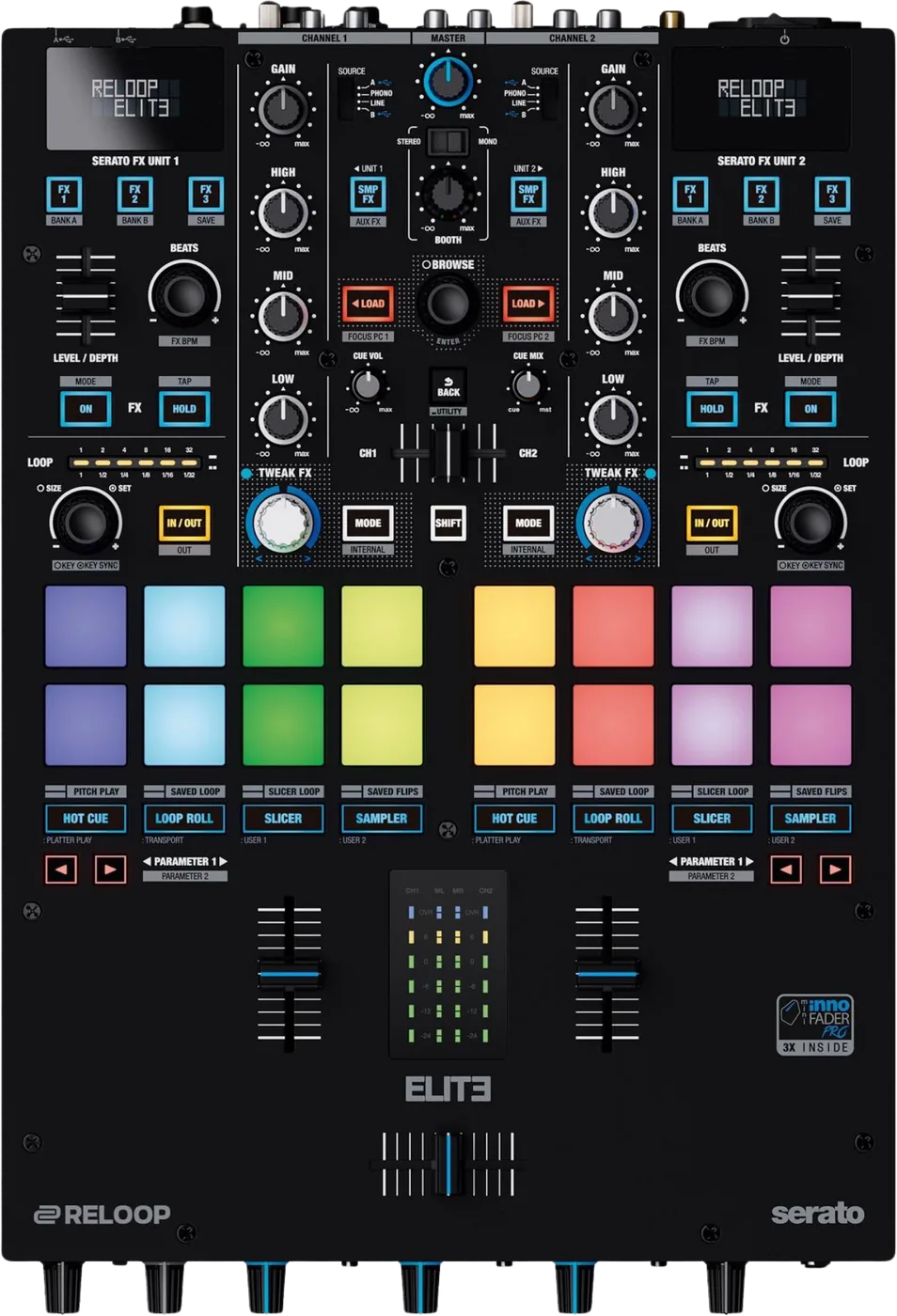
Booth briefing. The Reloop ELITE is a two channel Serato battle mixer, and it ships with Serato DJ Pro and the DVS Expansion Pack in the box, so there is no licence to buy before it works with timecode. Two computers can be connected at once, with the browse section driven by one of them. Its behaviour is set in an onboard setup utility of nineteen items, closed with EXIT. It has FX buttons that arm an effect before it is heard, and a record output whose level is independent of the volume dials, so the recording feed stays constant whatever the master is doing.
When it goes wrong: No sound from the mixer
Fast Lane
The five things that decide your gig
The five things on the ELITE that change what happens next, if you are reading this in the booth. All five are explained in full further down this page.
EXIT restarts the mixer. Leaving the setup utility drops the master output.
EXIT restarts the mixer. Reloop’s own words for it are that the mixing console starts anew, and the Spanish is explicit that it reboots. Dipping into the setup utility between records to nudge a cut-in setting drops the master output on the way out, and there is no documented save step: Back only returns to the previous menu.
Treat the setup utility as a soundcheck job rather than a mid-set one. There is nothing in the menu that is worth what leaving it costs while a record is playing.
No setting in the setup utility has a published default.
Reloop state a default value for not one of the nineteen setup items, and never say what the factory reset restores them to. On an unfamiliar or inherited mixer there is no published answer to the question of what any of these settings should be.
The menu carries master output stereo or mono, a master limiter, fader cut-in, FX fader control, USB output routing, filter resonance, talkover level, isolator crossover, shift lock, velocity sensitivity, pad sensitivity, mic to booth, mic low cut, aux gain compensation, an LED check, a factory reset, the firmware update, an ABOUT screen and EXIT.
On a mixer you did not set up yourself, that means the only way to know how it is configured is to walk the menu and read every item before you play.
A lit FX button means ARMED, not audible.
Pressing FX1, FX2 or FX3 ARMS the effect slot rather than switching it on. A lit FX button means armed. The effect is only audible after FX On or FX HOLD is activated.
So an FX button that lights and does nothing is the mixer working as designed, and the missing step is the one that makes the slot audible rather than the one that selects it.
In a back to back changeover, the incoming browse encoder looks dead.
Two computers can be connected at once, one to each USB port. Only one of them can drive the navigation section at a time, which Reloop describe as a guard against loading a track by accident. The assignment is moved with Shift plus Load 1 for USB port A and Shift plus Load 2 for USB port B.
In a back to back changeover the incoming DJ’s browse encoder appears dead until that assignment is moved, and nothing on the mixer says why.
The record output ignores the volume dials, so level a recorder off the recording.
The record output is not affected by the volume dials. Pulling the master down does not protect the recording and riding the master does not change it, so setting a recorder by ear off the master fader will be wrong.
Set the recorder from what the recorder itself is receiving. Riding the master to protect a take does nothing here.
If something goes wrong
Out of a cold van into a warm room
On the ELITE, build the wait into the load-in rather than into the soundcheck, because the one number that would tell you how long to wait is the number Reloop do not print.
All five manuals forbid operating the unit after bringing it from a cold environment into a warm one, and require waiting until it reaches ambient temperature. None of the five states how long that takes, which is the one number a DJ loading in from a cold van actually needs.
You are being asked to install something, or nothing at all
On the ELITE the two official documents disagree about what a Windows machine needs, and this site is not going to pick one for you.
The two documents do not agree about drivers. The Serato quick start states the ELITE needs no manufacturer specific drivers on Mac or Windows and is plug and play, adding that you may be asked to install a Control Panel which adjusts mixer settings. The Reloop manual has Windows users install a driver from reloop.com. The likeliest reading is that the Control Panel and the Windows driver are the same download described from two sides, and neither document says so, which is why this site records both rather than choosing.
What to watch for
Firmware: the published versions, and the route that works
On the ELITE this site will not repair the printed update procedure by guessing which encoder was meant or which power state is correct, because a guess written in a confident voice is indistinguishable from a fact. Read the version from the ABOUT screen, and take the update to a bench rather than a booth.
The manual names no firmware version and the ABOUT screen in the setup menu is the only place to read one. Reloop publish firmware v1.07 and v1.06 for this mixer on its product page, alongside a Windows ASIO driver.
The printed update procedure needs two steps read across from elsewhere in the manual. It says to make sure the mixer is OFF and then to scroll to FW UPDATE, and FW UPDATE is a setup utility item, which section 3.1 reaches by holding Shift and Back while turning the mixer ON. It then names a Time Encoder, where the encoders on this mixer are the beat length select encoder, the loop encoder and the navigation encoder. So: enter the setup utility with the power-on chord and confirm with the navigation encoder. The rest runs a Java tool named ReloopFirmwareUpdate.jar against a .bin file from the product page.
Reading the two language sections together
On four of these five models the English and the Spanish of the same manual give the same task in a different order. On two turntables the tone arm height procedure runs opposite ways: the English releases the ring lock before adjusting and the Spanish sets it, and the English order is the one that works on the hardware. On the Mixtour Pro it runs the other way round, and the Spanish, German and French editions are the ones that match the parts list.
On the ELITE that pattern shows up in the metering target and in the update procedure, so a reader who checks the other language section is not being paranoid. It is a real way to find out that an instruction is unreliable.
What the manual does not answer
On the ELITE this is where the published documentation stops. The manual contains no troubleshooting section.
There is no fader calibration procedure of any kind in this manual. The word does not appear. No fader travel check, no procedure after replacing a fader and no statement of which fader type is fitted.
The manual never says which side of the crossfader is A and which is B, although its own USB routing table refers to CF A and CF B.
The fuse clause says to replace like for like and never prints the rating.
Every one of these manuals excludes from warranty the wear parts that can be exchanged from the outside, and not one of them says which parts those are. All five also void the warranty if the manufacturer serial number is removed.
Compatibility
What Serato software is included, and what is not
Reloop state that the ELITE is a Serato DJ Pro and DVS enabled mixer and does not require further licences for activation. The box carries the full version of Serato DJ Pro with the DVS Expansion Pack, two Serato control vinyls with NoiseMap, a USB cable, a power cord, the manual and a 90 day BPM Supreme membership.
Pitch Play and the tone pitch controls need the Serato expansion pack Pitch N Time, which is NOT the DVS Expansion Pack in the box. The two are easy to conflate and only one of them is supplied.
Both are Serato expansions and both are called an expansion pack, which is exactly why the two get confused. The one in the box is the one that lets the mixer run timecode.
Which Serato category this mixer falls into
The Serato quick start guide calls the ELITE a Serato DJ Pro hardware unlocked device and states that it works with Serato DJ Pro out of the box. That is a different category from a deck that only works alongside other unlocking hardware.
Two computers, DVS sources and drivers
Two computers can be connected at once, one to each USB port. Only one of them can drive the navigation section at a time, which Reloop describe as a guard against loading a track by accident. The assignment is moved with Shift plus Load 1 for USB port A and Shift plus Load 2 for USB port B.
In a back to back changeover the incoming DJ’s browse encoder appears dead until that assignment is moved, and nothing on the mixer says why.
For DVS, turntables go to the phono inputs of channels 1 and 2 and CD players to the line inputs, with the input switches set to USB A or USB B, and the matching source selected in the Serato audio settings.
The ELITE is class compliant on macOS and needs no driver. Windows requires a driver from reloop.com, and Reloop instruct restarting the mixer after installing it.
Features explained
The setup utility, and the reboot on the way out
The setup utility is entered by holding Shift and the Back button while switching the mixer ON. The effect display then reads MASTER and the navigation encoder moves through the items.
The menu carries master output stereo or mono, a master limiter, fader cut-in, FX fader control, USB output routing, filter resonance, talkover level, isolator crossover, shift lock, velocity sensitivity, pad sensitivity, mic to booth, mic low cut, aux gain compensation, an LED check, a factory reset, the firmware update, an ABOUT screen and EXIT.
EXIT restarts the mixer. Reloop’s own words for it are that the mixing console starts anew, and the Spanish is explicit that it reboots. Dipping into the setup utility between records to nudge a cut-in setting drops the master output on the way out, and there is no documented save step: Back only returns to the previous menu.
That is the shape of the problem on this mixer. The menu holds the settings a DJ is most likely to want changed on an unfamiliar unit, and the only documented way out of it interrupts the audio.
Nineteen items and not one published default
Reloop state a default value for not one of the nineteen setup items, and never say what the factory reset restores them to. On an unfamiliar or inherited mixer there is no published answer to the question of what any of these settings should be.
A setup item changes the Shift button from held to latched. Every Shift chord in the manual is written as a hold, so on a mixer left in shift lock they all behave differently, and no indicator for the state is described.
A setup item sends the microphone to the booth output or keeps it out of it, and Reloop name the OFF position as the way to prevent feedback. Which state the mixer arrives in is not stated, so a howling booth monitor may or may not be this setting.
Cut-in for the crossfader and the channel faders is adjustable in the setup menu from 0.0 mm to 3.2 mm in 0.1 mm steps.
Read the whole menu before you play on a mixer somebody else has been using. Since the factory reset has no published result either, resetting is not a way of getting back to a known state, it is a way of getting to an undocumented one.
The effect sections, and why a lit button is silent
Pressing FX1, FX2 or FX3 ARMS the effect slot rather than switching it on. A lit FX button means armed. The effect is only audible after FX On or FX HOLD is activated.
The left effect section is assigned to deck 1 and the right to deck 2, and Reloop state that this assignment cannot be changed. There is no routing workaround in the mixer.
Channels 1 and 2 carry hardware effects on the TweakFX control: Filter, BitCrush, Whitenoise and Flanger, cycled with the mode button, with the filter off at the 12 o’clock position.
No filter frequency range, no resonance percentage range and no BitCrush depth is printed anywhere.
Faders, curves and cut-in
The line fader curve dial is linear at the 12 o’clock position and the line fader signal can be reversed with a switch. The crossfader curve dial is sharp fully anticlockwise, which Reloop describe as good for scratching and cutting, and smooth fully clockwise for long mixes.
The two curve knobs do not follow the same logic: the line fader is neutral in the middle and the crossfader is at one extreme of its range for the setting most battle DJs want.
Cut-in for the crossfader and the channel faders is adjustable in the setup menu from 0.0 mm to 3.2 mm in 0.1 mm steps.
The manual never says which side of the crossfader is A and which is B, although its own USB routing table refers to CF A and CF B.
The pads, and a mode count that does not add up
The manual states that 12 different modes can be set for the eight pads and then documents eight of them: hot cue, loop roll, slicer, sampler, pitch play, saved loop, slicer loop and saved flips. Four modes are named nowhere in any language, so a DJ cycling the mode buttons cannot tell what should be there.
The pad sensitivity labels read backwards from what they appear to mean. Reloop state that ULTRA needs very low pressure while LOW needs a harder press, so the label names the sensitivity and not the force required.
So a pad that seems to need a hammer is a mixer set to LOW, and the label is describing the sensitivity rather than the effort.
Metering, the limiter, and a target the manual gives twice
The English manual contradicts itself about the same meter. The channel section says to keep peak signals within the GREEN range of the LED indicator, and the master section says of the same indicator that it should only be visible in the YELLOW range. The Spanish says yellow in both places.
The master limiter offers 0 dB, minus 3 dB, minus 6 dB and minus 12 dB. The 0 dB setting is no limiting at all, and which setting the mixer ships in is not stated.
A setup item sends the microphone to the booth output or keeps it out of it, and Reloop name the OFF position as the way to prevent feedback. Which state the mixer arrives in is not stated, so a howling booth monitor may or may not be this setting.
The specification table prints no THD, no signal to noise ratio, no output level, no output impedance, no input sensitivity, no phono capacitance, no mic sensitivity and no power consumption. It gives a frequency response of 20 Hz to 20 kHz, the EQ ranges, the dimensions and the weight, and stops.
Professional tips
Streaming a set without a second mixer
Reloop publish a two page sheet on livestreaming from the ELITE. The route they document is to feed OBS directly from the REC channel of the second interface: connect the USB B port to a second computer for streaming while the first computer runs Serato DJ Pro, set the general audio settings in OBS, create an Audio Input Capture, and choose Reloop ELITE as its device.
That is a use for the second USB port that the manual never describes. The manual presents two computers as a back to back changeover feature; the streaming sheet uses the same port to send a record feed to a machine that is not mixing anything.
Connections and setup
Every socket, and the output that is not on the fader
Two phono RCA, two line RCA, an AUX RCA, a microphone or line TRS input with a level switch, two Smart Link USB type A ports and two USB type B ports.
Balanced XLR master, unbalanced RCA master, balanced TRS booth, unbalanced RCA record output, and headphones on 6.3 mm and 3.5 mm jacks.
The record output is not affected by the volume dials. Pulling the master down does not protect the recording and riding the master does not change it, so setting a recorder by ear off the master fader will be wrong.
Firmware, drivers and manuals
Official downloads and documents
Go to Reloop for the files themselves. We link their pages instead of hosting a copy, because a manual copied here is a snapshot of release day and theirs is the one that stays current.
Manuals. Official Reloop manual page →
Broken link? Let us know and we'll fix it.
Frequently asked questions
What is it?
Reloop describe it as a professional mixing console which regulates and mixes low level audio signals, connected between a signal source and an amplifier or active speakers.
The panel is a 2 channel battle mixer layout with a crossfader, built around Serato.
What goes in, what comes out, and how far does the EQ move?
Two phono RCA, two line RCA, an AUX RCA, a microphone or line TRS input with a level switch, two Smart Link USB type A ports and two USB type B ports.
Balanced XLR master, unbalanced RCA master, balanced TRS booth, unbalanced RCA record output, and headphones on 6.3 mm and 3.5 mm jacks.
Minus 45 dB total kill, and minus 90 to plus 12 dB, quoted at 70 Hz, 1 kHz and 13 kHz. The microphone EQ runs minus 26 to plus 12 dB at 100 Hz and 10 kHz.
How big is it, and what does it weigh?
290 mm wide by 426 mm deep by 105 mm high, with the potentiometers adding 18.5 mm. 6.3 kg
The specification table prints no THD, no signal to noise ratio, no output level, no output impedance, no input sensitivity, no phono capacitance, no mic sensitivity and no power consumption. It gives a frequency response of 20 Hz to 20 kHz, the EQ ranges, the dimensions and the weight, and stops.
Related mixers
Commonly paired with
What you usually find beside it in working booths, from club, festival and rental installs rather than from a manufacturer document.
Playing soon and it is not working?
Emergency Mode walks you through the checks in order, and it works with no signal once you have opened it.
Start Emergency ModeKeep the Emergency Card
We will email you the printable PDF so it is on your phone before the next dark booth. Occasional notes that save gigs. No spam, unsubscribe in one click.
Registering is free and counts everywhere on Save My Gig. We send a confirmation email first. Your address is stored with Brevo, our email provider. Unsubscribe any time. Privacy