

RP-8000 MK2, the field manual
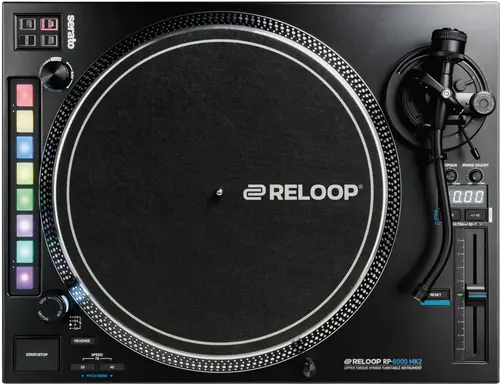
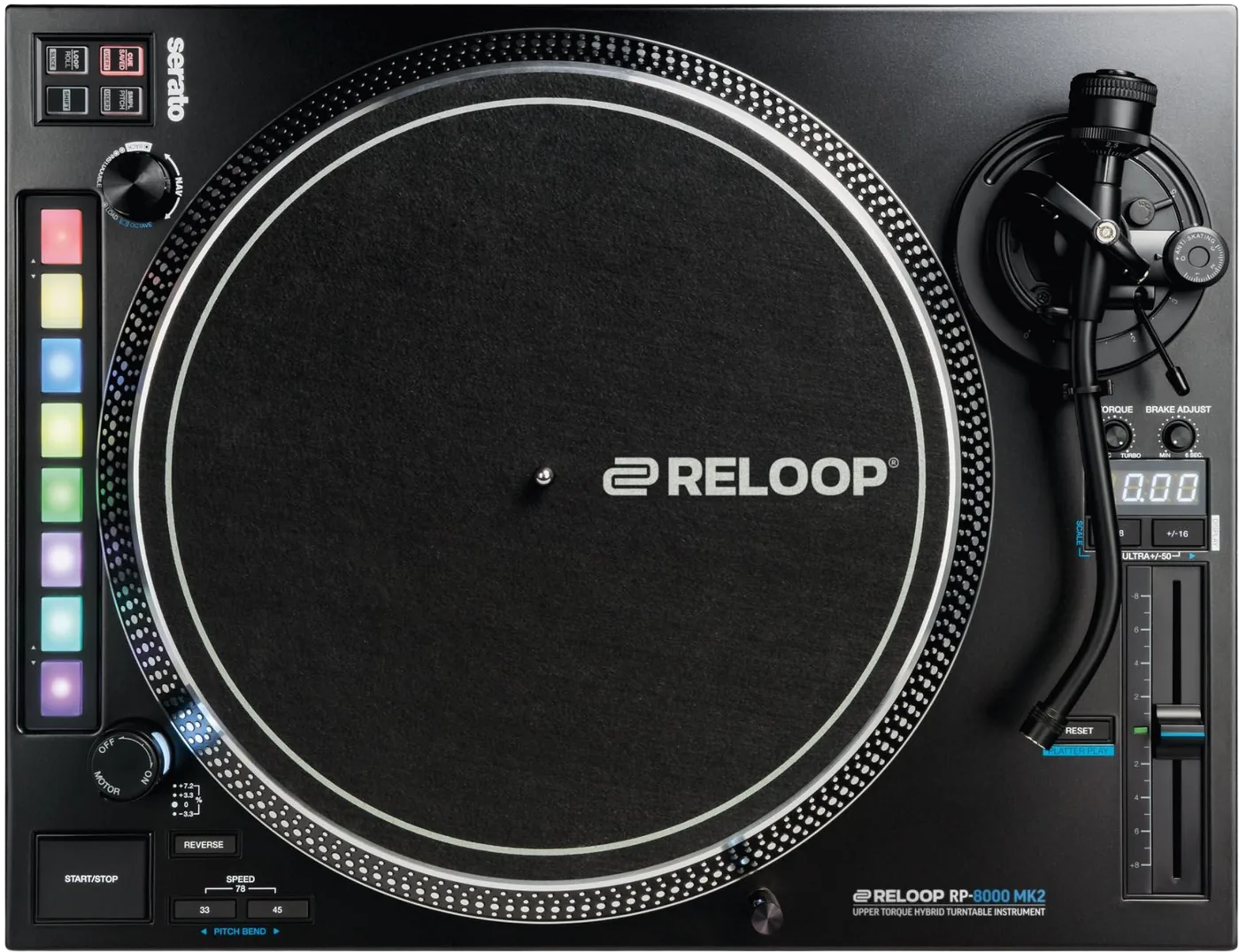
Booth briefing. The Reloop RP-8000 MK2 is a quartz driven direct drive turntable with eight performance pads and a USB port, so it is two machines in one case: a turntable and a Serato controller. The pads drive Serato over USB, and a Platter Play mode moves the pads off Serato and turns the speed buttons into pitch bend, with its own PDF to describe it. Two decks chain together on one computer cable, and the deck holding the cable is deck 1. A reverse control runs the platter backwards and stays engaged until pressed again.
When it goes wrong: A turntable that hums
Fast Lane
The five things that decide your gig
The five things on the RP-8000 MK2 that change what happens next, if you are reading this in the booth. All five are explained in full further down this page.
Reverse latches. One press leaves the platter running backwards.
Reverse latches by default. The advanced setup menu records the shipping state as toggle, so pressing reverse once leaves the platter running backwards until it is pressed again. The body of the manual describes only the momentary behaviour, which is the option that is switched OFF out of the box.
The momentary behaviour most DJs expect is the setting that is switched OFF when the deck arrives, and it lives in the advanced setup menu rather than beside the button.
If the pads stopped driving Serato, you are in Platter Play.
Entering Platter Play stops the pads controlling Serato DJ Pro entirely, and the CUE and LOOP buttons become pitch bend. Nothing on the deck announces the change except the pad colours.
Reloop give the entry and exit gesture as Shift plus Reset or a double tap of Reset, and also say the mode can be left by selecting any performance mode or by pressing Reset again.
Two lit speed LEDs mean 78 RPM, not a fault.
To select 78 RPM you press the 33 and the 45 switch together, and both LEDs light. The manual gives this as a note, not as a control.
The same chord works on the RP-7000 MK2 and the RP-7, and on all three it is printed as a note rather than as a control.
In a chain, cabling order decides which deck is which.
In a chain, the deck holding the cable to the computer is always the master and is set to deck 1 automatically, and the second deck becomes deck 2. Re-patching the chain reassigns the decks with nothing on the panel to say so.
To reassign a deck by hand, hold the navigation encoder for more than three seconds, turn it to pick CH-1 through CH-4, and press to confirm. CH-1 is deck A, CH-2 is deck B, CH-3 is deck C and CH-4 is deck D.
The TT-Link socket is USB A and gives 5 V at 0.2 A. Do not use it as a charger.
A TT-Link port allows up to four of these decks to be chained so that only one USB cable reaches the computer. Reloop cap it at 5 V and 0.2 A and warn that a connected device drawing more may be damaged, and recommend connecting only RP-8000 MK2 series decks to it.
Neither the current limit footnote nor the instruction to connect only RP-8000 MK2 series decks appears in the Spanish section of the same manual.
If something goes wrong
Out of a cold van into a warm room
The RP-8000 MK2 carries the same condensation clause as every Reloop manual in this set, with operating limits of 5 degrees Celsius to 35 degrees Celsius and no storage range published at all.
All five manuals forbid operating the unit after bringing it from a cold environment into a warm one, and require waiting until it reaches ambient temperature. None of the five states how long that takes, which is the one number a DJ loading in from a cold van actually needs.
It suddenly runs fast, or controls stop behaving
On the RP-8000 MK2 a deck that speeds up on its own is a software setting before it is a motor fault.
Reloop publish an answer for a deck that suddenly runs fast or whose functions stop behaving. They attribute it to hardware remapping from Serato DJ Pro, and the documented fix is to disable Allow Hardware Remapping in the Serato settings.
Serato does not see the deck at all
On the RP-8000 MK2 there are three separate things that can be missing, and only one of them is a cable.
Reloop publish an answer for a deck Serato does not see. They ask for an up to date Serato DJ Pro, state that the RP-8000 MK2 was released with version 2.1.0 of Serato, and note that DVS needs its own licence activated separately.
What to watch for
Firmware: two published files, and the serial number decides
On the RP-8000 MK2 the manual and the product page answer different halves of the same question, and the half that decides which file you need is on the product page. The manual documents an update procedure but names no version number. Reloop publish two firmware downloads on the product page and label which unit each one is for: v1.13 is marked for serial numbers below G220300001C only, and v2.02 for serial numbers G220300001C or higher. Reloop also publish how to read the version already installed, in their product FAQ rather than in the manual: power the deck off, then hold SHIFT and SMPL while switching it back on. That is the same chord the manual gives for entering the update procedure with USB connected, and Reloop nowhere explain the difference between the two.
The update is entered by holding SHIFT and SAMPLER while switching the deck on with USB connected, at which point the pitch display reads Update. Reloop require a Java Runtime Environment on the computer for the update tool.
The English and Spanish procedures end differently: English says to unplug the USB cable after a successful update, Spanish says to power cycle the deck. The English LED check also documents an encoder brightness adjustment that is saved, and the Spanish has neither, prints its first step unfinished, and cites a control numbered T3 that does not exist.
An LED check is entered by holding CUE and Shift while switching the deck on. In the English procedure the encoder then sets LED brightness and the setting is saved.
What the manual does not answer
On the RP-8000 MK2 this is where the document in the box stops. Two of the items below are answered by Reloop elsewhere, and those answers are printed with them. The manual contains no troubleshooting section.
The manual does not document standby. Its only mention there is a setup pad that turns a start and standby sequence on or off, with no timeout, no indicator behaviour and no procedure. Reloop answer it outside the manual: their product FAQ states that standby is switched off by holding SHIFT and LOOP while turning the deck on, which opens the advanced setup menu, where each drum pad toggles one function and lights green for on and red for off. Neither source publishes the timeout, which the smaller RP-7 does.
The manual never says what the pitch display shows during ordinary play, and documents it only for deck assignment, for the word Update, and for Platter Play. Reloop fill that in outside the manual: their product FAQ states that holding Shift and pressing the plus 16 percent button changes the display mode, and lists four of them as pitch fader position, BPM, elapsed time and remaining time. Reloop qualify the last three as Serato DJ Pro, and say nothing about what those three show on a deck that is not connected to it.
No fuse rating is printed, and the fuse replacement clause appears only in the Spanish section with no English counterpart.
Every one of these manuals excludes from warranty the wear parts that can be exchanged from the outside, and not one of them says which parts those are. All five also void the warranty if the manufacturer serial number is removed.
Compatibility
What Serato needs beside it, and what it does not need installing
The Serato quick start guide states the deck is a Serato DJ Pro official accessory, that it works with Serato DJ Pro out of the box, and that it requires additional primary hardware connected which falls under the Serato DJ Pro hardware unlocked or paid upgrade categories. The turntable does not unlock the software by itself.
On drivers the same guide is unambiguous: the deck does not require manufacturer specific drivers on Mac or Windows and is plug and play with Serato DJ Pro.
Those two sentences answer the two questions people actually ask before buying a pair. Nothing has to be installed, and the deck still cannot run Serato on its own: something else in the chain has to be the unlocking hardware.
Stems, and the version that has to be underneath them
For Serato Stems on this deck Reloop point to custom MIDI mapping inside Serato DJ Pro rather than to a dedicated pad mode, and state that at least Serato DJ Pro 3.0 must be installed.
Features explained
Reverse, and the default that catches people
A reverse switch runs the platter counterclockwise with its LED lit. Reloop state that all functions of the deck remain available while it is reversed.
Reverse latches by default. The advanced setup menu records the shipping state as toggle, so pressing reverse once leaves the platter running backwards until it is pressed again. The body of the manual describes only the momentary behaviour, which is the option that is switched OFF out of the box.
That sentence from Reloop matters twice over on the RP-8000 MK2: nothing is inhibited while the platter runs backwards, so a deck left in reverse behaves normally in every other respect and gives you no second clue.
Speeds, pitch ranges, and the chord the parts list does not explain
33 1/3, 45 and 78 RPM. To select 78 RPM you press the 33 and the 45 switch together, and both LEDs light. The manual gives this as a note, not as a control.
Variably adjustable at plus or minus 8 percent, 16 percent and 50 percent.
The manual says the 50 percent range is selected by pressing both pitch range select switches at once, with both LEDs lit. Its own parts list names only one Pitch Range Select Switch, so the document never says which two buttons those are.
On all three turntables, 78 RPM is a chord: press the 33 and the 45 button together and both LEDs light. Two lit speed LEDs mean 78, not a fault and not both speeds at once.
Platter Play, and why your pads stopped working
Platter Play is documented only in a separate five page English-only guide, revision 1.2, published as its own download rather than included in the instruction manual.
Platter Play maps the eight performance pads to musical note values so the platter speed, and therefore the pitch of whatever is playing, is driven from the pads. Reloop publish 22 scales and describe up to four octaves shown as four pad colours: green is the default octave, red the lower, yellow the higher and blue the highest where available.
Entering Platter Play stops the pads controlling Serato DJ Pro entirely, and the CUE and LOOP buttons become pitch bend. Nothing on the deck announces the change except the pad colours.
Reloop give the entry and exit gesture as Shift plus Reset or a double tap of Reset, and also say the mode can be left by selecting any performance mode or by pressing Reset again.
Custom scales are saved in the deck and survive power off, and Shift plus the 16 percent button jumps straight into custom scale 1. An inherited deck can therefore hold somebody else’s scales.
A root note must be assigned to the root note pad before any other pad can be assigned. Building a scale in any other order fails without saying so.
An external MIDI keyboard driving the platter must transmit on channels 12 to 15 rather than 1 to 4, so a keyboard left on its factory default channel does nothing at all.
The pads, the layers and the plug-in that is not included
The deck appears to the operating system as RP8000MK2 by plug and play with no driver, on the Windows and macOS versions the manual names.
The performance modes are stacked in three layers reached by pressing a mode button, pressing it again, and holding Shift. Cue, Sampler and Loop are the first layer, Saved Loop, Pitch Play and Roll the second, and two user MIDI banks plus Slicer the third.
Pitch Play requires the paid Serato plug-in Pitch N Time, which is not supplied with the deck. The mode appears on the deck whether or not the plug-in is licensed.
The tone arm, the 6 mm limit, and the order to do it in
The tone arm height is adjustable over 6 millimetres from a 0 millimetre default, and Reloop warn that exceeding the maximum 6 millimetres risks damage to the tone arm socket.
The two language editions give the sequence in opposite order. The Spanish takes the tone arm ring lock TO the LOCK position first; the English releases it FROM LOCK, adjusts the height, then returns it to LOCK. Follow the English order, because the ring has to be free before the height will move, and forcing a locked ring is what the warning above is about.
The counterweight scale must face the DJ on this deck. That is the opposite of the RP-7, where Reloop require the same scale to face the tone arm tube.
3.5 to 8.5 g, or 13 to 18 g including the headshell. Anti-skating range 0 to 3 g.
Not stated. Reloop defer the recommended stylus force to the cartridge manufacturer.
Professional tips
Assign the decks before the room fills
The Serato guide gives the deck assignment as pushing the NAV encoder in and holding it for five to ten seconds until CH-1 to CH-4 flashes, turning the encoder to choose, then pressing again to confirm, at which point the display flashes rapidly. Holding it again reassigns.
The Serato guide and the manual describe the same encoder with different hold times, so do it once at soundcheck and watch the display rather than counting seconds in the dark.
Connections and setup
What comes out, and what Reloop never print
Reloop’s published specification lists one phono output and one line output, both gold plated, and one GND earth connection, and they state that the deck can be connected to two mixers at the same time, which also allows switching from DVS to vinyl. Reloop state that grounding the turntable is optional and usually only necessary under extreme circumstances.
No output level, no output impedance and no phono or line gain figure appears anywhere in the manual, and the manual parts list names no phono or line switch. The two separate outputs and the connection to two mixers are published on the product page rather than in the document that ships with the deck.
White is left positive, blue is left negative, red is right positive and green is right negative.
The three turntables give three different answers about earthing. The RP-7000 MK2 says grounding is usually unnecessary because the housing does it, and to connect the wire only if you hear hum. The RP-8000 MK2 calls grounding optional and needed only under extreme circumstances. The RP-7 states the ground connection as a plain step with no condition attached.
The TT-Link port, and what must not go in it
A TT-Link port allows up to four of these decks to be chained so that only one USB cable reaches the computer. Reloop cap it at 5 V and 0.2 A and warn that a connected device drawing more may be damaged, and recommend connecting only RP-8000 MK2 series decks to it.
Neither the current limit footnote nor the instruction to connect only RP-8000 MK2 series decks appears in the Spanish section of the same manual.
In a chain, the deck holding the cable to the computer is always the master and is set to deck 1 automatically, and the second deck becomes deck 2. Re-patching the chain reassigns the decks with nothing on the panel to say so.
To reassign a deck by hand, hold the navigation encoder for more than three seconds, turn it to pick CH-1 through CH-4, and press to confirm. CH-1 is deck A, CH-2 is deck B, CH-3 is deck C and CH-4 is deck D.
Firmware, drivers and manuals
Official downloads and documents
Go to Reloop for the files themselves. We link their pages instead of hosting a copy, because a manual copied here is a snapshot of release day and theirs is the one that stays current.
Manuals. Official Reloop manual page →
Broken link? Let us know and we'll fix it.
Frequently asked questions
What is it, and what does the drive actually do?
Reloop describe it as a professional turntable that plays conventional 12 inch and 7 inch records, connected to a mixing console, and the specification table calls it a manual quartz driven turntable with MIDI control.
Quartz driven upper torque direct drive on a brushless DC motor, with an aluminium die cast platter.
Adjustable on a dial. Reloop print the range as, and the typo is theirs, adjsutable from min. 2800 to 4500 qf-cm. Electronic brake with an adjustable time of 0.2 to 6 seconds on a dial. Less than 0.2 seconds for start up and tempo change at 33 RPM.
How big is it, and what does it draw?
458 x 144.6 x 354 mm, width by height by depth. 11.8 kg
Power input 17 W. AC 115 or 230 V at 60 or 50 Hz for EU and US units, AC 100 V at 50 or 60 Hz for Japan.
What comes in the box?
Reloop give no scope of delivery section. The only statement is a footnote under the specifications: incl. USB cable, slipmat and tone arm illumination but without stylus.
The Spanish footnote adds a cartridge the English does not, while the parts list says the headshell is not included in the scope of delivery.
Related turntables
Playing soon and it is not working?
Emergency Mode walks you through the checks in order, and it works with no signal once you have opened it.
Start Emergency ModeKeep the Emergency Card
We will email you the printable PDF so it is on your phone before the next dark booth. Occasional notes that save gigs. No spam, unsubscribe in one click.
Registering is free and counts everywhere on Save My Gig. We send a confirmation email first. Your address is stored with Brevo, our email provider. Unsubscribe any time. Privacy