

Xone:K2, the field manual
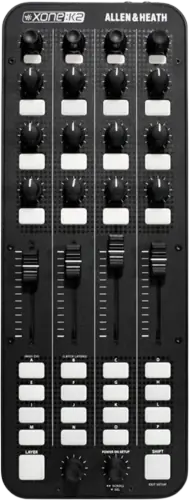
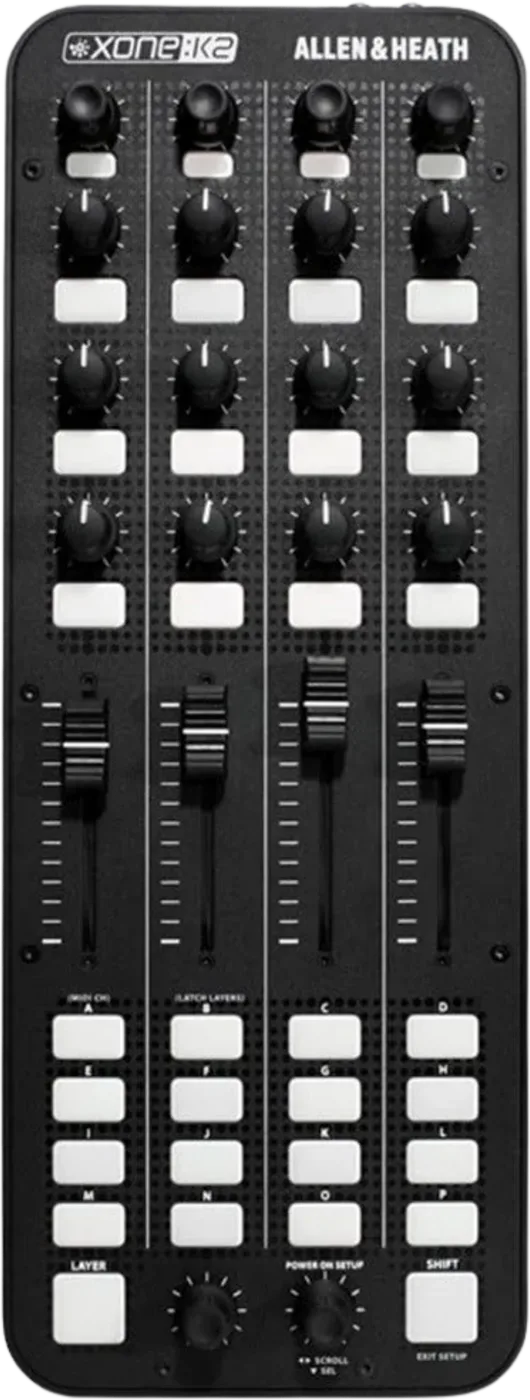
Booth briefing. The Xone:K2 is Allen & Heath's MIDI control surface with a built in sound card: four channels, output only, feeding the headphone socket and the rear phonos, so it cues and outputs audio where the Xone:K3 that replaced it does not. It connects to the computer over USB and sends its MIDI over the same cable. On Windows the full four channels arrive once the driver is installed. Firmware V2.5.0 and later supports MIDI over USB on an Apple Silicon Mac, and the updater runs from an Intel Mac or a Windows PC.
When it goes wrong: The computer cannot see the controller No sound from the controller
Fast Lane
The five things that decide your gig
The five things on the Xone:K2 that change what happens next, if you are reading this in the booth. All five are explained in full further down this page.
On an Apple Silicon Mac, below firmware V2.5.0, it does no MIDI over USB.
A Xone:K2 on firmware older than V2.5.0 does not do MIDI over USB on an Apple Silicon Mac, and the updater that fixes it will not run on an Apple Silicon Mac either. So the unit cannot be repaired from the machine it is failing on. You need one session on an Intel Mac or a Windows PC, once, and after that it works normally on the M-series host.
So this is a thing to settle at home with a second computer, not something you can solve in a booth with the laptop you brought.
On Windows without the driver you get two of the four outputs, and the pair you lose is the master out.
On Windows the class compliant device is only two channels. Allen & Heath state that "To benefit from the full four-channels of audio provided, the Xone:K2 ASIO compatible USB audio and MIDI Device Drivers must be installed", and since outputs 1 and 2 are the headphone pair, the two a Windows machine loses without the driver are the master out on the rear phonos.
Nothing is faulty. The class compliant device is genuinely two channels until their driver is installed.
It does have a sound card, and it is output only.
A four-channel 16-bit internal sound card running at 44.1 and 48 kHz. It is output only: Allen & Heath state that "All four channels run from the PC to the Xone:K2", and the guide documents no audio input anywhere.
That is the headline difference from the Xone:K3 that replaced it, which has no audio path at all. Here you can cue through the unit.
A control that does nothing is usually the layer you are on, not a fault.
Three layers, red, amber and green, selected with the LAYER button when Latching Layers is on. The colour of the LAYER switch is the colour any switch you use will light.
The other candidate is the MIDI channel. Between those two, most dead controls on a connected unit are accounted for.
Two units out of the box both answer to everything, because they ship on the same MIDI channel.
The MIDI channel defaults to 15, which Allen & Heath chose "to prevent control interaction with Xone DB series mixers which default to channel 16".
Every unit leaves the factory on it, so a second one has to be moved before a two-unit rig behaves.
If something goes wrong
The computer does not see it at all
Short answer. Ask what the computer is before you ask what the Xone:K2 is doing. On an Apple Silicon Mac or an AMD Ryzen PC, a unit below firmware V2.5.0 is expected to fail here, and Allen & Heath document both.
Why this happens. On the PC side Allen & Heath document that the K2 "fails enumeration between the host computer and the K2 controller" and gets "stuck in a connection loop" on AMD Ryzen systems, and the same V2.5.0 update fixes it, with the same requirement to run the updater on an Intel-based Mac or Windows PC. Their firmware notes are more concrete about what you will see: the unit "does not maintain stable (power) connection with Windows PCs on some AMD Ryzen (5000 Series) chipsets before V2.5.0 firmware is installed", and the symptoms they list are that PCs "may prompt this device cannot start, code 10 error, or the host PC continually re-powers the XONE controller". On the Mac side the symptom is a unit that is present but does no MIDI. Neither is a broken unit and neither is a cable, which is what makes the half hour you would otherwise spend swapping leads a wasted one.
Fix it now, if you can. If a different laptop is in the room, try it: an Intel Mac or a non-Ryzen PC will very likely work, and that also tells you what you are dealing with. If not, the honest answer is that this is not fixable here and the rig needs to work without the unit. Everything you mapped to it has to be reachable somewhere else.
Avoid it next time. Update to V2.5.0 on an Intel Mac or a Windows PC, once, before it matters. And check power: bus power through an unpowered hub produces its own version of this symptom that no firmware will fix.
Only two outputs appear, and nothing reaches the mixer
Short answer. A Xone:K2 on Windows without the driver is a two-channel device, and the two channels you get are the headphone pair. On Windows the class compliant device is only two channels. Allen & Heath state that "To benefit from the full four-channels of audio provided, the Xone:K2 ASIO compatible USB audio and MIDI Device Drivers must be installed", and since outputs 1 and 2 are the headphone pair, the two a Windows machine loses without the driver are the master out on the rear phonos.
Why this happens. The class compliant path Windows uses with no driver installed exposes a stereo device, and Allen & Heath say it defaults to Soundcard Output 1 and 2, which is the headphone pair. The unit's four channels are a headphone pair and a master pair, so the two you lose are the two the room hears. Your cue is perfect and the rear phonos carry nothing, which is why this reads as a software routing mistake rather than a missing driver.
Fix it now. Install the Allen & Heath driver, v2.9.95.2, released December 2021, then reselect the device in your software and check the output routing again, because adding two channels usually resets what was assigned where. The installer has conditions of its own: open the Drivers folder and run Setup.exe, pick a language, select Install the driver, and connect the Xone:K2 with the USB lead only when the installer prompts for it. When the installation finishes it asks you to reboot the computer.
Avoid it next time. Install the driver on every Windows machine that will ever run the gig, including the backup laptop. Allen & Heath note that the installer "does not remove previous driver installs from registry". So on a machine that has had an older driver, remove the old one deliberately rather than installing over it, and Allen & Heath print the removal route: Start, Settings, Devices, Device Manager, expand the Universal Serial Bus controllers tree, right click the Allen & Heath XONEK2 entry, select Uninstall, tick the option to delete the driver software for this device, and click Uninstall.
A control does nothing and the unit is connected
Short answer. Two candidates before you suspect the Xone:K2 itself: the layer you are on, and the MIDI channel.
Why this happens. Three layers, red, amber and green, selected with the LAYER button when Latching Layers is on. The colour of the LAYER switch is the colour any switch you use will light. A control that appears dead is very often a control that is live on a layer you are not looking at, and the layer scope is itself a setting, so which controls are layered is not obvious from the panel. Separately, The MIDI channel defaults to 15, which Allen & Heath chose "to prevent control interaction with Xone DB series mixers which default to channel 16". A mapping written for channel 16, or imported from somebody whose unit was changed, addresses a unit that is not listening.
Fix it now. Press LAYER and try the control again on each colour. If it is dead on all three, check the MIDI channel in setup mode by counting the illuminated switches, and compare that to what your mapping expects. Only after both of those is the mapping itself the suspect.
Avoid it next time. Write the MIDI channel on the underside of the unit in permanent marker, particularly if you own two. It is a setting you change once and need to know for years.
What to watch for
On an Apple Silicon Mac, below V2.5.0, it will not do MIDI
Short answer. A Xone:K2 on firmware older than V2.5.0 does not do MIDI over USB on an Apple Silicon Mac, and the updater that fixes it will not run on an Apple Silicon Mac either. So the unit cannot be repaired from the machine it is failing on. You need one session on an Intel Mac or a Windows PC, once, and after that it works normally on the M-series host.
Allen & Heath's own words. Their support article says it directly: "There is a firmware update for the Xone:K2 to overcome an issue, whereby, the MIDI on K2 does not work when connecting to M-series Apple Mac devices. The update must be performed either on an Intel-based Mac or Windows PC." The emphasis on the second sentence is theirs, and it is the sentence that matters, because it turns a firmware update into a logistics problem.
Why this is on the watch list and not in the fixes. Because it cannot be fixed where it happens. Every other problem on a page like this has an answer you can carry out in the booth. This one needs a different computer, and the moment you discover it is the moment you cannot solve it. It belongs in the bag-packing conversation.
What actually stops, and what does not. Allen & Heath describe the fix as enabling "full-duplex MIDI and audio via USB connection with Apple silicone devices for macOS", but the symptom they print is narrower and is the one you will recognise: the "hardware is listed and passes audio, but not MIDI data". So below V2.5.0 on an M-series Mac the unit is visible and audible and controls nothing. So a unit that appears in the audio list on an M-series Mac and plays sound is still a unit that will not answer a single control.
The same update fixes a matching PC failure. Allen & Heath document that the K2 "fails enumeration between the host computer and the K2 controller" and gets "stuck in a connection loop" on AMD Ryzen systems, and the same V2.5.0 update fixes it, with the same requirement to run the updater on an Intel-based Mac or Windows PC.
Do this. If you own a K2 and a modern Mac, check the firmware now, on a day when nothing depends on it. There is a way to read it without committing to anything: the updater displays the current device firmware version before it writes anything, and Allen & Heath say that if what it reads is V2.5.0 the firmware is up to date, you do not need to continue the update, and you close the application. They also note that device drivers do not need to be installed on the computer running the updater. If it is below V2.5.0, borrow an Intel Mac or a Windows PC once and update. The updater itself runs on macOS Mojave through Ventura, or on Windows 7, 8.1, 10 and 11. Allen & Heath print it in capitals: do not disconnect the hardware during the update. And it is not finished when the progress bar is: Allen & Heath ask for the unit to be rebooted, meaning disconnected and reconnected, after the new firmware is installed. They ask for the same reboot in the other case too, where the updater reported V2.5.0 already present and you closed it without writing anything.
Official documents. No MIDI on M-series Mac →
Not connecting to a Ryzen PC →
Firmware V2.5.0 release notes →
Found an entry we have missed? Tell us and we will add it.
Where it stands now, and what replaced it
Short answer. Where the Xone:K2 stands is documented rather than announced. Allen & Heath file it under Legacy Products, it is absent from the current Xone series page, and its old product address now serves the Xone:K3. They nowhere print the word discontinued, and support for it is still live: the Ryzen article was last updated in March 2026.
The successor. Allen & Heath announced the Xone:K3 in October 2025 and say it "updates the K2 for the modern performance environment". They also say existing K1 and K2 mappings work on it and that Xone K series users "can use it as a drop-in replacement for their existing K controller". The word "drop-in" is theirs and it is accurate about the mapping. It is not accurate about the rig: the newer unit has no sound card and no headphone socket, so a K2 that was carrying your cue feed cannot be swapped for one without something else taking that job.
No release year. Allen & Heath never announced a launch date for this unit and their news archive does not reach back that far, but their own user guide dates it: publication AP8509 Issue 2 carries Copyright 2011, which puts Issue 1 at 2011 or earlier and rules out the 2012 that usually circulates. Their own site now serves only Issue 3, from 2018, which is why the earlier number was easy to miss.
Compatibility
Drivers, and the two channels Windows does not give you
On a Mac. On a Mac nothing is installed. Allen & Heath state it "is class compliant and enumerates as a MIDI device and four-channel audio device on a Mac".
On Windows, and this is the part that empties the rear phonos. On Windows the class compliant device is only two channels. Allen & Heath state that "To benefit from the full four-channels of audio provided, the Xone:K2 ASIO compatible USB audio and MIDI Device Drivers must be installed", and since outputs 1 and 2 are the headphone pair, the two a Windows machine loses without the driver are the master out on the rear phonos.
Read that consequence slowly. A Windows DJ who plugs in and starts working has a unit that appears to be fully installed, sends MIDI correctly, and cues perfectly in the headphones. The two channels that are missing are the master pair on the rear phonos. So the failure is not "it does not work", it is "everything works except the sound the room hears", which is the version of the problem you find out about in front of people.
The driver. The Windows release Allen & Heath publish is v2.9.95.2, released December 2021. On operating system coverage, the release note marks Windows 11, 10 and 8 compatible and marks only Windows 11 and 10 as having support active, and its own changelog records that "Direct support closed for Windows 8 and legacy Microsoft Windows Operating Systems" in that release. The user guide, which is older, names Windows 7, 8 and 10. Allen & Heath note that the installer "does not remove previous driver installs from registry". So an upgrade over an old install is worth doing deliberately rather than casually.
Common mistakes. Testing at home on a Mac, playing the gig on a Windows laptop, and discovering the asymmetry in the booth.
The mappings Allen & Heath publish, and the two downloads that are not mappings
Short answer. What Allen & Heath publish for the Xone:K2 is a short list. Allen & Heath publish mappings for Ableton Live, TRAKTOR PRO 2 and TRAKTOR PRO 3, on the legacy resources page.
The trap on the same page. The Beatport DJ and VirtualDJ downloads on the same page are printed overlays, the paper legends that sit on the panel. They are not mappings and installing one changes nothing. They sit in the same download list, they are named after software, and they are pieces of paper. Downloading one and expecting your controls to work is a wasted evening.
What is not published. Allen & Heath publish no Serato and no rekordbox mapping for this unit. That does not mean the unit cannot be used with them. It means any mapping you find for those is somebody else's work, with nobody's support behind it, and it is your job to keep a copy of it.
Common mistakes. Assuming a manufacturer mapping exists because the unit is common in that software's community. Those are two different facts.
Two units, one computer, and both responding to everything
Short answer. Both units are on the same MIDI channel, because every Xone:K2 leaves the factory on it. The MIDI channel defaults to 15, which Allen & Heath chose "to prevent control interaction with Xone DB series mixers which default to channel 16". Two units out of the box are two units on channel 15.
Why this happens. Nothing negotiates. Each unit sends on the channel it is set to and your software cannot tell two identical senders apart, so one knob moves two things and a layer press on one changes the colour of both. It looks like a software bug and it is a factory default meeting itself.
Fix it now. Change the channel on one of them. Hold down encoder 1 and then apply power, either by plugging in USB or by connecting the X:LINK lead. The switch matrix flashes red three times to confirm. Switch A is the MIDI channel, the current value shows as a count of lit switches, and the setup encoder changes it.
Avoid it next time. If the two units are permanently a pair, set them once and label them. And if a Xone DB series mixer is in the rig, remember why the default is 15 in the first place: The MIDI channel defaults to 15, which Allen & Heath chose "to prevent control interaction with Xone DB series mixers which default to channel 16".
Features explained
The sound card, and which sockets it feeds
Short answer. A four-channel 16-bit internal sound card running at 44.1 and 48 kHz. It is output only: Allen & Heath state that "All four channels run from the PC to the Xone:K2", and the guide documents no audio input anywhere.
Where the four channels go. Outputs 1 and 2 are the headphone socket on the front, a 3.5 mm mini-jack. Outputs 3 and 4 are the master out on the rear, on RCA phonos. So the unit is a cue feed and a master feed in one box, which is what makes it a complete minimum rig with a laptop and nothing else, and it is exactly the capability the Xone:K3 does not have.
Output only, and that word is doing work. There is no audio input of any kind. You cannot record into it, you cannot put a microphone through it, and you cannot use it as the input side of a DVS rig. Allen & Heath state the direction in one line: all four channels run from the computer to the unit.
Their own document gives two sample rates. The overview bullet in Allen & Heath's own user guide says "Four-channel 48kHz 16-bit internal soundcard" while the Audio Interface section of the same guide says it "can operate at 44.1 and 48kHz". The body text is the specific one. We publish both because they do.
What the numbers are. Frequency response at 44.1 kHz is 20 Hz to 20 kHz, +0 to -0.4 dB, THD+N 0.01% typical, maximum output level +6 dBu, output dynamic range 96 dB. Allen & Heath recommend headphones "rated between 30 to 100 ohms impedance" and add that "8 ohm headphones are not recommended". What they publish no figure for is headphone output power, so this page prints none.
Headphones, and where the level lives. Allen & Heath are specific about this one: the guide asks you to "Ensure that the headphone level in your DAW is turned to an appropriately low level before connecting headphones", which puts the cue level in the software rather than on the unit, and it asks for closed-ear headphones "that provide maximum acoustic isolation when cueing your sources".
Common mistakes. Reading a Xone:K3 guide, or a forum thread about one, and concluding this unit has no audio. The family looks alike and the two generations are opposite on the one thing that decides whether you can hear your cue.
The surface, the layers and what latching actually means
Short answer, in their numbers. Allen & Heath describe it as "52 hardware controls providing up to 171 MIDI control commands across three layers". The switch matrix consists of 16 back-lit tri-colour switches.
Why we are not breaking that down further. Allen & Heath print no per-type count for this surface beyond the 16 switches in the matrix, so this page prints none either. Note also that 171 is not 52 multiplied by 3. Counts that circulate for this unit are derived rather than published, and a reference page that quietly rebuilds a manufacturer's figure is a reference page that will eventually be wrong about one.
Latching does not mean what most people assume. The push switches built into the rotary encoders are the ones Allen & Heath document as momentary: pressing sends a Note On and releasing sends a corresponding Note Off. They document no way to make any switch on this surface latch, and latching here refers only to the Latching Layers feature. If your software shows a button as held rather than toggled, that is the hardware behaving correctly and the fix is in the mapping, not on the unit.
The encoders are not knobs, as far as your software is concerned. There is one difference here worth knowing before you map anything: turning an encoder produces MIDI CC messages "with a unique controller number in two's compliment binary encoding", which is a relative message rather than an absolute one, so a mapping that expects a 0 to 127 sweep from an encoder will not track it. The pots and the faders are the absolute ones, and Allen & Heath describe those as sending "a control value from 0 to 127".
The layers. Three layers, red, amber and green, selected with the LAYER button when Latching Layers is on. The colour of the LAYER switch is the colour any switch you use will light. Setup mode chooses what the layers cover: off entirely, the switch matrix only, the pot switches and top row encoder switches, all switches, or all controls. On all controls the faders and pots pick up softly rather than jumping. With Latching Layers off, the LAYER button is a normal assignable control.
Common mistakes. Building a three layer map at home and never checking that you can identify the active layer at arm's length in a dark booth. The colour is the only signpost you get.
Setup mode, and the two things in it
How to get in. Hold down encoder 1 and then apply power, either by plugging in USB or by connecting the X:LINK lead. The switch matrix flashes red three times to confirm.
What is in there. Setup mode holds exactly two things: the MIDI channel and the Latching Layers scope. Switch A is the MIDI channel and switch B is Latching Layers. That is the whole of it. There is no LED mode, no curve setting, no calibration and no factory reset in this menu, so if a guide tells you to change something else in setup mode it is describing a different unit.
How to get back out, and this is the step people miss. Changing a value on the encoder is not the same as keeping it: the sequence Allen & Heath print is rotate the setup encoder to the value you want, press encoder 1 to store it and return to setup mode, then press the amber switch to exit setup mode, at which point the switch matrix LEDs flash red three times. The store press is its own step, separate from the turn.
The MIDI channel, and why the default is odd. The MIDI channel defaults to 15, which Allen & Heath chose "to prevent control interaction with Xone DB series mixers which default to channel 16". The channel number is shown as a count of illuminated switches rather than as a number. So a second unit on the same computer needs its channel changed here, and you read the current one by counting lights rather than by seeing a number.
Common mistakes. Trying to enter setup mode on a unit that is already powered. The encoder has to be held down as power arrives, which means unplugging first.
X:LINK, what it carries and what it does not
Short answer. Two RJ45 sockets. The supplied lead carries power and data between two units, which frees a USB port when the second unit is used for control only.
The limit, in their words. "X:LINK does not transfer audio between the units, so if units are to have their audio aggregated then two USB ports will be necessary." So the second unit's sound card is unreachable over X:LINK. If you want eight outputs you want two USB cables, and on a Mac you want an aggregate device: "To aggregate two Xone:K2 units together, click the "+" button in the bottom left of the audio devices window to create a new aggregate audio device. Next, in the right hand side of the window, select both instances of the K2 and you will essentially create one device with eight outputs." That editor is the Mac route, and the PC route is not built in at all: Allen & Heath print that procedure for the Mac audio devices window only. Their guide gives no PC equivalent, so this page describes none.
Which end goes to the computer. The unit wired to the IN connection is the one connected to the computer.
How long a chain. The user guide documents linking two Xone:K2 units and no more than two. The one longer run it draws puts a Xone DB series mixer on the end of that pair. Allen & Heath state no maximum beyond what they draw, so this page claims no longer chain than that.
The three device case, and what it does to your MIDI. Allen & Heath document one more shape: their diagram runs OUT of the left K2 to IN of the right K2, and OUT of the right K2 to the X:LINK socket of a Xone DB series mixer, with power to both K2 units supplied over X:LINK. In that arrangement the mixer "acts as a MIDI hub for the two Xone K2 units", their MIDI channel numbers "must be different to each other AND the mixer", and Allen & Heath state the K2 units "will not be seen in software as MIDI devices in their own right", so they are addressed through the mixer by channel number.
And it is not a network port. The socket is RJ45 and the protocol is not Ethernet. Allen & Heath's standing instruction across the X:LINK range is not to connect an X:LINK device to an Ethernet device, and the safety section below is worth reading before anything goes into it.
Power, and what a second unit runs on
Short answer. USB bus powered. A second unit can take its power over X:LINK instead of its own USB port. A Xone DB series mixer at the end of an X:LINK run can power a pair of them, which is the one arrangement Allen & Heath draw in which neither unit has a USB cable of its own.
What is not published. Allen & Heath publish no current draw figure for this unit and document no external power supply. The 5 V 450 mA figure that circulates is the Xone:K3's and does not belong to this one. We are saying that explicitly because the wrong figure is easy to pick up: the two units look alike, sit next to each other in every listing, and one of them has a published number.
What that means in a booth. Bus power means the host has to actually supply it, and an unpowered hub shared with a drive and a controller is where that quietly stops being true. A unit that enumerates and then drops out under load is a power question before it is a firmware question.
The chassis. A light plastic base with a steel front panel, 135 mm wide, 30 mm high, 358 mm deep, 1.0 kg. A carry case that doubles as a stand is included, Allen & Heath part AN8502. It is the only official accessory: no rack kit and no rack ears exist for this unit in their documentation.
Professional tips
Before you put one in the bag
Check the firmware on a quiet day, not a gig day. A unit below V2.5.0 will not do MIDI on an Apple Silicon Mac, and the updater will not run on one either. The fix needs a borrowed Intel Mac or Windows PC, which is a favour you can arrange on a Tuesday and cannot arrange at load-in.
Install the Windows driver on the backup laptop too. Without it Windows gives you a two-channel device, and the two channels you lose are the master pair on the rear phonos. A backup machine that can cue but cannot feed the mixer is not a backup.
Do not plan on X:LINK carrying a second unit's audio. It carries power and data only. Two units with audio is two USB cables, and on a Mac an aggregate device on top of that.
Write the MIDI channel on the base. The default is 15, it is read by counting lit switches rather than seeing a number, and the day it matters is the day you are standing over two identical units trying to work out which one your map is talking to.
Give each layer a colour you can name across a dark booth. Red, amber and green are the only signpost the surface gives you once one knob is three assignments. A scheme that reads on a laptop at home is not the same thing.
If you are replacing it with a K3, find the cue feed first. The newer unit takes your mappings and does not take your headphones. That is a rig change, not an upgrade, and it is answerable in thirty seconds by looking at what is plugged into the K2 you own.
Safety
The RJ45 on the back is not a network port
Short answer. X:LINK uses an RJ45 socket and the same patch lead as a network port, and it carries power as well as data. Allen & Heath's standing instruction across the X:LINK range is not to connect an X:LINK enabled device to an Ethernet enabled device.
Why this matters. Every venue has spare network cable and most have a switch within reach of the booth. The mistake is an easy one to make with a lead in your hand, in the dark, between two sockets that look identical, and it is made between devices that each look entirely happy about it until they are not.
Do this. Only ever run X:LINK between X:LINK devices. Do not patch it into a switch, a router, a laptop or any other RJ45 socket in the booth. If the rig lives in an install, label the cable so the next person does not have to guess which of two identical leads is which.
Firmware, drivers and manuals
Official downloads and documents
Go to Allen & Heath for the files themselves. We link their pages instead of hosting a copy, because a manual copied here is a snapshot of release day and theirs is the one that stays current.
Manuals. Official Allen & Heath manual page →
Broken link? Let us know and we'll fix it.
Frequently asked questions
Quick answers
- Does it work on an M-series Mac?
- On firmware V2.5.0 or later, yes. Below that, no. A Xone:K2 on firmware older than V2.5.0 does not do MIDI over USB on an Apple Silicon Mac, and the updater that fixes it will not run on an Apple Silicon Mac either. So the unit cannot be repaired from the machine it is failing on. You need one session on an Intel Mac or a Windows PC, once, and after that it works normally on the M-series host.
- Can I update the firmware from my M-series Mac?
- No, and this is the whole difficulty. There is a firmware update for the Xone:K2 to overcome an issue, whereby, the MIDI on K2 does not work when connecting to M-series Apple Mac devices. The update must be performed either on an Intel-based Mac or Windows PC.
- Does it have a sound card?
- Yes. A four-channel 16-bit internal sound card running at 44.1 and 48 kHz. It is output only: Allen & Heath state that "All four channels run from the PC to the Xone:K2", and the guide documents no audio input anywhere.
- Can I plug headphones into it?
- Yes. Outputs 1 and 2 are the headphone socket on the front, a 3.5 mm mini-jack. Outputs 3 and 4 are the master out on the rear, on RCA phonos.
- Can I record into it?
- No. It is output only and there is no audio input of any kind.
- Do I need a driver?
- On a Mac, no. On Windows, yes for the full four channels. On Windows the class compliant device is only two channels. Allen & Heath state that "To benefit from the full four-channels of audio provided, the Xone:K2 ASIO compatible USB audio and MIDI Device Drivers must be installed", and since outputs 1 and 2 are the headphone pair, the two a Windows machine loses without the driver are the master out on the rear phonos.
- Which software has an official mapping?
- Allen & Heath publish mappings for Ableton Live, TRAKTOR PRO 2 and TRAKTOR PRO 3, on the legacy resources page. Allen & Heath publish no Serato and no rekordbox mapping for this unit.
- Are the Beatport and VirtualDJ downloads mappings?
- No. The Beatport DJ and VirtualDJ downloads on the same page are printed overlays, the paper legends that sit on the panel. They are not mappings and installing one changes nothing.
- Can I chain more than two units?
- The user guide documents linking two Xone:K2 units and no more than two. The one longer run it draws puts a Xone DB series mixer on the end of that pair. Allen & Heath state no maximum beyond what they draw, so this page claims no longer chain than that.
- Does X:LINK carry the second unit's audio?
- No. X:LINK does not transfer audio between the units, so if units are to have their audio aggregated then two USB ports will be necessary.
- Why do both my units respond to one knob?
- They share a MIDI channel. The MIDI channel defaults to 15, which Allen & Heath chose "to prevent control interaction with Xone DB series mixers which default to channel 16".
- Can a switch be made to latch?
- No. The push switches built into the rotary encoders are the ones Allen & Heath document as momentary: pressing sends a Note On and releasing sends a corresponding Note Off. They document no way to make any switch on this surface latch, and latching here refers only to the Latching Layers feature.
- Can two units and a DB series mixer share one X:LINK run?
- Yes, and it changes how the computer sees them: their diagram runs OUT of the left K2 to IN of the right K2, and OUT of the right K2 to the X:LINK socket of a Xone DB series mixer, with power to both K2 units supplied over X:LINK. In that arrangement the mixer "acts as a MIDI hub for the two Xone K2 units", their MIDI channel numbers "must be different to each other AND the mixer", and Allen & Heath state the K2 units "will not be seen in software as MIDI devices in their own right", so they are addressed through the mixer by channel number.
- Do the encoders send absolute values?
- No: turning an encoder produces MIDI CC messages "with a unique controller number in two's compliment binary encoding", which is a relative message rather than an absolute one, so a mapping that expects a 0 to 127 sweep from an encoder will not track it. The pots and the faders are the absolute ones, and Allen & Heath describe those as sending "a control value from 0 to 127".
- How do I read which firmware it is on?
- By running the Windows updater, which reports it before it changes anything: the updater displays the current device firmware version before it writes anything, and Allen & Heath say that if what it reads is V2.5.0 the firmware is up to date, you do not need to continue the update, and you close the application. They also note that device drivers do not need to be installed on the computer running the updater.
- What headphone impedance do they recommend?
- Between 30 and 100 ohms. Allen & Heath recommend headphones "rated between 30 to 100 ohms impedance" and add that "8 ohm headphones are not recommended". What they publish no figure for is headphone output power, so this page prints none.
- Is there an external power supply?
- Allen & Heath publish no current draw figure for this unit and document no external power supply. The 5 V 450 mA figure that circulates is the Xone:K3's and does not belong to this one.
- What year was it released?
- Allen & Heath never announced a launch date for this unit and their news archive does not reach back that far, but their own user guide dates it: publication AP8509 Issue 2 carries Copyright 2011, which puts Issue 1 at 2011 or earlier and rules out the 2012 that usually circulates. Their own site now serves only Issue 3, from 2018, which is why the earlier number was easy to miss.
- Is it still made?
- Allen & Heath file it under Legacy Products, it is absent from the current Xone series page, and its old product address now serves the Xone:K3. They nowhere print the word discontinued, and support for it is still live: the Ryzen article was last updated in March 2026.
Where this sits in the line
- Next generation Xone:K3
Related controllers
Allen & Heath All brands Knowledge base FAQ and Fixes Dictionary
Playing soon and it is not working?
Start Emergency ModeKeep the Emergency Card
We will email you the printable PDF so it is on your phone before the next dark booth. Occasional notes that save gigs. No spam, unsubscribe in one click.
Registering is free and counts everywhere on Save My Gig. We send a confirmation email first. Your address is stored with Brevo, our email provider. Unsubscribe any time. Privacy
Sources: Allen & Heath's Xone:K2 User Guide, publication AP8509 Issue 3, their legacy resources page, the V2.5.0 firmware release notes, the Windows driver release notes and three of their own support articles, checked 12 August 2026. Specifications theirs, priorities ours.