

Xone:PX5, the field manual
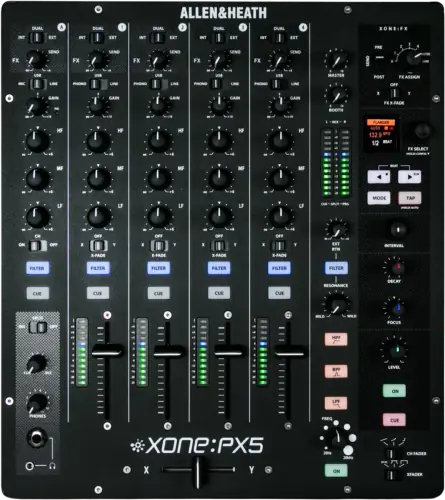
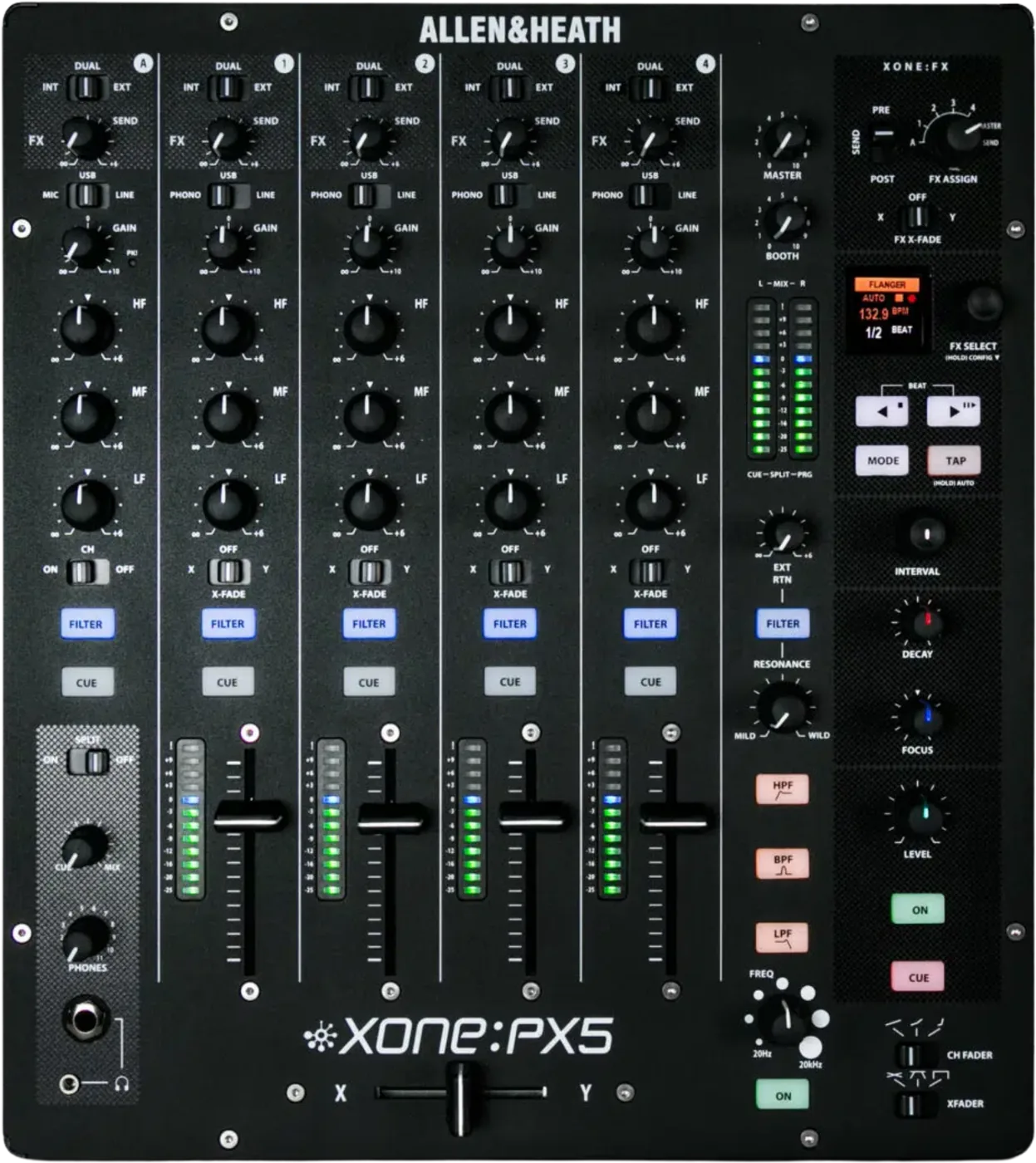
Booth briefing. The Xone:PX5 is Allen & Heath's 4+1 analogue club mixer with a built in interface: four phono/line/USB channels plus a flexible mic and aux channel. It is standalone, so it makes sound with no computer attached, and there is no firmware on it. For timecode it is Traktor Scratch certified, the only DVS platform Allen & Heath name for it. The XONE:VCF filter offers selectable responses and a FILTER assignment per channel, and both the response and the assignments are saved when mains power is turned off, so the mixer powers up as it was last set.
When it goes wrong: No sound from the mixer
Fast Lane
The five things that decide your gig
The five things on the Xone:PX5 that change what happens next, if you are reading this in the booth. All five are explained in full further down this page.
Timecode here is Traktor Scratch. Allen & Heath certify nothing else.
Traktor Scratch certified. Allen & Heath name no other DVS platform for this mixer.
So Serato and rekordbox are not certified here, whatever the presence of a soundcard suggests. Nothing is published either way, which makes them yours to test rather than yours to rely on.
Every music channel picks phono, line or USB, so a correctly patched channel can be silent.
Each of the four music channels chooses its own source. A channel with the right cable in the right socket and the wrong source selected is silent and looks perfectly patched.
It is the first thing to check on this mixer, because nothing about the panel will point at it.
The mic input takes a low impedance dynamic, and Allen & Heath instruct against condensers that need phantom power.
Allen & Heath's user guide asks for a "good quality low impedance dynamic mic" on the balanced XLR, wired pin 1 ground, pin 2 hot and pin 3 cold. Their instruction is explicit: "Do not use high impedance or unbalanced microphones, or condenser mics requiring phantom power.".
Thin, quiet or completely dead usually means the wrong kind of microphone is on the end of the cable rather than a fault in the channel.
Effects that have vanished are usually the assign rotary or the loop, not the FX engine.
The FX are the XONE:Xcite FX suite, with a send and return and pre or post fade selection, and a Channel FX Mode Select switch on every channel that routes that channel's send to INT, EXT or DUAL, meaning the internal XONE:FX engine, external hardware on FX SEND and EXT RTN, or both at once.
A dead outboard unit on the send and return loop takes the effect away and nothing more. A dead outboard unit in the master insert sits in line with the mix outputs, and that one takes the whole room with it.
There is no firmware on this mixer, and the driver is not firmware.
Allen & Heath publish no firmware for it at all. What they publish is a Windows driver, v4.6.70, which the same release note also writes as v4.67.0: the document headers carry v4.6.70 while the installer screen it reproduces reads "XONE:PX5 v4.67.0 software is installed", which lives on the computer.
On macOS nothing is installed, because the interface is class compliant. So there is no version on this mixer to check before a booking.
If something goes wrong
Timecode will not calibrate, and the reason may be the software you brought
Short answer. The Xone:PX5 is certified for one timecode platform, so check what you are running before you check anything else. Allen & Heath's position is exact: Traktor Scratch certified. Allen & Heath name no other DVS platform for this mixer. They name Traktor Scratch Pro 3 on the product page, and in the manuals themselves the user guide says the mixer "is fully Traktor Scratch Certified for use with timecode control setups from Traktor Scratch Pro 2 v2.11", and the same guide prints the reason the wording matters: "TRAKTOR PRO 2 does not support Timecode control". They certify no Serato and no rekordbox for it.
Why this happens. The assumption that any mixer with a soundcard does Serato is the trap, and it is a reasonable assumption that is simply wrong here. A soundcard is a way to get audio in and out of a computer. A DVS certification is a manufacturer stating that a specific program has been tested and mapped against a specific mixer, and it is what your software leans on when it looks for a supported device. This interface is 20 channel, 10 in and 10 out, expressed as 5 stereo in and 5 stereo out, 24-bit / 96 kHz, USB 2.0 and class compliant, which is plenty of audio, and none of that adds a certification that Allen & Heath have not issued.
Fix it now. If you are on Traktor Scratch, work through the ordinary chain: the USB cable at both ends, the mixer selected as the audio device, the channel source set to the input the turntable is actually on, then calibrate. If you are on anything else, stop trying to make the certification appear and plan around it: play from the analogue inputs, or bring your own certified interface and treat this desk as an analogue mixer, which it fully is.
Avoid it next time. Settle the software question before the booking, not in the booth. This is the one specification on this mixer that cannot be worked around with a cable.
A channel is silent and the cable is in the right socket
Short answer. The Xone:PX5 gives each of its four music channels its own three way source selector between phono, line and USB, so a channel with the correct cable in the correct socket and the wrong source selected is silent and looks perfectly patched.
Why this happens. A three way source selector is the fastest control on this mixer to leave in the wrong place, because nothing about the cable, the meter or the fader tells you which of the three the channel is listening to. It is also where the interface meets the analogue side: USB is one of the three choices on every music channel, so a desk left on USB after somebody else's laptop set is a desk where every turntable is silent.
Fix it now. Walk the source selectors across all four channels before you touch anything else. Phono for a turntable cartridge, line for a player, USB for the computer feed. Then confirm on the channel you can hear rather than the one you are about to open with.
Avoid it next time. Put the source selectors in the same pre set pass as gain and the filter assign, on every channel and not just the two you plan to start on. Remember there is a second switch per channel on the rear panel, LN or PH, and that one only sets what the soundcard is fed, so it will never be the reason the room is quiet.
The mic is thin, quiet, or completely dead
Short answer. The Xone:PX5 mic input is particular about what it is fed, so check what kind of microphone is on the end of the cable. Allen & Heath's user guide asks for a "good quality low impedance dynamic mic" on the balanced XLR, wired pin 1 ground, pin 2 hot and pin 3 cold. Their instruction is explicit: "Do not use high impedance or unbalanced microphones, or condenser mics requiring phantom power.".
Why this happens. A high impedance microphone into an input built for a low impedance one loses level and loses bottom end, which reads in a room as a thin, quiet voice rather than as a mismatch. An unbalanced microphone is the second case the guide names, and a condenser needing phantom power is the third: all three are listed as things not to plug in here. A condenser with no supply of its own will be quiet or dead on this input whatever the channel is doing, and the channel ON/OFF switch is worth a glance too, because it mutes the microphone into the mix while leaving it audible in cue.
Fix it now. Put a low impedance dynamic microphone on it, which is what the guide asks for and what most venues already have in a drawer. If a condenser is unavoidable, carry your own phantom power supply ahead of the mixer so the question never arises at the desk.
Avoid it next time. Ask the venue what microphone they will hand you before the gig, and treat "it is a mic, it will be fine" as an unanswered question rather than an answer.
The effects have vanished, and what a dead outboard unit really takes
Short answer. The Xone:PX5 routes its effects two different ways, so look at the assign rotary, the per channel INT, DUAL or EXT switch and the pre or post fade selection before you look at the engine itself. The FX are the XONE:Xcite FX suite, with a send and return and pre or post fade selection, and a Channel FX Mode Select switch on every channel that routes that channel's send to INT, EXT or DUAL, meaning the internal XONE:FX engine, external hardware on FX SEND and EXT RTN, or both at once.
Why this happens. A send that is set pre fade keeps feeding the effect after you pull the fader down, which is how a delay tail survives a cut. A send set post fade dies with the fader. Neither is wrong and both surprise a DJ who was expecting the other one. DUAL and EXT add a second way to be caught out: once an outboard unit is on the rear send and return, that unit switched off, on standby, or in a bypass mode that does not pass audio is an effect that has quietly gone, while the channel itself keeps playing. The master insert is the one to fear, because it is in line with the mix outputs: a dead box patched there is a silent room and not a silent effect.
Fix it now. If the room has gone silent rather than the effect, pull the Y lead out of the master insert first. Otherwise confirm the outboard unit is powered and passing audio, then set the send pre or post fade to match what you actually want from the tail. If the effect is simply missing, put the channel switches back to INT and prove the internal engine on its own before you go back to DUAL.
Avoid it next time. Treat the send and return as a patch you commit to rather than one you leave hanging, and prove the whole loop at soundcheck with the outboard unit switched on and switched off, so you know what each state sounds like.
A channel sounds hollow and nothing is faulty
Short answer. The Xone:PX5 has an isolator EQ with Total Kill on every band. A band turned fully down does not attenuate that part of the signal, it removes it, so a knob somebody left at the bottom is a channel that sounds broken and is not.
Why this happens. The EQ is 3-band isolator EQ with Total Kill on every band, on all five channels, boost to +6 dB, crossover points at 3.5 kHz, 1.2 kHz and 400 Hz. An isolator is a much stronger tool than a channel EQ on a mixing desk, and the give away is the asymmetry: there is a small amount of boost available and an unlimited amount of cut. A DJ used to an EQ that goes roughly as far up as it goes down will not read a fully anticlockwise knob as an emergency, because on their usual desk it is not one.
Fix it now. Return all three bands to centre on every channel before you start, then work from there. If one band is already at the bottom on a channel that is playing, that is the explanation and not a symptom.
Avoid it next time. A Total Kill EQ is a performance control, so the desk you are handed carries the last person's performance until you reset it. Centre the isolators as part of your pre set pass.
Windows does not see the mixer, and there is no firmware to blame
Short answer. On Windows the Xone:PX5 needs Allen & Heath's driver, which they publish as v4.6.70, which the same release note also writes as v4.67.0: the document headers carry v4.6.70 while the installer screen it reproduces reads "XONE:PX5 v4.67.0 software is installed". On macOS there is nothing to install: the interface is class compliant, so the mixer appears as an audio device on its own.
Why this happens, and what it is not. A missing Windows driver looks exactly like a hardware fault to the software: no device in the list, no inputs, no outputs. What it is not is a firmware problem, because this mixer has no firmware. The driver runs on your computer and the mixer holds nothing that can be out of date, so a Windows machine that has never seen this desk before is a Windows machine that needs an install, not a desk that needs an update.
Fix it now. Install the driver on the Windows machine, restart it, then select the mixer as the audio device in your software. If a Mac is not seeing it, the answer is not a driver either, because none exists: check the USB cable and the port, then the software's own device selection.
Avoid it next time. Install the driver on any Windows laptop that might touch this mixer while you have a working internet connection and time, which is never in the booth.
The recording is empty, or the room is quiet while the meters look right
Short answer. The Xone:PX5 keeps its recording feeds away from the master control, so two switches and one knob decide this and none of them is the one you are watching. The rear USB 9/10 switch chooses between a pre master mix and the effects send, the RCA record output is taken pre master, and the master control moves the two master outputs only.
Why this happens. The master control does not move the booth output, does not move the record output and does not move the meters. So the meters can sit at 0 with a quiet room, and a recording can be perfectly healthy while the house is down. In the other direction, a USB recording that captures nothing is usually the 9/10 switch sitting on FX, which sends the effects send to the computer instead of the mix.
Fix it now. For a computer recording, set the rear USB 9/10 switch to MST and take the pre master mix. For a hardware recorder, use the RCA record output and set its level with gain and the channel faders rather than with the master. If the room is quiet and the meters are not, the master control is where to look, and the booth has a separate level control again.
Avoid it next time. Decide before doors whether USB 9/10 is a recording or an effects send, because it cannot be both, and remember that pressing a channel cue changes what the booth monitor and the main meters show you, not only the headphones.
What to watch for
There is no firmware, and a driver is not firmware
Short answer. Allen & Heath publish no firmware for the Xone:PX5 at all. There is no firmware section on its resources page and no firmware article in its support section. What they publish is a Windows driver, v4.6.70, which the same release note also writes as v4.67.0: the document headers carry v4.6.70 while the installer screen it reproduces reads "XONE:PX5 v4.67.0 software is installed", and a driver is a different thing.
Why the distinction is worth the sentence. Firmware lives inside the hardware and changes what the hardware does. A driver lives on your computer and changes how that computer talks to the hardware. Move a mixer with firmware between two venues and it carries its version with it. This mixer carries nothing: every desk of this model behaves the same way, and the only version in the story belongs to whichever laptop is plugged in. So the question this site asks on most equipment, what version is it on, does not exist here.
How thoroughly absent it is. The word firmware does not appear anywhere in Allen & Heath's published documents for this mixer: not in the user guide, not in the quick start guide, not in the technical datasheet, and not in the Windows driver release note. The only version numbers any of them carry belong to that driver.
What that means in a booth. Nothing to update before a gig, and equally no fix coming for anything you do not like, because it is all analogue circuitry and a fixed interface. Spend the time you would have spent chasing a version on the source selectors and the isolators instead. That is where this desk's surprises live.
Allen & Heath never announced this mixer, and their own paperwork still dates it to 2016
Short answer. 2016, and it comes from Allen & Heath's own documents rather than from an announcement, because there was no announcement. There is no launch date on the product page, none on the resources page, and no press release for this mixer in their news area at all, although the Xone:K3, the Xone:92 and the Xone:24 each have one.
What does date it, and it is three documents agreeing. Their engineering drawing 007-177 for this mixer is marked RELEASED DATA 15/06/2016. Their user guide AP10733 is Issue 1 and carries Copyright 2016 Allen & Heath Limited. And their FX notes document is published under a filename ending V1.00_NOV_2016. An Issue 1 user guide is written for a launch, so three of the maker's own papers put this desk in 2016 and none of them disagrees.
Why it matters to you. Age is how a DJ decides whether a desk is a current model or something they will only meet in a rental inventory, and it is how a buyer reads a second hand listing. You can now answer that question, which you could not before.
Where the limit is, precisely. The year is solid and a month is not. A document date is not a release date: paperwork gets revised, reissued and back dated. So if somebody quotes you a specific launch day for this mixer, that did not come from Allen & Heath, and every date in circulation for it traces back to a retailer or a review. This page gives you the year its maker's own documents give, and nothing finer than that.
Do this. Judge the desk in front of you rather than the year. Allen & Heath still list it and still publish its support documents, so it is a mixer you will be handed rather than a museum piece, and its condition, its faders and its sockets tell you more than a year would.
Official documents. Xone:PX5 product page →
Xone:PX5 user guide →
Xone:PX5 resources and downloads →
Windows driver release note →
Broken link? Let us know and we'll fix it.
Compatibility
Computers, the driver, and the thing it is not
Short answer. On macOS the Xone:PX5 needs nothing installed: the interface is class compliant, so the mixer appears as an audio device on its own. On Windows you need Allen & Heath's driver, and they print it as v4.6.70, which the same release note also writes as v4.67.0: the document headers carry v4.6.70 while the installer screen it reproduces reads "XONE:PX5 v4.67.0 software is installed".
Why the version reads oddly. That is one download with its number written two different ways inside a single release note: the header and the installer filename carry one form, and the installer's own progress text carries the other. Both are theirs, so both are published here rather than one being quietly chosen. If you are checking a Windows machine against a number before a gig, expect the two to look like two releases. That note covers Windows 11 and Windows 10, and says direct support is closed for legacy Windows versions.
One documented driver fault. Allen & Heath list clicks in Ableton Live 9 at 88.2 and 96 kHz when the ASIO buffer size is left on Auto with USB streaming mode set to Reliable. Their fix is a fixed buffer size in the mixer's control panel, chosen to suit what your computer can keep up with, and a reset of the streaming mode if the interruptions survive that.
And it is still not firmware. Nothing you install touches the mixer. There is no version in the hardware to check, to match or to update, so a Windows machine that misbehaves is a Windows machine, not a desk that has fallen behind.
Common mistakes. Hunting for a macOS driver that does not exist, and hunting for a firmware update that has never existed.
Timecode and DVS, in Allen & Heath's own words
Short answer. The Xone:PX5 position here is narrow and specific. Traktor Scratch certified. Allen & Heath name no other DVS platform for this mixer. They name Traktor Scratch Pro 3 on the product page and Traktor Scratch Pro 2 in the older user guide, and both are their own documents.
Serato and rekordbox are not certified here. Said plainly because the opposite is what everybody assumes. Neither appears in Allen & Heath's documentation for this mixer, so this page does not imply that either works and does not claim that either fails. If one of them is how you play, treat it as something to test yourself, with nothing published to fall back on when it misbehaves, and remember that whatever is certified for a different Xone mixer is a different mixer with a different signal path.
Which Traktor, exactly. This is the detail that wastes a soundcheck: the user guide says the mixer "is fully Traktor Scratch Certified for use with timecode control setups from Traktor Scratch Pro 2 v2.11", and the same guide prints the reason the wording matters: "TRAKTOR PRO 2 does not support Timecode control". Scratch is the word that carries the weight. Timecode lives in the Scratch product, so arriving with a plain Traktor Pro 2 licence is arriving with software that cannot do it at all.
The hardware side. Timecode arrives on a channel like any other source, so the rear LN/PH switch and the top panel source selector for that channel both have to match what is plugged into it before your software sees anything usable at all. Allen & Heath publish no minimum software version for DVS on this mixer and there is no firmware to gate it, so there is no version requirement to chase if it will not lock. Expect soundcard channels 1 to 8 to arrive as deck layout C, A, B, D rather than in numerical order, which is Allen & Heath's own documented default and not a fault.
Do this. Confirm your own licence and software before the gig, set the source selectors to match your decks, and calibrate in the room.
Features explained
The channels, the EQ and Total Kill
Short answer. 4+1, four phono/line/USB channels plus a flexible mic and aux channel. Each of the four music channels selects its own source, and the fifth channel is the one that takes a microphone or an auxiliary source.
The EQ, which is the part that changes how you work. 3-band isolator EQ with Total Kill on every band, on all five channels, boost to +6 dB, crossover points at 3.5 kHz, 1.2 kHz and 400 Hz. Three things follow from that. Total Kill means a band turned fully down removes that part of the signal rather than reducing it, which is a performance tool and a hazard in equal measure. The boost is small, so this is not an EQ you use to make a quiet record louder: that is what gain is for. And the crossover points are fixed and published, so you can plan a swap knowing exactly where the bands divide.
The fifth channel is built differently. It selects between the XLR microphone input, its own USB return and a balanced quarter inch line input, with a mono source going into the L/M socket of that line input. It has no fader and no meter of its own: gain, a peak indicator and an ON/OFF switch are the whole of its level control. That switch takes the channel out of the mix and leaves what it sends to cue untouched, so a microphone switched off is a microphone you can still hear in the headphones.
Where the four channel meters read from. Allen & Heath meter each music channel post gain, post EQ and pre fader, so the meter shows what the EQ is doing before the fader and the crossfader get near it. A channel with its fader down, or assigned to the far side of the crossfader, still meters normally while it is silent. Set gain so a channel averages about 0 with the loudest peaks between +6 and +9.
Common mistakes. Reaching for EQ boost to fix a level problem and running out of boost. Leaving an isolator at the bottom of its travel between records and reading the result as a fault. Forgetting that the fifth channel is a full channel with the same EQ rather than a bare mic input. And putting a line level player into a phono input, which Allen & Heath warn will overload the preamp and cause severe, high level distortion.
The XONE:VCF, and what it will take
Short answer. XONE:VCF, an analogue voltage controlled filter with switchable HPF, BPF and LPF plus frequency and resonance, assignable to all five input channels and to the external return.
Why it matters. Two details in that description are the ones that decide how you use it. It is analogue and voltage controlled, so it is part of the audio path rather than a processor the signal is handed to. And it is assignable to every input channel and to the external return, which means an outboard effect coming back into the mixer can be filtered exactly like a record can.
Where it sits in the channel. On the four music channels the filter takes the signal post gain, post EQ and post fader, so pulling a fader down takes the filtered sound with it. On the mic and aux channel there is no fader, so it takes the signal post gain and post EQ. The crossfader is a voltage controlled amplifier that also acts on signals routed through the filter, so a channel crossfaded away is filtered and inaudible at the same time.
The three types are not exclusive. The filters are state variable, which is why high pass, band pass and low pass are available at once: press any combination together for response shapes such as a notch or an interesting all pass effect. The switches are soft switched, so the audio is ramped between filter states rather than clicking, and the frequency sweep runs from 20 Hz to 20 kHz.
It remembers, and that is the trap. On the Xone:PX5 the last selected XONE:VCF response and the channel FILTER assignments "are saved when mains power to the mixer is turned OFF", so the mixer comes back set the way the last person left it rather than in a neutral state. Walk the five channel filter buttons and the filter ON switch in your pre set pass, because nothing resets them for you.
Common mistakes. Treating a filter that is switched out as a dead channel. A channel that is not assigned to the filter is not muted, it is simply unfiltered. And sweeping a resonant filter for the first time in a full room: resonance is a level control as much as a tone control, and where it bites is worth learning before doors.
The Xcite FX, and the hybrid loop
Short answer. The FX section is the XONE:Xcite FX suite, with a send and return and pre or post fade selection, and a Channel FX Mode Select switch on every channel that routes that channel's send to INT, EXT or DUAL, meaning the internal XONE:FX engine, external hardware on FX SEND and EXT RTN, or both at once.
Two routings, and they are not the same risk. The assign rotary decides where the internal engine sits: inserted in one channel, inserted across the master, or in send and return on the mix, and it powers up on SEND. Separately, every channel has a send control and an INT, DUAL or EXT switch that decides whether that channel's send feeds the internal engine, the outboard hardware on the rear FX SEND and EXT RTN sockets, or both at once. That loop is parallel, so outboard hardware which stops passing audio takes the effect away and not the channel.
The master insert is the one that is in line. It is an unbalanced quarter inch TRS point wired tip send, ring return and sleeve ground, taken with a Y lead, and it sits in line with the mix outputs. A limiter, a compressor or an effects unit patched there that is switched off, on standby or in a bypass mode that does not pass audio silences the room rather than one channel.
What the effects follow. The BPM engine listens automatically between 60 and 260 BPM. With the engine inserted in a channel it takes its tempo from that channel; set to send or to master it takes it from the mix clean feed ahead of the FX return. Holding TAP for three seconds puts detection back to automatic.
Common mistakes. Leaving the send on the wrong side of the fader for the effect you want, and leaving a cable in the return with nothing feeding the send.
The mic and aux channel, and what it can take
Short answer. The fifth channel is the flexible one: it selects between the XLR microphone input, its own USB return and a balanced quarter inch line input, and it carries the same isolator EQ as the music channels. What Allen & Heath ask for on the microphone input is a "good quality low impedance dynamic mic" on the balanced XLR, wired pin 1 ground, pin 2 hot and pin 3 cold. Their instruction is explicit: "Do not use high impedance or unbalanced microphones, or condenser mics requiring phantom power.".
What that rules out. A condenser needing phantom power is named in the guide as something not to plug in here, and so are high impedance microphones and unbalanced microphones. They want the XLR wired pin 1 ground, pin 2 hot and pin 3 cold. If a condenser is unavoidable, its supply has to sit ahead of the mixer.
Why the channel design helps. A microphone on a full channel with a Total Kill isolator is a microphone you can actually shape, which is not true of a mixer where the mic arrives on a bare input with a level knob. A voice fighting a room usually needs bottom end removed rather than treble added, and this EQ removes it completely.
Common mistakes. Assuming the mic channel is a second class input and patching a valuable source somewhere else because of it.
The interface, and what it is for
Short answer. 20 channel, 10 in and 10 out, expressed as 5 stereo in and 5 stereo out, 24-bit / 96 kHz, USB 2.0 and class compliant.
What it does not change. This mixer is standalone. The analogue side works with no computer attached at all, so the interface is an addition to a mixer rather than the thing that makes it work. That is the opposite of how a DJ controller behaves, and it is worth being clear about, because it decides what happens when a laptop dies mid set: here, nothing. The record on the turntable keeps playing.
What it is genuinely for. Getting audio into and out of a computer without a second box in the booth: a recording, a feed to a streaming rig, a return from software, or the timecode chain covered above with the one certified platform. Ten channels in each direction is enough to take separate feeds rather than only a stereo mix.
What the ten channels actually are. Eight of the ten inputs to the computer are the four music channels in stereo, taken from their phono or line sockets. The ninth and tenth are shared, and a rear switch decides which: MST gives you a pre master stereo mix and FX gives you the effects send instead. The ten outputs are the four channel USB returns plus the mic and aux channel's return, so the microphone itself is not one of the things this interface can record.
The second switch nobody finds. Each music channel also has a rear LN/PH switch that sets the level fed to the soundcard, PH for a turntable cartridge and LN for a player, and it works independently of the top panel source selector. Timecode needs both: the rear switch matching the deck, and the top panel selector on USB.
What it will run at. 24 bit at 44.1, 48, 88.2 or 96 kHz, with buffer sizes from 32 up to 8192 samples.
Common mistakes. Assuming a soundcard implies a DVS certification. It does not, and on this mixer that gap is the single most expensive assumption you can make.
MIDI, tap tempo and X:LINK
Short answer. The Xone:PX5 carries RJ45 X:LINK and a 5-pin DIN labelled MIDI SYNC / OUT, which Allen & Heath describe as "MIDI Clock and MIDI Tx (transmit) signal output for syncing to external MIDI hardware", so the DIN sends and does not receive. Incoming MIDI clock from a DAW or from DJ software arrives over USB instead, and the transport "sends START, STOP & CONTINUE messages for USB and MIDI SYNC / OUT"..
What the clock changes. Sending and receiving a MIDI clock, with start, stop, pause and tap tempo, means this desk can be either the thing that sets the tempo for a rig or the thing that follows one. That is a real decision to make before a gig rather than a setting to discover during it: two devices both generating a clock is a rig that drifts, and neither generating one is a rig that never starts.
Which way the sockets go. The 5-pin DIN is a sync output. It sends clock and transport to a drum machine or a synth, and it has a DIN offset in the config menu, adjustable by up to plus or minus 50 ms, for pulling a stubborn device into time. Clock coming the other way, from a computer, arrives over USB instead, and that direction has no offset control on the mixer at all.
X:LINK. An RJ45 socket carrying Allen & Heath's own protocol, which is what connects this mixer to a Xone controller. Read the safety section above before anything goes into that socket, because it is not a network port and it is not to be treated as one. The mixer transmits on MIDI channel 16 unless you change it in the config menu, and it keeps whatever you last set when the power goes off. A Xone K Series controller on the other end of X:LINK has to be on a different MIDI channel from the mixer, and a second daisy chained controller on a third again, or the devices talk over each other.
Common mistakes. Assuming the RJ45 is Ethernet. Assuming a MIDI clock exists because a socket does, without deciding which device generates it.
Professional tips
Before you open the first channel
Walk all four source selectors, not the two you are opening with. Every music channel picks phono, line or USB on its own, and a desk left on USB after somebody else's computer set looks perfectly patched with every turntable silent.
Centre the isolators on all five channels. This is a 3-band isolator EQ with Total Kill on every band, on all five channels, boost to +6 dB, crossover points at 3.5 kHz, 1.2 kHz and 400 Hz, so a knob left at the bottom of its travel removes that part of the signal instead of reducing it, and the mic and aux channel carries the same EQ as the music channels. The boost is small by design, which is why gain is the control for a quiet record and this is not.
Read the crossfader curve before you diagnose a worn fader. The crossfader is a 45 mm VCA, user replaceable and Innofader Pro 2 compatible, with Constant Power, Transition and Fast-cut curves, so a cut that feels too abrupt or a blend that feels too gradual is usually the curve the last person chose. If it really is worn, it is a part you fit yourself rather than a service visit, and Allen & Heath print the codes: 004-852X is the XONE:PX5 CH FDR SPARE for a channel fader and 004-853X is the XONE:PX5 XFDR SPARE for the crossfader, and they name the innoFADER Pro2 from Audio Innovate as fully compatible as a crossfader upgrade.
Settle the timecode question before you accept the booking. Traktor Scratch certified. Allen & Heath name no other DVS platform for this mixer. If that is not how you play, plan on bringing your own certified interface and working this desk as the standalone analogue mixer it fully is. No cable adds a certification.
Walk the filter buttons too. On this desk the last selected XONE:VCF response and the channel FILTER assignments "are saved when mains power to the mixer is turned OFF", so the mixer comes back set the way the last person left it rather than in a neutral state, so the five channel filter buttons and the filter ON switch belong in the same pass as the isolators.
Know what split cue does before you need it. With split cue on, the cue signal takes the left ear and the mix keeps the right, the left main meter reads cue while the right reads the mix, and the cue and mix blend control stops doing anything. That is useful once you expect it and alarming if you do not.
Do not plan around a condenser microphone. The user guide asks for a "good quality low impedance dynamic mic" on the balanced XLR, wired pin 1 ground, pin 2 hot and pin 3 cold. Their instruction is explicit: "Do not use high impedance or unbalanced microphones, or condenser mics requiring phantom power.", so the only planning position that is not a guess is a dynamic microphone, or your own supply ahead of the desk.
The faders are yours to replace, and the parts are named
Short answer. Both are yours. The crossfader is a 45 mm VCA, user replaceable and Innofader Pro 2 compatible, with Constant Power, Transition and Fast-cut curves, and Allen & Heath print the codes: 004-852X is the XONE:PX5 CH FDR SPARE for a channel fader and 004-853X is the XONE:PX5 XFDR SPARE for the crossfader, and they name the innoFADER Pro2 from Audio Innovate as fully compatible as a crossfader upgrade.
Why it matters. The crossfader is the control most likely to wear out on any mixer that gets used hard, and three things in that description change what you can do about it. It is user replaceable, so a worn fader is a part rather than a service visit. It takes a documented aftermarket fader, so the replacement is something you can source rather than something you wait for. And the channel faders are individually replaceable on the same terms, which is unusual enough to be worth knowing before you write a channel off.
When to suspect wear. Allen & Heath are explicit: channel and crossfaders subject to excessive wear and tear, or extensive use, will require replacing over time, and "Intermittent or noisy operation is an indication of faders becoming worn". A proprietary fader cleaner such as CaigLube or DeOxit "may temporarily restore use", and they warn not to use it on new faders because it can displace factory applied finishes.
The detail that ruins the job. The tray under the crossfader has two mounting slots. The standard fader must be fitted to slot 1, and the longer slot 2 beside it exists for the optional innoFADER Pro2. Allen & Heath also ask that only spare parts they approve are used, say to read the whole procedure before starting, and advise handing the work to an authorised agent if you are unsure of your ability to carry it out safely. The unit is opened with the rear power switch off and the mains lead out of both the wall and the mixer.
The curves are a setting, not a fault. Three curves are published, and a crossfader that feels wrong, either too abrupt for a blend or too gradual for a cut, is usually a curve somebody else chose rather than a fader on the way out. Check the curve before you diagnose wear.
Do this. Inspect cables before they go in the bag rather than when a fault appears, unplug by the connector and never by the cable, and keep the USB socket clean and unstressed, since it is the one connector on this desk that carries everything the computer does.
Safety
Power, ventilation and the rack ears that do not fit
Short answer. The Xone:PX5 runs on an internal supply that accepts mains between 100 and 240V AC at 50/60Hz with nothing to change, a maximum consumption of 35W, a 3 pin IEC socket with a cable clamp, and a 250V AC T1AL 20mm fuse.
Ventilation, and the rack ears. Allen & Heath print two warnings beside the panel drawings in the guide. Do not cover the louvres on the front and side panels, which rules out stacking a laptop or a record box against them. And this mixer is not compatible with the standard Xone Series rack ear kits, so a rack plan built around one is a plan that fails at load in.
Switching order. Allen & Heath call it standard practice to turn connected amplifiers or active speakers down or off before switching mains power to the mixer on or off, which keeps the switch on transient away from the speakers. Press the IEC plug fully home before switching on.
Earthing. Two chassis earth terminals are provided on the rear panel for turntable earth straps. Allen & Heath say not to remove the earth connection from the mains plug, because the chassis is earthed through the power cable and audio 0V is connected to the chassis inside, and to deal with a ground loop using the ground lift switches on the connected equipment instead.
The RJ45 on the back is not a network port
Short answer. The Xone:PX5 carries RJ45 X:LINK and a 5-pin DIN labelled MIDI SYNC / OUT, which Allen & Heath describe as "MIDI Clock and MIDI Tx (transmit) signal output for syncing to external MIDI hardware", so the DIN sends and does not receive. Incoming MIDI clock from a DAW or from DJ software arrives over USB instead, and the transport "sends START, STOP & CONTINUE messages for USB and MIDI SYNC / OUT".. X:LINK is Allen & Heath's own control protocol and their instruction about it is short: Do not connect any X:LINK enabled device to any Ethernet enabled device. The socket is RJ45 and the protocol is not Ethernet.
Why this matters. The socket looks exactly like an Ethernet port, it takes the same patch lead, and in a dark booth the only thing telling you which is which is the label. That warning is Allen & Heath's statement about the protocol rather than about one product, so it applies to every X:LINK socket including this one, and the risk sits on both ends of the cable.
Do this. Only ever run X:LINK to other Xone X:LINK devices. Do not patch it into a switch, a router, a laptop or any other RJ45 socket in the booth, and label the cable if it lives in an install so the next person does not have to guess.
Firmware, drivers and manuals
Official downloads and documents
Go to Allen & Heath for the files themselves. We link their pages instead of hosting a copy, because a manual copied here is a snapshot of release day and theirs is the one that stays current.
Manuals. Official Allen & Heath manual page →
Broken link? Let us know and we'll fix it.
Frequently asked questions
Quick answers
- Does it do Serato?
- Not by certification. Traktor Scratch certified. Allen & Heath name no other DVS platform for this mixer. Serato and rekordbox appear nowhere in their documentation for this mixer, so nothing is claimed either way here.
- What firmware should it be on?
- The question does not apply. Allen & Heath publish no firmware for this mixer at all. What they publish is a Windows driver, which lives on your computer.
- Do I need a driver?
- On macOS, no: the interface is class compliant. On Windows, yes, and they print it as v4.6.70, which the same release note also writes as v4.67.0: the document headers carry v4.6.70 while the installer screen it reproduces reads "XONE:PX5 v4.67.0 software is installed".
- Can I use it without a computer?
- Yes. It is a standalone analogue mixer, and the interface is an addition to that rather than a requirement.
- What microphone can I use?
- The user guide asks for a "good quality low impedance dynamic mic" on the balanced XLR, wired pin 1 ground, pin 2 hot and pin 3 cold. Their instruction is explicit: "Do not use high impedance or unbalanced microphones, or condenser mics requiring phantom power.", so plan around your own supply ahead of the desk if a condenser is unavoidable.
- Why does a channel sound hollow?
- Look at the isolator. 3-band isolator EQ with Total Kill on every band, on all five channels, boost to +6 dB, crossover points at 3.5 kHz, 1.2 kHz and 400 Hz, so a band left at the bottom of its travel removes that part of the signal rather than reducing it.
- Why is a channel silent when the cable is right?
- The source selector. Each music channel chooses between phono, line and USB, and the wrong choice is silent and looks patched.
- Can I replace the crossfader?
- Yes, and the channel faders too. The crossfader is a 45 mm VCA, user replaceable and Innofader Pro 2 compatible, with Constant Power, Transition and Fast-cut curves, and Allen & Heath print the codes: 004-852X is the XONE:PX5 CH FDR SPARE for a channel fader and 004-853X is the XONE:PX5 XFDR SPARE for the crossfader, and they name the innoFADER Pro2 from Audio Innovate as fully compatible as a crossfader upgrade.
- Does the filter reset when the mixer is switched off?
- No: the last selected XONE:VCF response and the channel FILTER assignments "are saved when mains power to the mixer is turned OFF", so the mixer comes back set the way the last person left it rather than in a neutral state.
- Why is my USB recording empty?
- Check the rear USB 9/10 switch. MST sends a pre master mix to the computer and FX sends the effects send instead.
- Which Traktor do I need?
- The Scratch product: the user guide says the mixer "is fully Traktor Scratch Certified for use with timecode control setups from Traktor Scratch Pro 2 v2.11", and the same guide prints the reason the wording matters: "TRAKTOR PRO 2 does not support Timecode control".
- Will standard Xone rack ears fit?
- No. Allen & Heath state that the Xone:PX5 is not compatible with the standard Xone Series rack ear kits.
- Can I plug a network cable into the X:LINK socket?
- No. Do not connect any X:LINK enabled device to any Ethernet enabled device. The socket is RJ45 and the protocol is not Ethernet.
- When was it released?
- 2016. Allen & Heath never announced it, so there is no published launch date, but three of their own documents date it: an engineering drawing marked RELEASED DATA 15/06/2016, the Issue 1 user guide AP10733 carrying Copyright 2016, and an FX notes file named V1.00_NOV_2016. The year is theirs; any exact day you are quoted is not.
Related mixers
Commonly paired with
What you usually find beside it in working booths, from club, festival and rental installs rather than from a manufacturer document.
Allen & Heath All brands Knowledge base FAQ and Fixes Dictionary
Playing soon and it is not working?
Start Emergency ModeKeep the Emergency Card
We will email you the printable PDF so it is on your phone before the next dark booth. Occasional notes that save gigs. No spam, unsubscribe in one click.
Registering is free and counts everywhere on Save My Gig. We send a confirmation email first. Your address is stored with Brevo, our email provider. Unsubscribe any time. Privacy
Sources: Allen & Heath's own Xone:PX5 product page, user guide, resources page, quick start guide, technical datasheet, FX notes and Windows driver release note, checked 10 August 2026. Specifications theirs, priorities ours.