

Lexicon, field manual
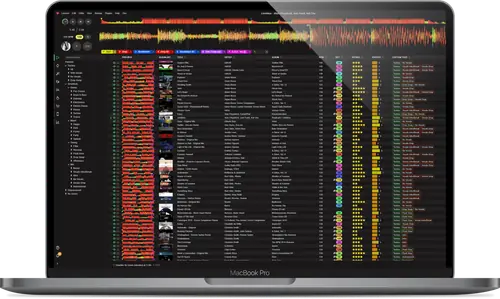
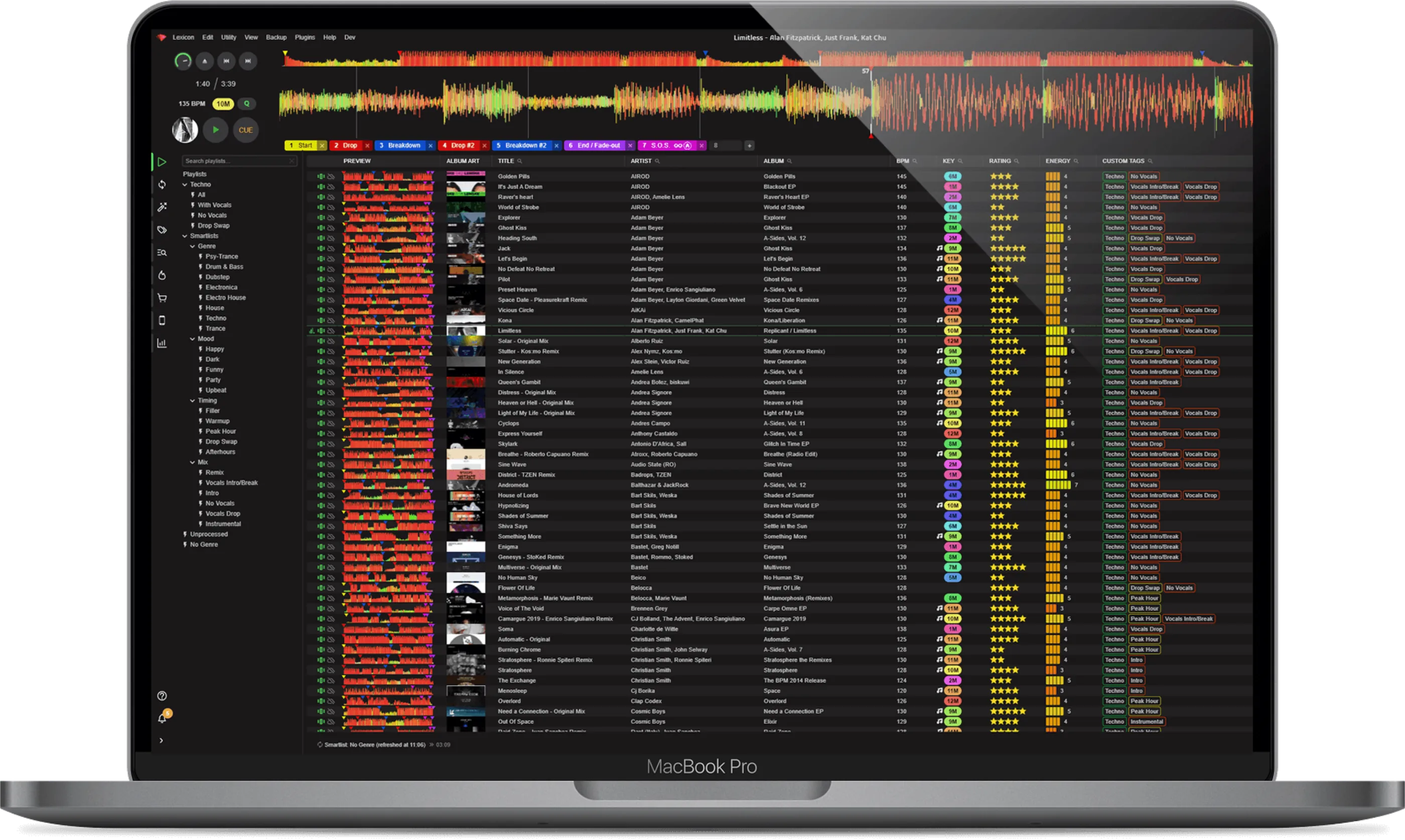
Booth briefing. Lexicon, sold as Lexicon DJ, is a library manager for DJs, made by Rekordcloud. It imports your library from rekordbox, Serato, TRAKTOR, VirtualDJ, Engine DJ or djay Pro, lets you clean it, edit it and generate cue points, then syncs it back to one or more of them, or to a Pioneer USB stick. You cannot mix in it. A DJ cares because it is the step between buying music and playing it, and because a sync writes into the library your DJ program reads, so what you do before a gig matters.
The story: Lexicon, the history
Fast Lane
Lexicon: software profile
A library manager for DJs that sits between your music and your DJ programs.
- Runs on
- Windows 10 or 11; macOS from Big Sur 11 (Apple Silicon) or Catalina 10.15 (Intel); 64-bit Linux. What it needs to run
- Reads your library from
- Six DJ programs, Apple Music, iTunes, M3U playlists and Pioneer USB sticks. What it is, and what it leaves to other software
- What you build with it
- Playlists, tag edits, duplicate searches, generated cue points, BPM, key and energy analysis.
- What comes out
- Synced libraries in the six DJ programs, rekordbox XML, Pioneer USB sticks (OneLibrary and DeviceLibrary), CSV and M3U.
- Playing live
- No. DeckConnect is for prep only. What it is, and what it leaves to other software
- What it costs to keep
- Free, Essential and Ultimate. The paid two are monthly or lifetime. What the licence buys
The five things that decide your pick
Lexicon in five points, each linked to its section.
It prepares the library, it does not play a set
Edit once, sync to one program or several.
It talks to six DJ programs, and it never writes until you press Sync
Until then, browsing and editing are safe.
Import with Merge, or a Full sync can remove tracks
Keep Merge on unless you mean to start over.
What a sync replaces: cues and beatgrids
Edited cues in rekordbox? Import with Merge first.
Know where the backups are before you need them
Find the folder before the gig, not during it.
Official software video
Note: This feature requires an internet connection.
Understanding the software
What it is, and what it leaves out
Its own description. Lexicon is a desktop app for managing a DJ library across programs, and its FAQ is plain about the limit: "you can't mix tracks in Lexicon".
The routine. Its maker describes the routine in five steps: import an existing library or start fresh, add tracks and edit playlists, sync to a DJ program such as rekordbox or Serato, mix and play the gig in the DJ program, then repeat.
What it can read. Lexicon lists support for libraries from Serato 3 and 4 (Lite and Pro), rekordbox 5, 6 and 7, TRAKTOR PRO 3 and 4, VirtualDJ, Engine DJ and djay Pro. Its manual also covers Apple Music and iTunes, M3U playlists and a Pioneer USB stick. The FAQ says they were tested with each program's up to date release and that earlier releases should also work.
The practical reading. That makes Sync the moment to plan around: finish your edits, sync a few days before the gig, open the DJ program and check cues and beatgrids on a handful of tracks you will really play, then leave the library alone. A Full sync on the afternoon of a gig is the one move we would not make.
Importing, and the Merge choice
On import. Importing is read only: browsing and editing in Lexicon do not change your DJ program, and Lexicon writes to it only when you press Sync.
Merge or not. Import has one choice that matters. With Merge on, existing tracks and playlists are updated, new ones are added and nothing is deleted, but a playlist with the same name in the same folder is replaced by the DJ program's version, so Lexicon edits to it are lost. Without Merge, Lexicon deletes your current library before importing, including anything that exists only in Lexicon such as its playlists, custom tags and Energy values, and it asks you to confirm first. On the Free plan Merge is not available, so every import replaces the Lexicon library.
Before a first Full sync. The manual's warning is to import your DJ program's library into Lexicon before your first Full sync, because tracks or playlists that exist only in the DJ program are removed. If that has already happened, Lexicon made a backup of the DJ program's database before the sync, and the manual links a guide to restoring it.
What the plans buy
The plans. Lexicon has Free, Essential and Ultimate. Free converts a library between the supported DJ programs and comes with community support. Essential adds track and playlist editing, the iPhone and Android app and cloud storage. Ultimate adds cue point generation, duplicate finding, missing tag and album art search, a watch folder, cloud database backup and priority support. Essential and Ultimate are each sold as a monthly subscription or a one time lifetime purchase, and Unlimited Cloud Storage is a monthly add-on.
When a plan ends. When a subscription expires Lexicon goes into demo mode: you can still browse the library and create playlists, but you cannot sync. Your tracks and playlists stay on your computer, and cloud storage files are deleted some time after expiry. A free account is needed, made in the app with no credit card. A 30 day money-back guarantee applies, except to the Cloud Storage add-on.
What it needs to run
Operating systems. Lexicon's download page lists Windows 10 or 11 (64-bit), macOS on Apple Silicon from Big Sur 11, and macOS on Intel from Catalina 10.15, where Catalina needs a separate legacy build that the page labels beta. For Linux it lists 64-bit Intel or AMD only: a .deb package for Ubuntu 22.04 or later and Debian 12 or later, and an .rpm for Fedora, openSUSE and RHEL 10. A DJ program on Linux is reachable only through a Wine prefix or a folder you select.
Files and account. The FAQ lists these audio files: MP3, MP4, WAV, FLAC, AIFF, OGG, M4A and AAC. A free Lexicon account is needed, and the app is available in 14 languages.
Analysis and cue points
Cue points. The Cue Point Generator places cues from a template, using machine learning to find drops, breakdowns and the fade out, for example 64 beats before the drop. The manual says it is "not a total replacement for manual cue points". Accuracy depends on genre, with techno, house and drum and bass at high success rates and reggae and dancehall less accurate. A wrong BPM, such as 87 instead of 174, or a beatgrid offset, especially from rekordbox, misplaces cues, and drops can be 1 or 2 bars off. Check grids first. Undo is available for runs of fewer than ten thousand tracks.
Analysis. The analyser computes BPM and beatgrid, waveform, energy and key, and it is on the Essential and Ultimate plans. For key detection the manual also names OpenKeyScan, a separate free app by the same developer, as an optional alternative. Tracks shorter than 10 seconds or longer than 30 minutes are skipped, dynamic BPM analysis is not available yet, and tracks imported from a DJ program are not analysed automatically.
Compatibility
How a sync works
Modes. Sync comes in three kinds. Full makes your DJ program match Lexicon, so "any track that does not exist in Lexicon will be removed from your DJ app", with the rekordbox XML method the exception because its import deletes nothing. Playlist only adds and updates. Modified picks the playlists and tracks changed since your last sync, and it appears after a first Full or Playlist sync, tracked separately for each DJ program.
Fields only Lexicon has. Lexicon has more fields than DJ programs. Energy, Danceability, Popularity and Happiness exist only in Lexicon, so they stay invisible in a DJ program until you map them to a field that program has, separately for each program. They are written as a two digit number followed by the name, such as 08 Energy. With Overwrite off, the mapped value is added to what is already in the field.
Syncing to rekordbox
Recommended. For rekordbox 6 and 7 Lexicon offers Direct sync, which its manual calls the unofficial method: it writes straight into the rekordbox database, is much faster than XML, and is the one it recommends. rekordbox must be fully closed first, including in the system tray. If a rekordbox or rekordboxAgent process lingers using no CPU you can end it, but not while it is still using CPU, which can damage the database. Turn off auto analysis in rekordbox so beatgrids are not overwritten.
Cues. Syncing a track replaces its rekordbox cues with Lexicon's, so if you edited cues in rekordbox, import with Merge first. With Cue Destination on Default, cues return to where they came from at your last import, so imported memory cues stay memory cues, and cues made in Lexicon become hot cues only. To write memory cues from Lexicon, enable "Rekordbox memory cues" in its settings and restart; cues marked with an M become memory cues. Only one active hot loop and one active memory loop are supported, and any further active loops are dropped.
Beatgrids. On a Direct sync Lexicon sets rekordbox's analysis settings to Phrase only, so waveforms can be added without changing beatgrids. The Don't Touch My Grids option stops Lexicon changing existing beatgrids in your DJ program, although new tracks still receive Lexicon's grid.
Tags. MyTags go through with limits: at most 4 categories and 128 tags, and with more than 4 categories everything merges into one category called Lexicon Tags. Custom Tags are native only to rekordbox 6 and 7, and other programs get them through field mappings.
Cloud and USB. rekordbox Cloud Sync: Lexicon supports it, but duplicates cannot be fully ruled out, so the manual recommends turning it off. The XML method works with Cloud Sync because it never touches the database. The manual also advises against rekordbox's Sync Manager for USB exports after a Direct sync, because it can create duplicate tracks or skip field updates; right click a playlist in rekordbox and export to the USB instead.
The alternative. XML is the official method, and the only choice on rekordbox 5. Lexicon writes a file that you point rekordbox at in Preferences, then you import the tracks. The manual calls it very slow and limited: no MyTags, no smartlists, no memory cue colours and no active loops. It deletes nothing. There is a known rekordbox import bug, so import the tracks and not only the playlists, or tracks already in rekordbox are not updated; for rekordbox 5 the manual recommends version 5.6.0, which predates the bug.
The other five programs
Serato: Lexicon syncs to Serato DJ Pro and Lite on Serato 3 and 4, and you choose the one you use because each reads only its own database. Close Serato first, and Lexicon waits until it is fully closed. A Full sync removes crates that are not in Lexicon. On Serato 4, Lexicon skips tracks on external drives until Serato 4 has made its own library, so add one track in Serato 4, close it and sync again. Serato supports up to 128 beatgrid markers per track, and fluid grids are reduced to 128 on sync.
TRAKTOR: Lexicon writes straight into collection.nml, with no XML step, and the Serato rule applies: close it first. TRAKTOR has no coloured cue points, so cue colours are not visible there, and remix sets are not supported.
Engine DJ: you choose the target, which is the computer (the Engine DJ desktop program), a USB device or Denon hardware connected in Computer Mode and formatted (ex)FAT, or Dropbox. Engine DJ analysis can replace a Lexicon beatgrid unless the grid is locked: by default existing locks stay and new tracks are locked only if they have a grid, and Unlocked lets Engine's grid overwrite the synced one. Lexicon does not write waveforms, and streaming tracks are not copied to a USB device.
VirtualDJ: playlists go to Lists & Advice, and smartlists become Filter Folders, or normal playlists if you turn on Move smartlists. Cues are always written from Lexicon, so import from VirtualDJ with Merge first if you edited cues there. VirtualDJ also reads ID3 tags itself, so tags that differ from what Lexicon synced can change tracks when they are loaded or analysed. A playlist folder named Lexicon Ignore survives a full sync.
djay Pro: fluid beatgrids are only imported from and synced to djay Pro on macOS.
Keys: Alphanumeric, Open Key and musical
Notations. Keys can be shown and written as Alphanumeric (8A, 8B), Open Key (1m, 1d), musical key (Am, C), the original from your tags, or your own text for each Open Key. The Convert keys option sets which notation goes to the DJ program, and Open Key can carry a leading zero so it sorts correctly: 01m, 02m, 10m, 11m rather than 1m, 10m, 11m, 12m, 2m. Alphanumeric is the default for new installs. The manual notes that not every musical key can be converted, and that Open Key is not Alphanumeric with different letters: C major is 1d in Open Key and 8B in Alphanumeric.
The practical reading. Before you convert keys, look at how the tag is written now. A library that mixes 8A, 1m and Am will sort badly in any DJ program, and the conversion setting is applied on sync, so it is worth settling once and checking a few tracks in the DJ program afterwards.
Pioneer USB export and DeckConnect
The export. Lexicon can write a Pioneer USB stick itself, with both the OneLibrary and the DeviceLibrary databases on the same drive, so newer players such as the CDJ-3000 and XDJ-AZ and older ones such as the CDJ-2000, CDJ-900 and XDJ-XZ can read it. rekordbox is not needed, so it works alongside Serato or TRAKTOR. The drive must be FAT32, exFAT or HFS+. Music files are copied into a Contents folder even when they are already on that drive, so leave room for a second copy. The manual itself recommends always carrying a USB made by rekordbox as a backup.
Playback checks. During export Lexicon can read file headers for playback problems and fix some on the USB copy without re-encoding, leaving your originals alone. It fixes a WAV_EXTENSIBLE header, 32-bit float WAV (encoded again at 24-bit), sample rates above 48 kHz or below 32 kHz, a VBR MP3 missing its Xing header, multichannel audio (mixed down to stereo) and AIFF-C. It only warns, without fixing, about OGG Vorbis, WMA and ALAC, which CDJs do not support, FLAC (which works only on the CDJ-3000, CDJ-TOUR1 and CDJ-2000NXS2), DRM protected AAC, and file paths over 255 characters. The default mode does no detection, so you have to turn one on.
DeckConnect. DeckConnect connects Lexicon to a network capable AlphaTheta or Pioneer DJ CDJ or XDJ over PRO DJ LINK, for prep at home. The manual is direct: "Do not use it in a live situation." It needs the Essential or Ultimate plan, does not work with Denon DJ players, and does not work with the XDJ-RX3, which uses PRO DJ LINK over USB.
Player by player. Which file system each player reads, and which library format it needs, is on that player's own equipment page.
What to watch for
Backups, and what overwrites what
Its own backups. Lexicon saves local backups to Documents/Lexicon/Backups, backs up before each DJ program import (on by default) and once a day when you quit, and deletes backups older than a month whose names start with "backup". Backups hold tags, cue points, playlists and settings, not your music files. Restoring deletes your current database. Cloud Database Backup, on Ultimate, keeps up to 10 backups that you can restore on another computer.
Before a sync. Lexicon backs up your DJ program's library before syncing, and the timing depends on the program. On TRAKTOR, the first sync each day makes a new backup of collection.nml and backups older than a week are deleted. On Serato the backup is daily, and Serato 4 backups are kept for one week.
What to do about it. Keep your own copy of the DJ program's library folder as well, so a restore never depends on a single backup.
Where this page came from
Our sources. Written by working DJs from our own experience in the booth, and checked against Lexicon's official sources: its site, manual, FAQ, download and plan pages, and its maker's blog. The links below go straight to them.
- lexicondj.com · the product itself
- Lexicon manual · the manual, page by page
- Lexicon FAQ · the FAQ
- Lexicon plans · the plans
- Lexicon download page · what it runs on
- About Lexicon · who makes it
Keep the Emergency Card
We will email you the printable PDF so it is on your phone before the next dark booth. Occasional notes that save gigs. No spam, unsubscribe in one click.
Register and receive itRegistering is free and counts everywhere on Save My Gig. We send a confirmation email first. Your address is stored with Brevo, our email provider. Unsubscribe any time. Privacy
Other DJ software
Commonly used with
Sources: see the list above, all read on 11 November 2026.